Minecraft version
Back to mods 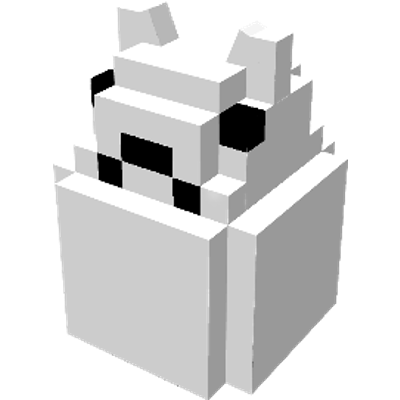
CurseForge · Minecraft mod
Eggcat
The Eggcat Mod is a simple Minecraft mod that adds a new decorative block to the game: the Eggcat. This block serves as a light source that can be turned on and off by clicking it.
Choose a version Pick your version below, then grab the matching file.
Quick answer
Which Eggcat release matches 1.19.3?
Best match for your filters 1.0.1
Game version 1.19.3
Loader Fabric
Eggcat 1.0.1 targets 1.19.3 with Fabric. Installation on the client is optional. Installation on the dedicated server is optional. No extra mods listed for this file.
Where it goes
Is Eggcat required on the client, server, or both?
Installation on the client is optional. Installation on the dedicated server is optional.
Client Optional
Dedicated server Optional
Loader for this release Fabric
Required install it here Optional supported, not mandatory Not supported do not install here Source doesn’t say do not assume
The source marks this as usable on both the client and server.
What else does Eggcat 1.0.1 need?
1.0.1 on 1.19.3. Every mod below is checked against that same setup.
This file does not list any required mods. Do not add a library just because a different file uses it.
This file does not list any required or optional mods.
Before you install it
Add Eggcat without breaking your instance.
Built for Eggcat 1.0.1 on 1.19.3. Pick another file and the loader, install side or required mods may change.
- 01
Stick to this file
Use 1.0.1. It targets 1.19.3 with Fabric; another release may have different loader, side or dependency requirements.
- 02
Bring the mods it needs
This file does not list any required mods. Do not add a library just because a different file uses it.
- 03
Put it on the correct side
Installation on the client is optional. Installation on the dedicated server is optional.
- 04
Pick the file you checked
Use the “Get this file” button beside 1.0.1. It opens that exact file at the source.
About this project
What does Eggcat add?
Eggcat Mod
You can also find my mods on Modrinth! Not only will I be releasing early versions of all my mods on Modrinth before CurseForge, but Modrinth also supports us developers by sharing the ad revenue generated from the downloads. Link: https://www.curseforge.com/minecraft/mc-mods/eggcat
The Eggcat Mod is a simple Minecraft mod that adds a new decorative block to the game: the Eggcat. This block serves as a light source that can be turned on and off by clicking it.
Getting Started:
Prerequisites
To use the Eggcat Mod, you will need the following:
- Fabric Loader
- Fabric API
Installing
- Download and install Fabric Loader following the instructions on the Fabric website.
- Download the Eggcat Mod JAR file from the releases page or on Modrinth.
- Move the JAR file to the
modsfolder in your Minecraft installation directory. - Launch Minecraft with the Fabric profile.
Crafting the Eggcat Block
Once you have installed the mod, you can find the Eggcat block in the creative inventory or craft it in a crafting table like the pattern specified below:

To turn the light on or off, simply right-click the block.
Source Code
The source code can be found on GitHub under the CC-BY-NC 4.0 License. More information about the license can be found under the License section.
License
The Eggcat Mod is released under the CC-BY-NC 4.0 License. This license allows you to use, modify, and distribute the mod for non-commercial purposes, as long as you credit the original author and include a copy of the license in any redistributed versions.
Bugs and Feedback
Bug reports can be submitted either through the GitHub Issues page of the Eggcat Mod repository or by contacting me personally over Discord (WinterWolfSV#9577). Please provide as much information as possible, including steps to reproduce the issue, error messages, and any relevant screenshots or log files. Your feedback is greatly appreciated and will help improve the mod for all users.
Project description from CurseForge.
Pick your setup
Eggcat by Minecraft version and loader
Choose the version and loader you play, then open the matching release.
Minecraft version
1.20
1 loader buildMinecraft version
1.19.4
1 loader buildMinecraft version
1.19.3
1 loader buildCheck the dependencies, then try the file in a copied instance before changing a world you care about.
Recent files
Eggcat versions and loaders
1.0.1
eggcat-1.19.3-fabric-1.0.jar
26 Feb 2023
Client Optional Server Optional Dependencies No extras listed Listed on Release listing
Check the 1.19.3 · Fabric setup 1.19.3Fabric release
Eggcat 1.0.1 1.19.3 Fabric
eggcat-1.19.3-1.0.jar
25 Feb 2023
Client Source doesn’t say Server Source doesn’t say Dependencies No extras listed Listed on Release listing
Check the 1.19.3 · Fabric setup 1.19.3Fabric release
Looking for an older file? The official CurseForge project page is in Resources.
 mod
CurseForge + Modrinth · Minecraft
Plague's Chat Timestamps
A Minecraft mod that adds customizable timestamps to chat!
 mod
CurseForge + Modrinth · Minecraft
Health Command
allows you to modifiy the health of entities with a command
 mod
CurseForge · Minecraft
Wintery Atmosphere
Adds snow particles falling from snow blocks and powder snow blocks when there's air or transparent blocks underneath.