Minecraft version
Back to mods 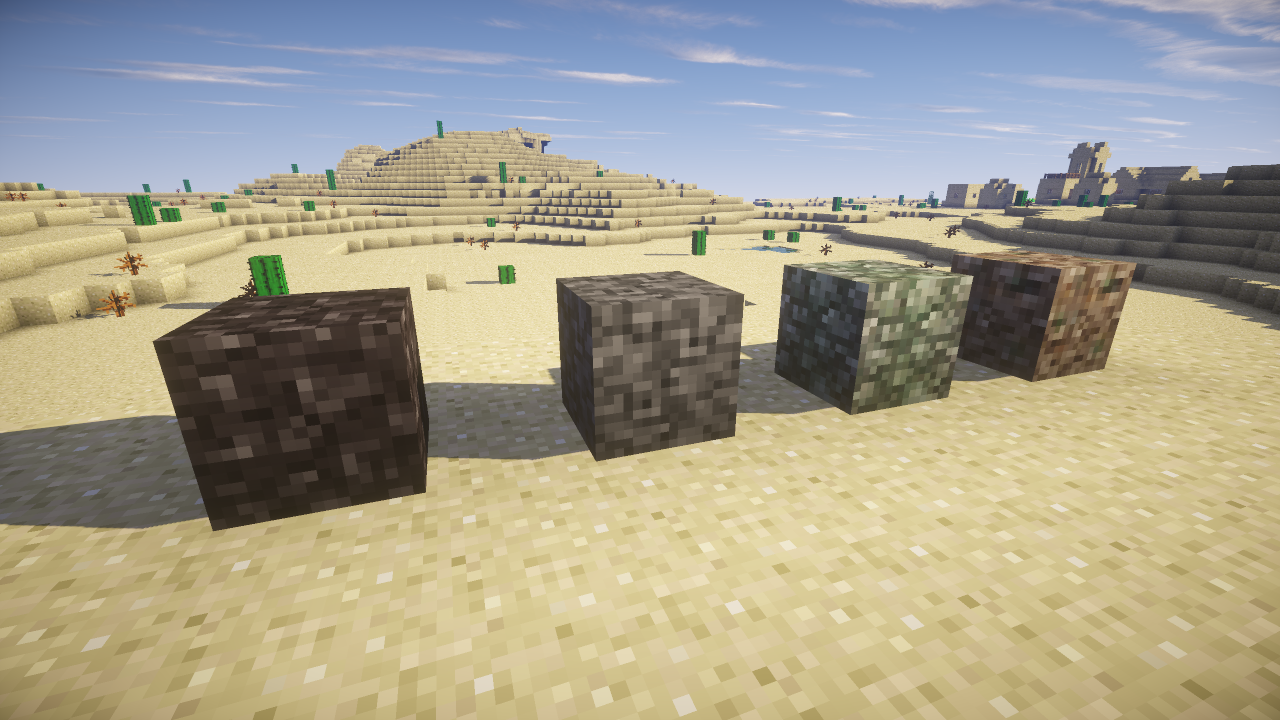
CurseForge · Minecraft mod
Rock Digger
Adding blocks one by one.
Choose a version Pick your version below, then grab the matching file.
Quick answer
Which Rock Digger release should I use?
Latest stable file RockDigger 1.3 - 1.6.4
Game version 1.6.4
Loader Not required
Rock Digger RockDigger 1.3 - 1.6.4 targets 1.6.4. The project page does not say whether this file belongs on the client, dedicated server, or both. No extra mods listed for this file.
Where it goes
Is Rock Digger required on the client, server, or both?
The project page does not say whether this file belongs on the client, dedicated server, or both.
Client Source doesn’t say
Dedicated server Source doesn’t say
Loader for this release No loader listed
Required install it here Optional supported, not mandatory Not supported do not install here Source doesn’t say do not assume
The source does not explicitly classify this release as client-only or server-only.
What else does Rock Digger RockDigger 1.3 - 1.6.4 need?
RockDigger 1.3 - 1.6.4. Change the file and its required mods may change too.
This file does not list any required mods. Do not add a library just because a different file uses it.
This file does not list any required or optional mods.
Before you install it
Add Rock Digger without breaking your instance.
Built for Rock Digger RockDigger 1.3 - 1.6.4. Pick another file and the loader, install side or required mods may change.
- 01
Stick to this file
Use RockDigger 1.3 - 1.6.4. It targets 1.6.4; another release may have different loader, side or dependency requirements.
- 02
Bring the mods it needs
This file does not list any required mods. Do not add a library just because a different file uses it.
- 03
Put it on the correct side
The project page does not say whether this file belongs on the client, dedicated server, or both.
- 04
Pick the file you checked
Use the “Get this file” button beside RockDigger 1.3 - 1.6.4. It opens that exact file at the source.
About this project
What does Rock Digger add?
Did you always wanted to add your own blocks to minecraft and generate them in the world?
But you don't know how?
Well don't look any further, because today I have this wonderful mod, just for you!
Simply add a .json file into the rockdigger config folder...
Toss in a texture...
Launch MineCraft...
Tada! You just added your own block to MineCraft.
The .json file is quite simple :
{
	id: 593,
	stairid: 594,
	slabid: 595,
	nameid: "rhyolite",
	name: "Rhyolite",
	rarity: 100,
	vein: 10,
	height: 10,
	range: 5,altergen: true,

	biomes:
	[
		{
			biometype: FOREST
		}
	]
}
This will spawn Rhyoliteonly in Forest biomes Types. with a rarity of 100 a max veinsize of 5 and between y32 and y92. And adds stairs and slabs.
Altergen true means it will generate stairs and slab, if set to false, or completely left out they won't generate.
Source Available :https://bitbucket.org/LordDusk/rockdigger/src
Project description from CurseForge.
Pick your setup
Rock Digger by Minecraft version and loader
Choose the version and loader you play, then open the matching release.
Minecraft version
1.6.4
1 loader buildCheck the dependencies, then try the file in a copied instance before changing a world you care about.
Recent files
Rock Digger versions and loaders
RockDigger 1.3 - 1.6.4
rockdigger-1.3-1.6.4.jar
6 Oct 2014
Client Source doesn’t say Server Source doesn’t say Dependencies No extras listed Listed on Release listing
Check the 1.6.4 setup 1.6.4 release
RockDigger 1.3
rockdigger-1.3.jar
6 Oct 2014
Client Source doesn’t say Server Source doesn’t say Dependencies No extras listed Listed on Release listing
Check the 1.7.10 setup 1.7.10 release
rockdigger-1.7.10-1.2.jar
3 Jul 2014
Client Source doesn’t say Server Source doesn’t say Dependencies No extras listed Listed on Release listing
Check the 1.7.10 setup 1.7.10 release
rockdigger-1.2.jar
10 Jun 2014
Client Source doesn’t say Server Source doesn’t say Dependencies No extras listed Listed on Release listing
Check the 1.6.4 setup 1.6.4 release
rockdigger-1.1.1.jar
10 Jun 2014
Client Source doesn’t say Server Source doesn’t say Dependencies No extras listed Listed on Release listing
Check the 1.6.4 setup 1.6.4 release
rockdigger-1.1.jar
10 Jun 2014
Client Source doesn’t say Server Source doesn’t say Dependencies No extras listed Listed on Release listing
Check the 1.6.4 setup 1.6.4 release
rockdigger-1.0.jar
10 Jun 2014
Client Source doesn’t say Server Source doesn’t say Dependencies No extras listed Listed on Release listing
Check the 1.6.4 setup 1.6.4 release
Looking for an older file? The official CurseForge project page is in Resources.
 mod
CurseForge · Minecraft
Visual Entity Skill Edit
A visual entity skill editor
 mod
CurseForge · Minecraft
Twilight Forge - Twilight Forest Addon
orge new Twilight Forest alloys, craft powerful tools and armor with unique set bonuses, and upgrade your legendary gear at the forge.
 mod
CurseForge · Minecraft
Legends Mod: Core
The official core framework for the Legends Mod ecosystem.