Minecraft version
Back to mods 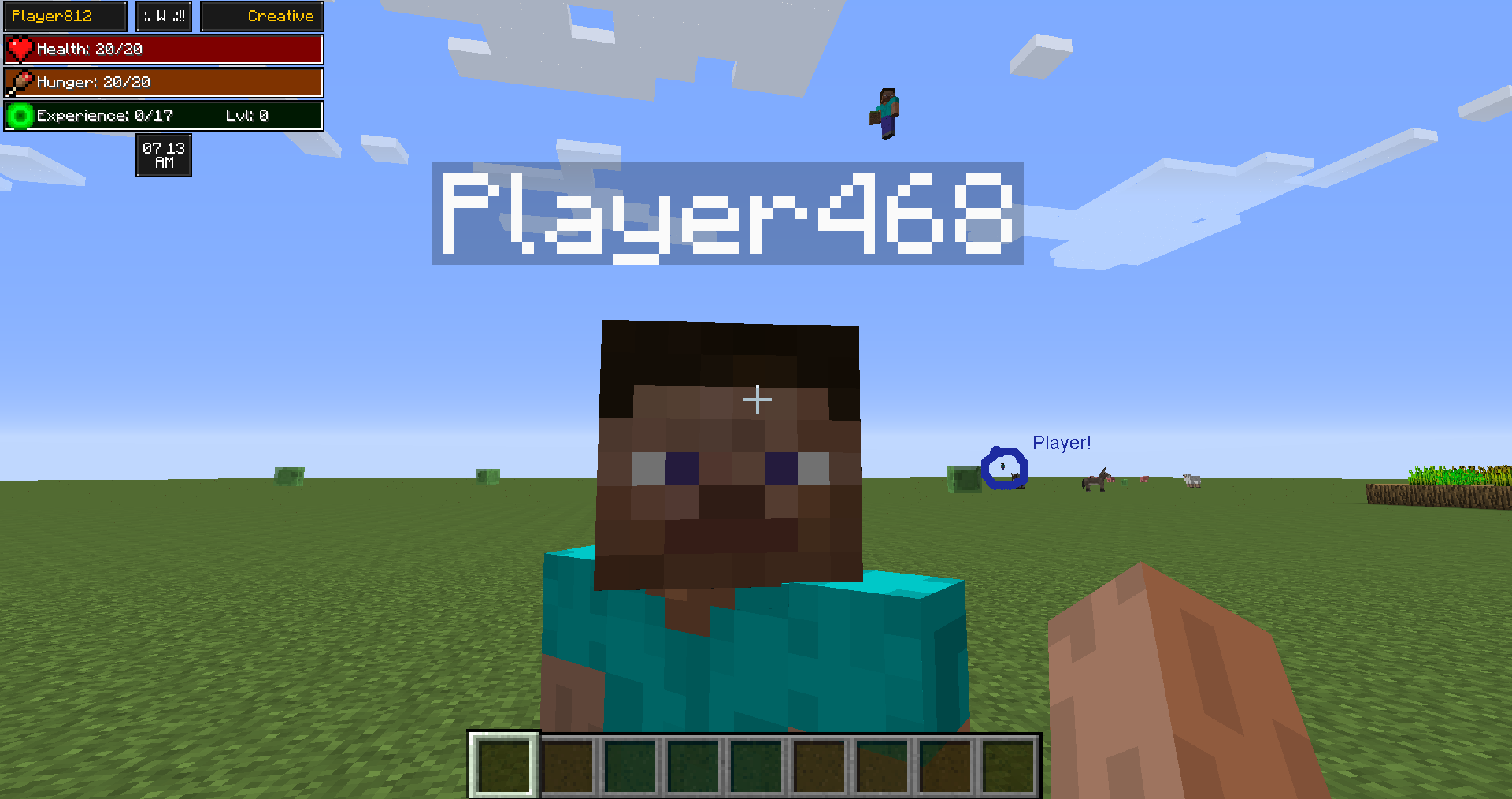
CurseForge · Minecraft mod
RenderTweaks
Simple mod that allows configuration of certain aspects of Minecraft's rendering.
Choose a version Pick your version below, then grab the matching file.
Quick answer
Which RenderTweaks release should I use?
Latest stable file RenderTweaks-1.2.jar
Game version 1.7.2
Loader Not required
RenderTweaks-1.2.jar targets 1.7.2. The project page does not say whether this file belongs on the client, dedicated server, or both. No extra mods listed for this file.
Where it goes
Is RenderTweaks required on the client, server, or both?
The project page does not say whether this file belongs on the client, dedicated server, or both.
Client Source doesn’t say
Dedicated server Source doesn’t say
Loader for this release No loader listed
Required install it here Optional supported, not mandatory Not supported do not install here Source doesn’t say do not assume
The source does not explicitly classify this release as client-only or server-only.
What else does RenderTweaks-1.2.jar need?
RenderTweaks-1.2.jar. Change the file and its required mods may change too.
This file does not list any required mods. Do not add a library just because a different file uses it.
This file does not list any required or optional mods.
Before you install it
Add RenderTweaks without breaking your instance.
Built for RenderTweaks-1.2.jar. Pick another file and the loader, install side or required mods may change.
- 01
Stick to this file
Use RenderTweaks-1.2.jar. It targets 1.7.2; another release may have different loader, side or dependency requirements.
- 02
Bring the mods it needs
This file does not list any required mods. Do not add a library just because a different file uses it.
- 03
Put it on the correct side
The project page does not say whether this file belongs on the client, dedicated server, or both.
- 04
Pick the file you checked
Use the “Get this file” button beside RenderTweaks-1.2.jar. It opens that exact file at the source.
About this project
What does RenderTweaks add?
Hey people!
I've got a very simple mod here for you, but also quite useful.
All this mod does is opens up a few of Minecraft's hard-coded rendering values, and lets you configure them.
Currently, you can change the rendering distance of mobs/players, as well as the distance of the nameplate above the players head. This could be very useful for PvP modpacks!
This is just a quick 1.7 port. I plan to add config file reinforcement from the server which forces values to take effect in the next update. This means that no matter what the client user wants, the server will set that value.
ConfigThe config is incredibly simple to use. You can toggle nameplate and entity altering with the two booleans, and set the values with the integers and double.
Value-wise, the nameplate ones are the distance in blocks that the nameplate will render from. Anything below 2 will completely disable nameplates. As for the entity range, lower values means a LARGER range. 0.5 will double Minecraft's setting, 0.25 will quadruple it and so on. Lower numbers also mean more resource usage, so try and find that "sweet spot". Default is around 80 blocks.
That's all there is to it! Enjoy, and please comment with any ideas and suggestions of what else you'd like to be able to tweak!
Project description from CurseForge.
Pick your setup
RenderTweaks by Minecraft version and loader
Choose the version and loader you play, then open the matching release.
Check the dependencies, then try the file in a copied instance before changing a world you care about.
Recent files
RenderTweaks versions and loaders
RenderTweaks-1.2.jar
5 Jul 2014
Client Source doesn’t say Server Source doesn’t say Dependencies No extras listed Listed on Release listing
Check the 1.7.2 setup 1.7.2 release
Looking for an older file? The official CurseForge project page is in Resources.
 mod
CurseForge · Minecraft
ReplayModCinematics: Camera Paths for Replay Mod
Unofficial Replay Mod add-on: camera paths, orbits and follow shots, with collision warnings and per-shot FOV. For Forge, NeoForge and Fabric.
 mod
CurseForge · Minecraft
El poder del OverWorld
Tintorería, el poder combativo del Overworld, misterios del pantano y mecánicas únicas. Practicamente Colonias_DC sin dependencias, todo para ustedes.
 mod
CurseForge + Modrinth · Minecraft
Reliable Advancements
In-game advancement editing and improvements to the advancement screen!