Reborn Core Needed by Hardcore Map Reset HardCoreMapReset-4.2.3.39.jar
requiredNo matching file

CurseForge · Minecraft mod
This mod is for modpack makers who include maps that might need to be reset after death.
Quick answer
Hardcore Map Reset HardCoreMapReset-4.2.3.39.jar targets 1.12.2. The project page does not say whether this file belongs on the client, dedicated server, or both. 1 required mod needs a matching file.
Where it goes
The project page does not say whether this file belongs on the client, dedicated server, or both.
The source does not explicitly classify this release as client-only or server-only.
HardCoreMapReset-4.2.3.39.jar. Change the file and its required mods may change too.
Install Reborn Core first, but 1 required mod has no matching file for this setup. Do not mix loader builds to force a match.
We only count dependency files that match this setup. A file for another loader does not fill the gap.
Before you install it
Built for Hardcore Map Reset HardCoreMapReset-4.2.3.39.jar. Pick another file and the loader, install side or required mods may change.
Use HardCoreMapReset-4.2.3.39.jar. It targets 1.12.2; another release may have different loader, side or dependency requirements.
Install Reborn Core first, but 1 required mod has no matching file for this setup. Do not mix loader builds to force a match.
The project page does not say whether this file belongs on the client, dedicated server, or both.
Use the “Get this file” button beside HardCoreMapReset-4.2.3.39.jar. It opens that exact file at the source.
About this project
Are you a modpack developer? Do you include a map in your modpack? Does this map sometimes need to be re installed by the user?
A lot has changed in the way version 2 works, now you have as many different instances of the same map!
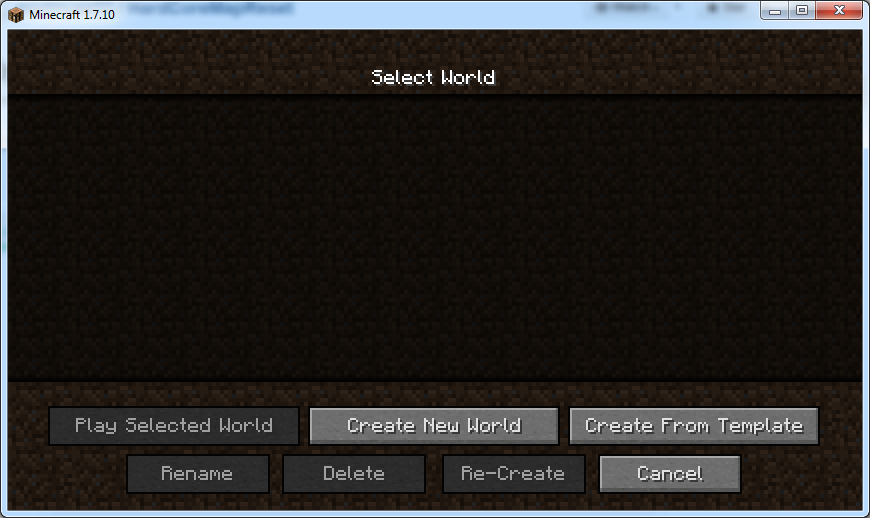
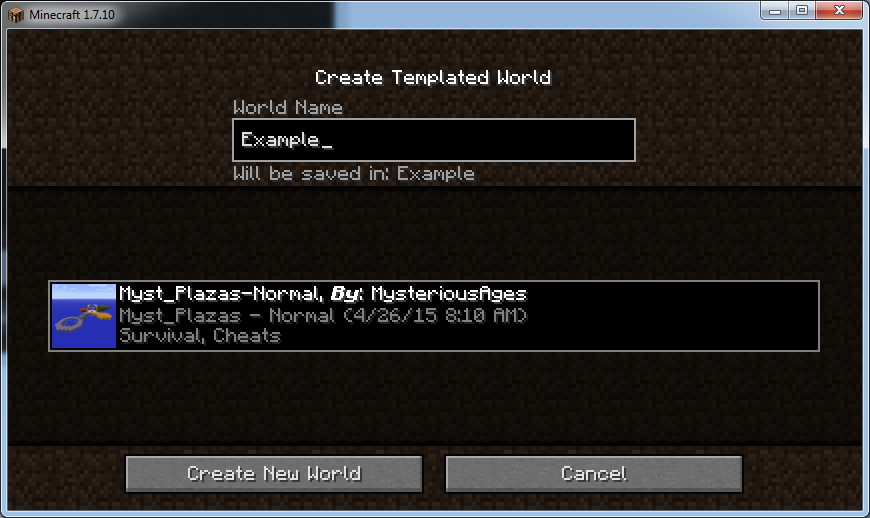
As a user to make a new instance click the "Create from template" button on the world list and select the world you want and then give it a name!
As a mod pack dev:
As a mod pack dev, you will want to copy the template maps into the maps folder. Then in that maps folder create an info.json file. This should look like:
{
"author" : "Your Name",
"thumbnail" : "thumbnail.png"
}
The thumbnail tag should point to a square logo/screenshot of you map so the user can easily see what the map is like. In testing this was a 128x128 size image. As long as it is a square image you should be good.
Using Structure Files (Version 4 and up):
As of version 4 structure nbt files generated using the vanilla structure blocks can be used. To use this function you first must enable the void world world type (doesnt apply to pre-existing worlds) in the config file.
You will need to create a new folder in the maps directory that contains the structure file. Call this file "structure.nbt". When you go to create a template it will create a default "info.json" that you can change the values of.
Using Sub Categories (4.2 and up):
Version 4.2 adds a new feature that allows for sub categories of maps. This can be done by creating a folder with the category name, and then within that creating a variations.json file.
{
  "author": "Test",
  "thumbnail": "icon.png",
  "description": "No Description set"
}
This file is basically the same as a normal map. Within that folder you can place the maps in the same way as before. You can have Categories within Categories.
If you still need more help please join our discord and ask for help.

We recommend Creeperhostfor hosting your minecraft (or other game) servers. They have provided you a discount code you can use to get a discount off a VPS server.

This mods adds a new folder in the minecraft directory called "maps" which the modpack dev can put backups of the map or maps in. When the player dies and has to restart the map they can click the Rest maps button on the select world screen.
{width=870 height=518}
As of version 1.2.0 up the user will be asked what maps they want to be reset.
{width=869 height=511}
The user will then be asked if they are sure they want to reset the maps that they selected.
{width=870 height=518}
When they click yes the saves folder is emptied and replaced with the maps folder.
How to install:
Install forge.
Download the .jar file and put in your mods folder.
run minecraft and check that the mod is installed.
How to use:
Copy all of your maps that you want into the maps folder.
When you are ready to reset your world click the reset world button.
INFO:
You can use this mod in your mod pack!
Want to help? The code is https://github.com/modmuss50/HardCoreMapReset
Project description from CurseForge.
Pick your setup
Choose the version and loader you play, then open the matching release.
Showing the newest 12 of 14 game versions. Older files are in the list below.
Check the dependencies, then try the file in a copied instance before changing a world you care about.
Recent files
30 Mar 2019
30 Mar 2019
1 Feb 2019
15 Jan 2019
15 Jan 2019
13 Jan 2019
19 Dec 2018
20 Nov 2018
20 Nov 2018
15 Nov 2018
22 Sept 2018
11 Mar 2018
Looking for an older file? The official CurseForge project page is in Resources.
 mod
modDiscover, highlight, inspect, modify - your vanilla & modded mob encyclopedia
 mod
modTired of vanilla? Bring the vibrant aesthetics of Hytale to your 1.12.2 instance. This mod adds RPG systems, themed zones, and rich fauna, all optimized to run in large modpacks.