Minecraft version
Back to mods 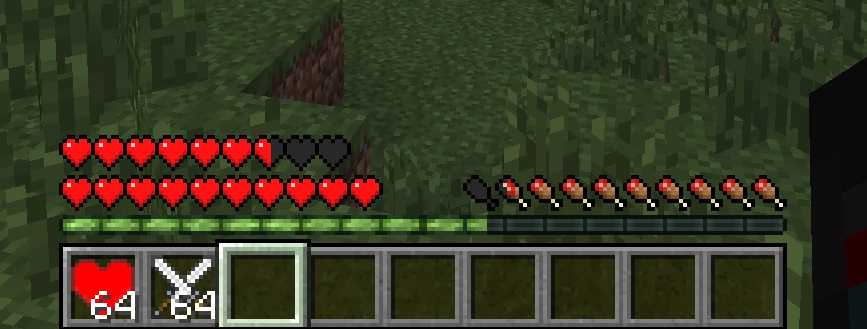
CurseForge · Minecraft mod
Hearts & Damage (Craftable/Permanent)
Craft permanent extra health and damage buff items, and extra food.
Choose a version Pick your version below, then grab the matching file.
Quick answer
Which Hearts & Damage (Craftable/Permanent) release should I use?
Latest stable file [MC1.7.X] Hearts 2.0.0
Game version 1.7.2, 1.7.10
Loader Not required
Hearts & Damage (Craftable/Permanent) [MC1.7.X] Hearts 2.0.0 targets 1.7.2, 1.7.10. The project page does not say whether this file belongs on the client, dedicated server, or both. No extra mods listed for this file.
Where it goes
Is Hearts & Damage (Craftable/Permanent) required on the client, server, or both?
The project page does not say whether this file belongs on the client, dedicated server, or both.
Client Source doesn’t say
Dedicated server Source doesn’t say
Loader for this release No loader listed
Required install it here Optional supported, not mandatory Not supported do not install here Source doesn’t say do not assume
The source does not explicitly classify this release as client-only or server-only.
What else does Hearts & Damage (Craftable/Permanent) [MC1.7.X] Hearts 2.0.0 need?
[MC1.7.X] Hearts 2.0.0. Change the file and its required mods may change too.
This file does not list any required mods. Do not add a library just because a different file uses it.
This file does not list any required or optional mods.
Before you install it
Add Hearts & Damage (Craftable/Permanent) without breaking your instance.
Built for Hearts & Damage (Craftable/Permanent) [MC1.7.X] Hearts 2.0.0. Pick another file and the loader, install side or required mods may change.
- 01
Stick to this file
Use [MC1.7.X] Hearts 2.0.0. It targets 1.7.2, 1.7.10; another release may have different loader, side or dependency requirements.
- 02
Bring the mods it needs
This file does not list any required mods. Do not add a library just because a different file uses it.
- 03
Put it on the correct side
The project page does not say whether this file belongs on the client, dedicated server, or both.
- 04
Pick the file you checked
Use the “Get this file” button beside [MC1.7.X] Hearts 2.0.0. It opens that exact file at the source.
About this project
What does Hearts & Damage (Craftable/Permanent) add?
V2.0.0 - for both 1.7.2 & 1.7.10
Now only has Health Heart and Damage Buff Items
Not working? Update your Forge!
Looking for the lost food? 1.7.2/1.7.10 Download
Recipes
**Health Heart -- (Adds 2.0D Health [1 Heart]) {64 Stack}
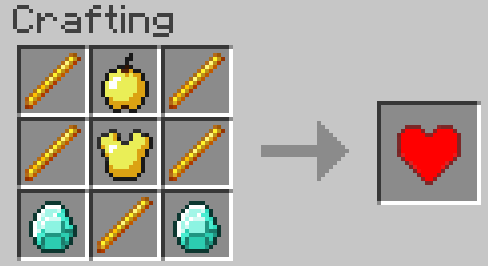
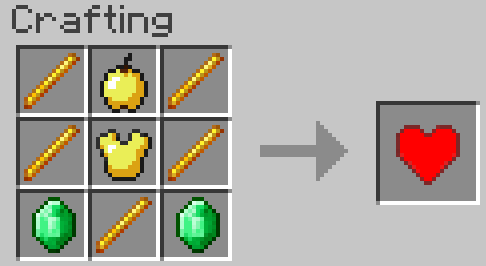
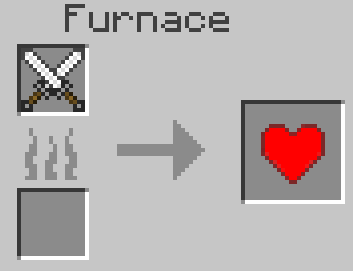
Damage Buff -- (Adds 0.5D Damage [Base Damage is 1.0D]) {64 Stack}
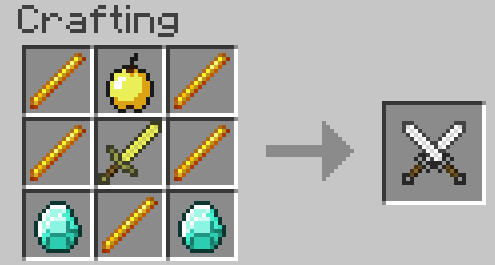
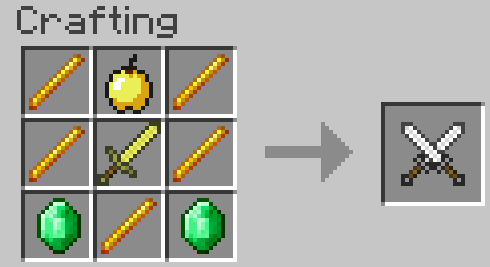
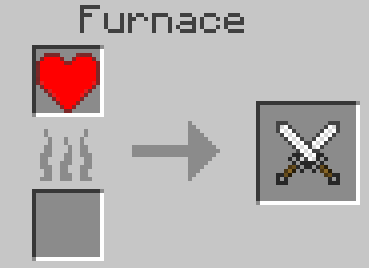 **
**
Configuration
consume_effect : enabled (boolean -- Default: true)Determines whether or not CONSUMING either health heart or the damage will actually affect the player's stats (items will still be in game and consumable, they just won't do anything useful)
damage : damageLimit (integer -- Default: -1 [no limit])Imposes a "count" restriction on the damage buff. This is effectively how many times a player can consume a damage buff item before it now longer grants any benefit.damage : damageModifier (double -- Default: 0.5)Determines how much of a damage buff should be granted when a player eats a damage buff. Minecraft sets base damage to 1.0 without modifiers (i.e. how much your punching damage is) for reference.damage : damageRetrofit (boolean -- Default: false)This will OVERWRITE your characters NBT data for the damage buff count. If you impose a damage:damageLimit that is LESS THAN your current base damage and you set this to true, it will effectively undo any buffs consumed in excess of the limit. (same idea as below, read hearts:heartRetrofit)
hearts:heartStart (double -- Default: 20.0 [10 Hearts])Sets player base health to the double provided here. The Mod will impose a value of 0.5 if this entry is less than 0.5 in order to prevent the player from instantly dying on world entry. There is no "official" upper limit, shy of the "count" restriction that you impose in hearts:heartLimit. This is applied EVERY time the player enters the world, allowing you to affect old maps to the new number. This number is also used as the base upon which extra hearts are added.hearts : heartLimit (integer -- Default: -1 [no limit])Imposes a "count" restriction on the health heart buff. This is effectively how many times a player can consume a health heart item before it now longer grants any benefit.hearts : heartModifier (double -- Default: 2.0)Determines how many hearts should be granted when a player eats a damage buff. Minecraft sets base health to 20.0 without modifiers (i.e. 10 hearts) for reference. Hearts are intervals of 2.0, while half hearts are 1.0 intervals.hearts : heartRetrofit (boolean -- Default: false)This will OVERWRITE your characters NBT data for the heart health count. If you impose a hearts:heartLimit that is LESS THAN your current health and you set this to true, it will effectively undo any buffs consumed in excess of the limit. (e.g. hearts:heartLimit = 3, hearts:heartRetrofit = true, player health = 30 [15 hearts] ==> player health will be PERMANENTLY changed to 26 [3 counts of health heart]. No effect if limit is more than current health)
Pro Tips:1) PERMANENTLY Resetting Buffs to 0 -- Set respective limit(s) to 0 AND set respective retrofit to true. Load world, exit, change limit back to whatever you like and retrofit back to false. This will "clean the slate" and play as though you never consumed any (respective) buffs.2) Play-as-though Buffs at 0 -- Set respective limit(s) to 0. (NOTE: Setting either limit to 0 will mean that you can no longer consume either buff for benefit)3) Limits are Retroactive -- If you have more health/damage than the limit would impose, the mod will scale you down to the limit until the limit is removed or modified, at which point you will default back to either the new limit or your previous count, whichever is lower. Obviously, you will no longer be able to consume the respective buffs for benefit (as you are at the limit).
DEPRECATED V1.1.1
------------------------------------------------------------------
**Requires FORGE**
(SEE VERSION NOTES)
v1.1.1 -- REQUIRES AT LEAST forge-1.7.2-10.12.2.1147 and will work in either 1.7.2 OR 1.7.10
v1.1.0 -- built upon forge-1.7.2-10.12.2.1121 and will work in either 1.7.2 OR 1.7.10
I use a motley crew of various Sphax images for a personal Sphax-themed version, so obviously I can't share it because I don't own the rights. However, please let me know if you make any texture packs (especially a Sphax PureBDCraft one) and I'll attempt to link to it.
Please donate to help keep this mod up-to-date! Thank you! :)
Abstract
Adds craftable permanent health and base damage increases. Additionally, some extra recipes are included (food, drink, and later-game).
Mod Overview
v1.1.0 by MattandJackPlay -- https://www.youtube.com/watch?v=RPuUV4M8F0U
Version Notes
- v1.1.1 -- Implements a GUI Config option to change item_ignore:ignoreList using commands ONLY AVAILABLE on forge build 1147 and higher for 1.7.2. Therefore, this version is only compatible with forge-1.7.2-10.12.2.1147 or higher. Recommended and higher 1.7.10 forge versions should be fully compatible.
- v1.1.0 -- Added configurable limits to items, see below.
- v1.0.2 -- Would not recommend using, although fully functional. Use v1.1.0, at least.
Configuration
<v1.1.1 ONLY>item_ignore : ignoreList (String -- Default: )Enter a comma separated list of DISPLAY NAMES to prevent the player from picking up those items (e.g. Carrot,Cheese,Diamond Sword). The mod will attempt to remove excessive white space and capitalize accordingly, but I encourage you to enter as the example illustrates to prevent errors (no spaces before/after commas, proper item name spacing and capitalization).</v1.1.1 ONLY>
consume_effect : enabled (boolean -- Default: true)Determines whether or not CONSUMING either health heart or the damage will actually affect the player's stats (items will still be in game and consumable, they just won't do anything useful)
damage : damageLimit (integer -- Default: -1 [no limit])Imposes a "count" restriction on the damage buff. This is effectively how many times a player can consume a damage buff item before it now longer grants any benefit.damage : damageModifier (double -- Default: 0.5)Determines how much of a damage buff should be granted when a player eats a damage buff. Minecraft sets base damage to 1.0 without modifiers (i.e. how much your punching damage is) for reference.damage : damageRetrofit (boolean -- Default: false)This will OVERWRITE your characters NBT data for the damage buff count. If you impose a damage:damageLimit that is LESS THAN your current base damage and you set this to true, it will effectively undo any buffs consumed in excess of the limit. (same idea as below, read hearts:heartRetrofit)
hearts : heartLimit (integer -- Default: -1 [no limit])Imposes a "count" restriction on the health heart buff. This is effectively how many times a player can consume a health heart item before it now longer grants any benefit.hearts : heartModifier (double -- Default: 2.0)Determines how many hearts should be granted when a player eats a damage buff. Minecraft sets base health to 20.0 without modifiers (i.e. 10 hearts) for reference. Hearts are intervals of 2.0, while half hearts are 1.0 intervals.hearts : heartRetrofit (boolean -- Default: false)This will OVERWRITE your characters NBT data for the heart health count. If you impose a hearts:heartLimit that is LESS THAN your current health and you set this to true, it will effectively undo any buffs consumed in excess of the limit. (e.g. hearts:heartLimit = 3, hearts:heartRetrofit = true, player health = 30 [15 hearts] ==> player health will be PERMANENTLY changed to 26 [3 counts of health heart]. No effect if limit is more than current health)
Pro Tips:
- PERMANENTLY Resetting Buffs to 0 -- Set respective limit(s) to 0 AND set respective retrofit to true. Load world, exit, change limit back to whatever you like and retrofit back to false. This will "clean the slate" and play as though you never consumed any (respective) buffs.
- Play-as-though Buffs at 0 -- Set respective limit(s) to 0. (NOTE: Setting either limit to 0 will mean that you can no longer consume either buff for benefit)
- Limits are Retroactive -- If you have more health/damage than the limit would impose, the mod will scale you down to the limit until the limit is removed or modified, at which point you will default back to either the new limit or your previous count, whichever is lower. If you are still at the limit, you will no longer be able to consume the respective buffs for benefit.
Recipes
Health Heart -- (Adds 2.0D Health [1 Heart]) {64 Stack}
Damage Buff -- (Adds 0.5D Damage [Base Damage is 1.0D]) {64 Stack}
FOOD
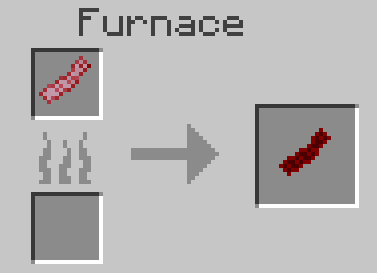
Bacon Strips -- (Adds 1 Saturation [0.5 Hunger] per strip) {64 Stack, Shapeless}
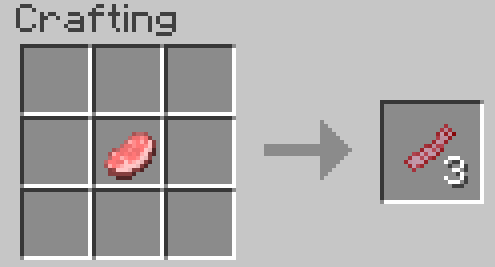
Bacon -- (Adds 3 Saturation [1.5 Hunger] per strip) {64 Stack}
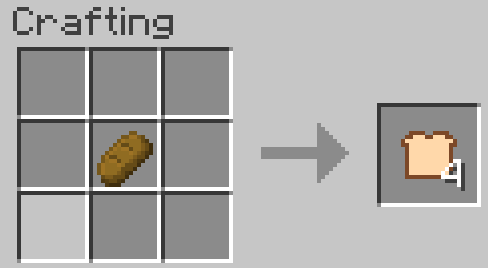
Bread Slices -- (Adds 1 Saturation [0.5 Hunger] per slice) {64 Stack, Shapeless}
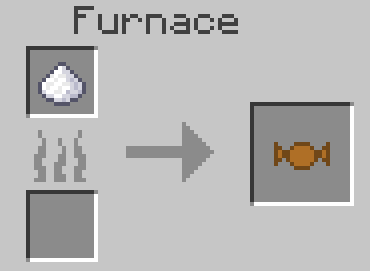
Caramel -- (Adds 3 Saturation [1.5 Hunger]) {64 Stack}
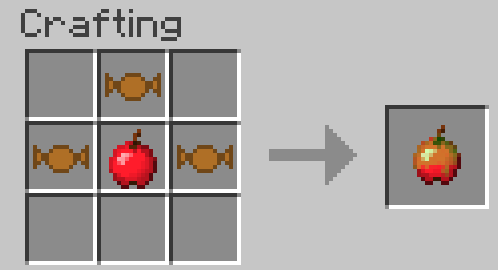
Caramel Apple -- (Adds 6 Saturation [3.0 Hunger]) {64 Stack, Shapeless}
Cheese -- (Adds 5 Saturation [2.5 Hunger]) {64 Stack}
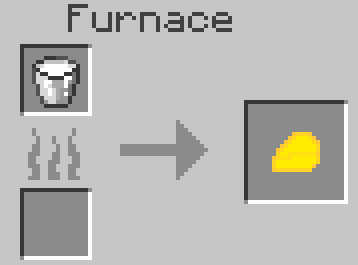
Chocolate -- (Adds 4 Saturation [2.0 Hunger]) {64 Stack, Shapeless}
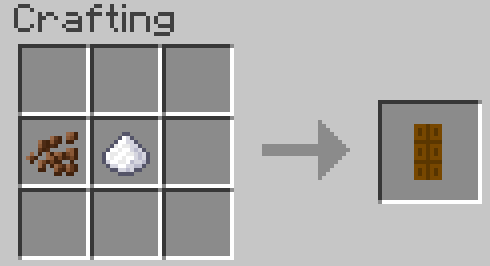
Fried Egg -- (Adds 4 Saturation [2.0 Hunger]) {64 Stack}
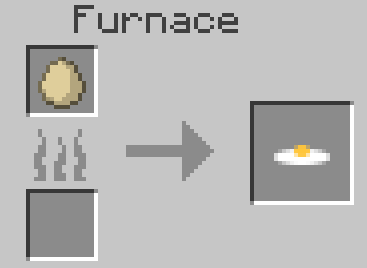
Toast -- (Adds 2 Saturation [1.0 Hunger] per slice) {64 Stack}
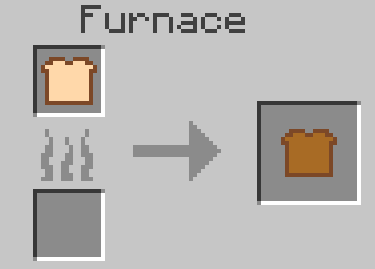
DRINKS
Grain Alcohol -- (Player gains 4 effects for 20 seconds) {64 Stack, Always Edible, Shapeless}
- Resistance II
- Strength II
- Slowness III
- Nausea IV
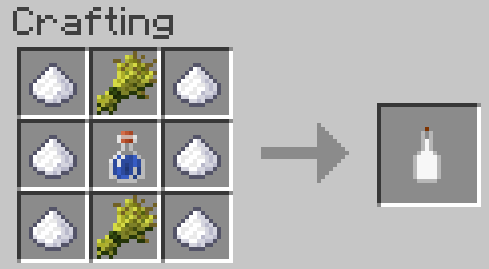
Vodka -- (Player gains 4 effects for 20 seconds) {64 Stack, Always Edible, Shapeless}
- Resistance II
- Strength II
- Slowness III
- Nausea IV
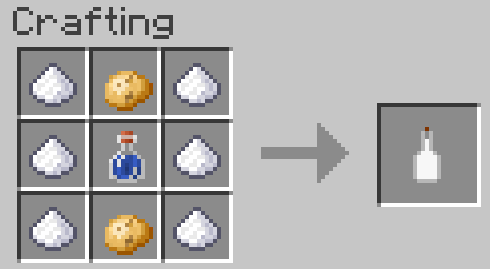
ITEMS
Blaze Charge -- (Revertible) {64 Stack, Shapeless}
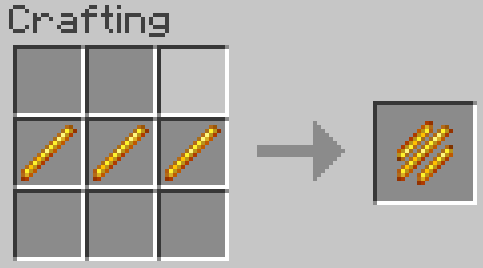
Nova Sphere -- (Revertible) {16 Stack, Shapeless}
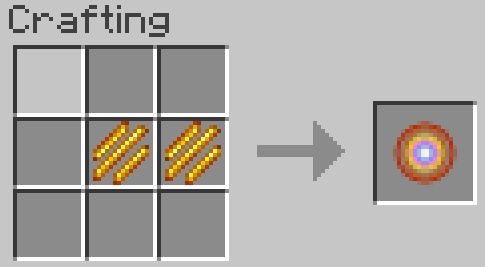
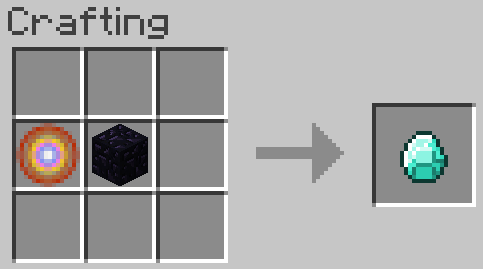
Diamond -- {Shapeless}
Project description from CurseForge.
Pick your setup
Hearts & Damage (Craftable/Permanent) by Minecraft version and loader
Choose the version and loader you play, then open the matching release.
Minecraft version
1.7.2
1 loader buildCheck the dependencies, then try the file in a copied instance before changing a world you care about.
Recent files
Hearts & Damage (Craftable/Permanent) versions and loaders
[MC1.7.X] Hearts 2.0.0
[MC1.7.X]Hearts-2.0.0.jar
8 Sept 2014
Client Source doesn’t say Server Source doesn’t say Dependencies No extras listed Listed on Release listing
Check the 1.7.10 setup 1.7.21.7.10 release
[MC1.7.10]Hearts-1.1.1.jar
28 Aug 2014
Client Source doesn’t say Server Source doesn’t say Dependencies No extras listed Listed on Release listing
Check the 1.7.10 setup 1.7.21.7.10 release
[MC1.7.X]Hearts-1.1.0.jar
28 Aug 2014
Client Source doesn’t say Server Source doesn’t say Dependencies No extras listed Listed on Release listing
Check the 1.7.10 setup 1.7.21.7.10 release
[MC1.7.2]Hearts-1.0.2.jar
26 Aug 2014
Client Source doesn’t say Server Source doesn’t say Dependencies No extras listed Listed on Release listing
Check the 1.7.10 setup 1.7.21.7.10 release
Looking for an older file? The official CurseForge project page is in Resources.