Minecraft version
Back to mods 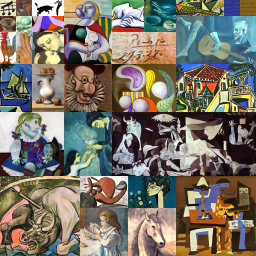
CurseForge · Minecraft mod
Uncle Jeff's Paintings
16 whole new sets of 31 paintings -- each set has a theme, and you can choose which you want by thecolor of carpet you use in crafting
Choose a version Pick your version below, then grab the matching file.
Quick answer
Which Uncle Jeff's Paintings release should I use?
Latest stable file jrfpaintings-1.10.2-01.02.00.jar
Game version 1.10.2
Loader Not required
Uncle Jeff's Paintings jrfpaintings-1.10.2-01.02.00.jar targets 1.10.2. The project page does not say whether this file belongs on the client, dedicated server, or both. No extra mods listed for this file.
Where it goes
Is Uncle Jeff's Paintings required on the client, server, or both?
The project page does not say whether this file belongs on the client, dedicated server, or both.
Client Source doesn’t say
Dedicated server Source doesn’t say
Loader for this release No loader listed
Required install it here Optional supported, not mandatory Not supported do not install here Source doesn’t say do not assume
The source does not explicitly classify this release as client-only or server-only.
What else does Uncle Jeff's Paintings jrfpaintings-1.10.2-01.02.00.jar need?
jrfpaintings-1.10.2-01.02.00.jar. Change the file and its required mods may change too.
This file does not list any required mods. Do not add a library just because a different file uses it.
This file does not list any required or optional mods.
Before you install it
Add Uncle Jeff's Paintings without breaking your instance.
Built for Uncle Jeff's Paintings jrfpaintings-1.10.2-01.02.00.jar. Pick another file and the loader, install side or required mods may change.
- 01
Stick to this file
Use jrfpaintings-1.10.2-01.02.00.jar. It targets 1.10.2; another release may have different loader, side or dependency requirements.
- 02
Bring the mods it needs
This file does not list any required mods. Do not add a library just because a different file uses it.
- 03
Put it on the correct side
The project page does not say whether this file belongs on the client, dedicated server, or both.
- 04
Pick the file you checked
Use the “Get this file” button beside jrfpaintings-1.10.2-01.02.00.jar. It opens that exact file at the source.
About this project
What does Uncle Jeff's Paintings add?
Critical Download Info:
To download this mod, you must go to the files section and make sure you download a "big" version (without "server" in its name). The server-only versions are optional (and have no graphics, as explained below).
Have you grown tired of the 26 paintings in vanilla Minecraft? Not seeing what you want? Do you wish that each color of wool produced a specialized painting subtype offering a different set of images? Do you wish that the lone texture file at least used all of its available space? Well, I can't change the vanilla painting, but now with Uncle Jeff's Paintings, you can add all those features and keep your vanilla too.
These paintings are crafted using carpet in place of wool; otherwise the recipe would conflict with vanilla paintings. What's special is that the color of carpet selects the subset of paintings. Each subset is bound to a different texture file having a different theme. Each texture file has 31 "canvasses" (and uses every pixel of available space) -- That's 31 images multiplied by 16 texture files*, all added to the game at the same time (and the vanilla images are left untouched).
This mod was developed in Forge 1.7.10 (b1180) and tested in Minecraft MP both client and server. It might work in Forge versions back as far as 1.7.4, but it hasn't been tested (at least not reported to me). Beginning with v00.01.03, I am compiling a separate server-only jar file that lacks the bulky resources needed only for display on a client. The client jar will work both client and server, both SP and MP. The server-only file is a light-weight jar for anyone who cares. As I add texture files, the client version could grow to multiple
megabytes while the server-only jar remains at about 25k.
The UPGRADE to MC 1.8:
There were major code changes (developed and tested using Forge b1450, retested in build 1577). Testing included post-build integration with the other mods I've upgraded to 1.8, which forced me to patch the others. If you've already downloaded my nethergem or walls, then you'll need to update them before adding paintings.
The latest builds have five fully fledged sets of paintings (asterisks in list below), and the most recent (Rock & Roll) has been back-ported to 1.7.10. I need to finish upgrading my other mods to accept 1.8.8 I have given up on vertical compatibility with revisions of 1.8.x (some class and method names change :( ). I hope to do a new mod or invention before returning to add more art sets... Suggestions welcome.
The colors and themes:
* 00 = White = Toys & Games
01 = Orange =
02 = Magenta =
03 = Lt Blue =
04 = Yellow = Gina Gardner Originals
* 05 = Lime = Anime 1
06 = Pink = Anime 2
07 = Gray = Movie Posters 1
* 08 = Silver = SciFi TV & Movies
09 = Cyan =
* 10 = Purple = Rock & Roll
* 11 = Blue = Picasso Paintings
12 = Brown =
13 = Green = Biomes / blocks
14 = Red =
15 = Black = Dutch Masters
Suggested categories not yet assigned (7 lots TBD):
MC Mobs
Impressionists
Pointilists
If you like this mod, then look for other Uncle Jeff's mods. If you know how I can make it better, then please leave a friendly comment.
Project description from CurseForge.
Pick your setup
Uncle Jeff's Paintings by Minecraft version and loader
Choose the version and loader you play, then open the matching release.
Minecraft version
1.8.8
1 loader buildMinecraft version
1.8.7
1 loader buildMinecraft version
1.8.6
1 loader buildMinecraft version
1.8.5
1 loader buildMinecraft version
1.8.4
1 loader buildMinecraft version
1.8.3
1 loader buildMinecraft version
1.8.2
1 loader buildMinecraft version
1.8.1
1 loader buildMinecraft version
1.8
1 loader buildMinecraft version
1.7.10
1 loader buildCheck the dependencies, then try the file in a copied instance before changing a world you care about.
Recent files
Uncle Jeff's Paintings versions and loaders
jrfpaintings-1.10.2-01.02.00.jar
21 May 2017
Client Source doesn’t say Server Source doesn’t say Dependencies No extras listed Listed on Release listing
Check the 1.10.2 setup 1.10.2 release
jrfpaintings-1.10.2-01.02.00-server.jar
21 May 2017
Client Source doesn’t say Server Source doesn’t say Dependencies No extras listed Listed on Release listing
Check the 1.10.2 setup 1.10.2 beta
jrfpaintings-1.10.2-01.01.01.jar
7 Dec 2016
Client Source doesn’t say Server Source doesn’t say Dependencies No extras listed Listed on Release listing
Check the 1.10.2 setup 1.10.2 release
jrfpaintings-1.10.2-01.01.01-server.jar
7 Dec 2016
Client Source doesn’t say Server Source doesn’t say Dependencies No extras listed Listed on Release listing
Check the 1.10.2 setup 1.10.2 beta
jrfpaintings-1.10.2-00.05.00.jar
2 Nov 2016
Client Source doesn’t say Server Source doesn’t say Dependencies No extras listed Listed on Release listing
Check the 1.10.2 setup 1.10.2 release
jrfpaintings-1.10.2-00.05.00-server.jar
2 Nov 2016
Client Source doesn’t say Server Source doesn’t say Dependencies No extras listed Listed on Release listing
Check the 1.10.2 setup 1.10.2 beta
jrfpaintings-1.8-00.04.00.jar
7 Apr 2016
Client Source doesn’t say Server Source doesn’t say Dependencies No extras listed Listed on Release listing
Check the 1.8 setup 1.8 release
jrfpaintings-1.8-00.04.00-server.jar
7 Apr 2016
Client Source doesn’t say Server Source doesn’t say Dependencies No extras listed Listed on Release listing
Check the 1.8 setup jrfpaintings-1.7.10-00.01.05.jar
4 Apr 2016
Client Source doesn’t say Server Source doesn’t say Dependencies No extras listed Listed on Release listing
Check the 1.7.10 setup 1.7.10 release
jrfpaintings-1.7.10-00.01.05-server.jar
4 Apr 2016
Client Source doesn’t say Server Source doesn’t say Dependencies No extras listed Listed on Release listing
Check the 1.7.10 setup 1.7.10 beta
jrfpaintings-1.8-00.03.01.jar
4 Apr 2016
Client Source doesn’t say Server Source doesn’t say Dependencies No extras listed Listed on Release listing
Check the 1.8 setup 1.8 release
jrfpaintings-1.8-00.03.01-server.jar
4 Apr 2016
Client Source doesn’t say Server Source doesn’t say Dependencies No extras listed Listed on Release listing
Check the 1.8.8 setup 1.8.71.8.41.8.81.8.3 beta
Looking for an older file? The official CurseForge project page is in Resources.
 mod
mod CurseForge · Minecraft
Futbol Argentino
This mod adds Argentine football content.
 mod
mod CurseForge · Minecraft
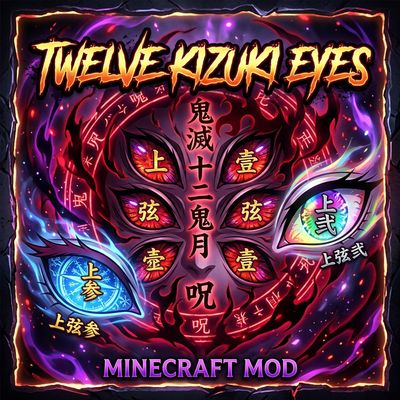
Kizuki Moons: Demon eyes
Imagine having the eyes of the Twelve Kizuki from the anime *Demon Slayer: Kimetsu no Yaiba*! With this mod, you can have the eyes of both the Lower Moons and the Upper Moons. Have fun!