Minecraft version
Back to mods 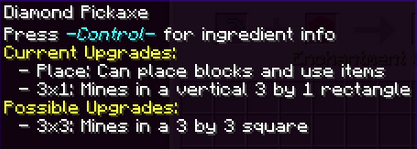
CurseForge · Minecraft mod
ToolUtilities
Area of Effect Mining, Right Click Placing and More!
Choose a version Pick your version below, then grab the matching file.
Quick answer
Which ToolUtilities release should I use?
Latest stable file ToolUtilities-MC1.7.10-0.0.1-10.jar
Game version 1.7.10
Loader Not required
ToolUtilities-MC1.7.10-0.0.1-10.jar targets 1.7.10. The project page does not say whether this file belongs on the client, dedicated server, or both. No extra mods listed for this file.
Where it goes
Is ToolUtilities required on the client, server, or both?
The project page does not say whether this file belongs on the client, dedicated server, or both.
Client Source doesn’t say
Dedicated server Source doesn’t say
Loader for this release No loader listed
Required install it here Optional supported, not mandatory Not supported do not install here Source doesn’t say do not assume
The source does not explicitly classify this release as client-only or server-only.
What else does ToolUtilities-MC1.7.10-0.0.1-10.jar need?
ToolUtilities-MC1.7.10-0.0.1-10.jar. Change the file and its required mods may change too.
This file does not list any required mods. Do not add a library just because a different file uses it.
This file does not list any required or optional mods.
Before you install it
Add ToolUtilities without breaking your instance.
Built for ToolUtilities-MC1.7.10-0.0.1-10.jar. Pick another file and the loader, install side or required mods may change.
- 01
Stick to this file
Use ToolUtilities-MC1.7.10-0.0.1-10.jar. It targets 1.7.10; another release may have different loader, side or dependency requirements.
- 02
Bring the mods it needs
This file does not list any required mods. Do not add a library just because a different file uses it.
- 03
Put it on the correct side
The project page does not say whether this file belongs on the client, dedicated server, or both.
- 04
Pick the file you checked
Use the “Get this file” button beside ToolUtilities-MC1.7.10-0.0.1-10.jar. It opens that exact file at the source.
About this project
What does ToolUtilities add?
Tool Utilities
Ever wanted to have the convenience of being able to place torches on right click, or mine in an area but keep a "vanilla" feel? ToolUtilities is for you!
ToolUtilities adds a whole host of features to vanilla tools (and some mod tools that are similar in functionality), including "Tinkers style" right-click placing of blocks, mining in a 3x1 column or a 3x3 area, cutting sections of wood on trees and even attacking mobs in an AoE. All the upgrades happen in an anvil, with in-game tooltips providing informations to players about what items do what. Even better is that everything is fully configurable - the items required to upgrade, the experience required, and you can even turn every feature on and off separately.
Features
All Tools
All tools without a right click functionality (sorry swords and hoes) place blocks in the next slot over on right click, except for the first slot, which will use the last slot on the hotbar. Great for placing torches, or cobblestone to backfill holes!
Pickaxes/Shovels
Pickaxes and Shovels can also be upgraded with Area of Effect Mining. The first upgrade is to a 3x1 column, and then can be upgraded further to a 3x3. All Area of Effect additions use the correct durability and hunger, and also slow down the mining speed of the tool. Also, the area of effect respects the mining level of the tool and doesn't allow the mining of blocks that are "too much harder" than the original block (No fast obsidian mining using stone for you!)
Axes
Axes can be upgraded with a 3x1 Wood Cutting addition, making cutting those Dark Oaks so much nicer.
Swords
Swords can be upgraded with an area of effect ability, allowing you to hit multiple mobs in a small area with a single swing. Uses the correct hunger and durability for each entity hit.
Hoes
Hoes can be upgraded with a 3x3 grass cutting ability, making them act effectively like a "scythe" from roughly a million other mods.
Source Code
This project is licensed under the MIT license. This means you are free to modify and publish this code at will. The source code for this mod is available at http://www.github.com/wyldmods/ToolUtilities
If you have any ideas, feel free to suggest them!
Modpacks
Yes. Absolutely.
Bugs/Issues
Please report all issues on the GitHub: http://github.com/wyldmods/toolutilities/issues
Acknowledgements
Thanks especially to tterrag1098 for all his work in developing this mod alongside me, as well as to KiwiFails (http://www.twitch.tv/KiwiFails) and Wyld (http://www.twitch.tv/Wyld) for the ideas, and also to everyone who has helped test, fix and suggest the mod thus far.
Project description from CurseForge.
Pick your setup
ToolUtilities by Minecraft version and loader
Choose the version and loader you play, then open the matching release.
Check the dependencies, then try the file in a copied instance before changing a world you care about.
Recent files
ToolUtilities versions and loaders
ToolUtilities-MC1.7.10-0.0.1-16.jar
17 Dec 2014
Client Source doesn’t say Server Source doesn’t say Dependencies No extras listed Listed on Release listing
Check the 1.7.10 setup 1.7.10 beta
ToolUtilities-MC1.7.10-0.0.1-11.jar
16 Oct 2014
Client Source doesn’t say Server Source doesn’t say Dependencies No extras listed Listed on Release listing
Check the 1.7.10 setup 1.7.10 beta
ToolUtilities-MC1.7.10-0.0.1-10.jar
30 Sept 2014
Client Source doesn’t say Server Source doesn’t say Dependencies No extras listed Listed on Release listing
Check the 1.7.10 setup 1.7.10 release
Looking for an older file? The official CurseForge project page is in Resources.
 mod
CurseForge · Minecraft
Raids & Stuff Revamp
A silly mod about hostile mobs, new weapons and new mechanics
 mod
CurseForge · Minecraft
Baba Yaga Raid Bosses
11 custom 3D raid bosses, 11 biome sanctuaries, 6 recruitable companions, 15 BE machines, 268 items, 73 blocks, and a 3D Quest Board for NeoForge 26.3.
 mod
CurseForge · Minecraft
Totems Of Zambesi
Brings the 6 totems of Zambesi from Legends of Tomorrow, their Ancestral Dimensions & the Waverider into 1.20.1. Totems grant players their unique powers, once mastered more can be learned in their Ancestral Realm, giving the opportunity for unique kits.