Minecraft version
Back to mods 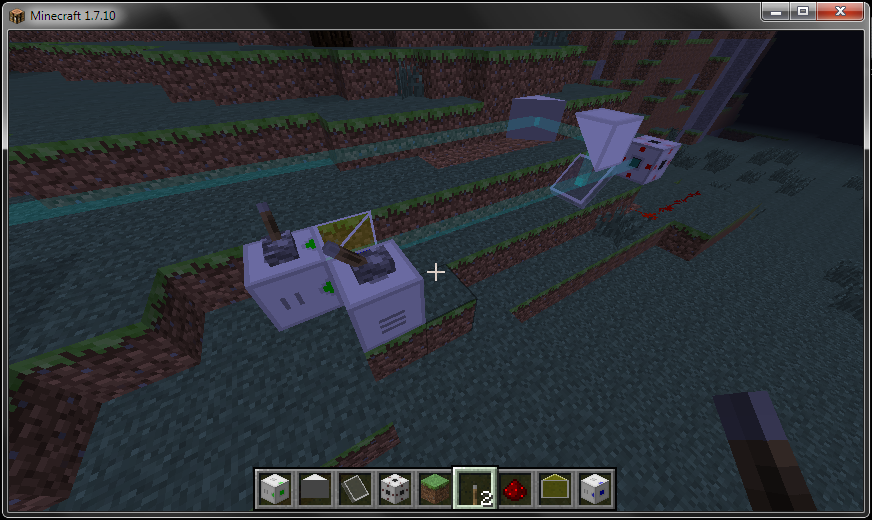
CurseForge · Minecraft mod
C9Light
Lasers, logic, automation, etc.
Choose a version Pick your version below, then grab the matching file.
Quick answer
Which C9Light release should I use?
beta file C9Light 0.7.2
Game version 1.7.10
Loader Not required
C9Light 0.7.2 targets 1.7.10. The project page does not say whether this file belongs on the client, dedicated server, or both. No extra mods listed for this file.
Where it goes
Is C9Light required on the client, server, or both?
The project page does not say whether this file belongs on the client, dedicated server, or both.
Client Source doesn’t say
Dedicated server Source doesn’t say
Loader for this release No loader listed
Required install it here Optional supported, not mandatory Not supported do not install here Source doesn’t say do not assume
The source does not explicitly classify this release as client-only or server-only.
What else does C9Light 0.7.2 need?
C9Light 0.7.2. Change the file and its required mods may change too.
This file does not list any required mods. Do not add a library just because a different file uses it.
This file does not list any required or optional mods.
Before you install it
Add C9Light without breaking your instance.
Built for C9Light 0.7.2. Pick another file and the loader, install side or required mods may change.
- 01
Stick to this file
Use C9Light 0.7.2. It targets 1.7.10; another release may have different loader, side or dependency requirements.
- 02
Bring the mods it needs
This file does not list any required mods. Do not add a library just because a different file uses it.
- 03
Put it on the correct side
The project page does not say whether this file belongs on the client, dedicated server, or both.
- 04
Pick the file you checked
Use the “Get this file” button beside C9Light 0.7.2. It opens that exact file at the source.
About this project
What does C9Light add?
Featuring various technology, including lasers, a mining machine, item and fluid transfer system, Redstone Flux producing solar panels and thermopile, proxy blocks, miniature void, screens, fountains, etc.
Screen blocks allow items to pass through while blocking all other entities, are useful for chicken farms, or item-based locking mechanisms.
The miniature void can be used to destroy items, fluids, and RF energy, or damage entities and players.
The accelerator consumes RF energy, and causes the block in front of it to grow faster.
The chunk miner uses RF energy to mine the chunk it is placed in. It also pumps any fluids it encounters. It will place special blocks to prevent fluids from flowing.
Flows will push items/fluids from source inventories/tanks to sink inventories/tanks through the air. No pipes to trip over, or climb on.
There are 4 frequencies of lasers (Infrared, Red, Green, Blue). They may be combined using splitters or prisms.
Infrared lasers will break weaker blocks, light entities on fire, etc.
Lasers will blind you if you look into them.
Some recipes are shown here: https://sites.google.com/site/cameronsmods/c9light/screenshots
Project description from CurseForge.
Pick your setup
C9Light by Minecraft version and loader
Choose the version and loader you play, then open the matching release.
Check the dependencies, then try the file in a copied instance before changing a world you care about.
Recent files
C9Light versions and loaders
C9Light 0.7.2
C9Light-0.7.2.jar
28 Oct 2014
Client Source doesn’t say Server Source doesn’t say Dependencies No extras listed Listed on Release listing
Check the 1.7.10 setup 1.7.10 beta
C9Light 0.7.1
C9Light-0.7.1.jar
21 Oct 2014
Client Source doesn’t say Server Source doesn’t say Dependencies No extras listed Listed on Release listing
Check the 1.7.10 setup 1.7.10 beta
C9Light API 0.7.1
C9LightAPI-0.7.1.zip
21 Oct 2014
Client Source doesn’t say Server Source doesn’t say Dependencies No extras listed Listed on Release listing
Check the 1.7.10 setup 1.7.10 beta
C9Light 0.7.0
C9Light-0.7.0.jar
20 Oct 2014
Client Source doesn’t say Server Source doesn’t say Dependencies No extras listed Listed on Release listing
Check the 1.7.10 setup 1.7.10 beta
C9Light API 0.7.0
C9LightAPI-0.7.0.zip
20 Oct 2014
Client Source doesn’t say Server Source doesn’t say Dependencies No extras listed Listed on Release listing
Check the 1.7.10 setup 1.7.10 beta
C9Light
C9Light-0.0.6.jar
6 Oct 2014
Client Source doesn’t say Server Source doesn’t say Dependencies No extras listed Listed on Release listing
Check the 1.7.10 setup 1.7.10 beta
C9Light Laser API
C9LightAPI-0.0.6.zip
6 Oct 2014
Client Source doesn’t say Server Source doesn’t say Dependencies No extras listed Listed on Release listing
Check the 1.7.10 setup 1.7.10 beta
Looking for an older file? The official CurseForge project page is in Resources.