Minecraft version
Back to mods 
CurseForge · Minecraft mod
SurvivalTabs
SurvivalTabs will allow mod developers to add their own survival tabs that will correspond with other tabs and will work together side-by-side!
Choose a version Pick your version below, then grab the matching file.
Quick answer
Which SurvivalTabs release should I use?
Latest stable file SurvivalTabs Core 1.7.2
Game version 1.7.2
Loader Not required
SurvivalTabs Core 1.7.2 targets 1.7.2. The project page does not say whether this file belongs on the client, dedicated server, or both. No extra mods listed for this file.
Where it goes
Is SurvivalTabs required on the client, server, or both?
The project page does not say whether this file belongs on the client, dedicated server, or both.
Client Source doesn’t say
Dedicated server Source doesn’t say
Loader for this release No loader listed
Required install it here Optional supported, not mandatory Not supported do not install here Source doesn’t say do not assume
The source does not explicitly classify this release as client-only or server-only.
What else does SurvivalTabs Core 1.7.2 need?
SurvivalTabs Core 1.7.2. Change the file and its required mods may change too.
This file does not list any required mods. Do not add a library just because a different file uses it.
This file does not list any required or optional mods.
Before you install it
Add SurvivalTabs without breaking your instance.
Built for SurvivalTabs Core 1.7.2. Pick another file and the loader, install side or required mods may change.
- 01
Stick to this file
Use SurvivalTabs Core 1.7.2. It targets 1.7.2; another release may have different loader, side or dependency requirements.
- 02
Bring the mods it needs
This file does not list any required mods. Do not add a library just because a different file uses it.
- 03
Put it on the correct side
The project page does not say whether this file belongs on the client, dedicated server, or both.
- 04
Pick the file you checked
Use the “Get this file” button beside SurvivalTabs Core 1.7.2. It opens that exact file at the source.
About this project
What does SurvivalTabs add?

SurvivalTabs will allow mod developers to add their own survival tabs that
will correspond with other tabs and will work together side-by-side!
Getting Started
All that you need in order to get started using the mod is to click on the inventory button that you have set in your minecraft controls!
The default key is E.
**For Mod Developers:**In the downloads, mod developers will be able to download the API in oreder to create thier own survival tabs!
What Are The Benefits Of This **Mod :**This mod will give the option to mod developers to create thier own tabs very easily and fast without overriding other mod tabs..
How To Setup a New Inventory Tab
This guide will show you how to create your own basic tab!
In this tutorial we will only add the minecraft default inventory and we will not make a new texture and container!
First of all, we need to add the API to the project by right clicking on the source folder "/src/main/Java" and selecting "import".
After that, select "Archive File" from the list in the "General" section. Afterwards, click "Next" and "Browse" for the API archive and click Finish!
screenshots:
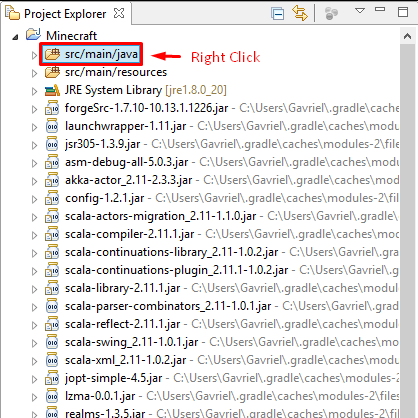
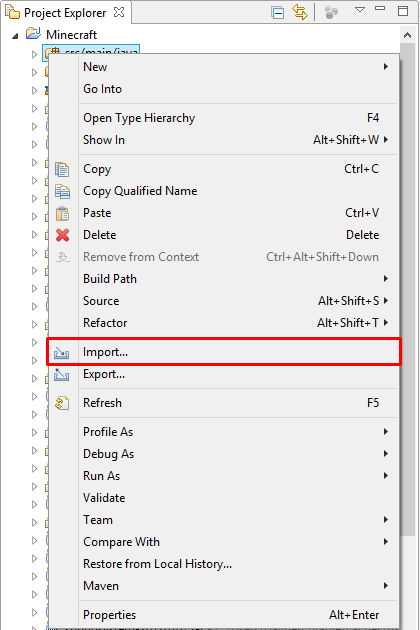

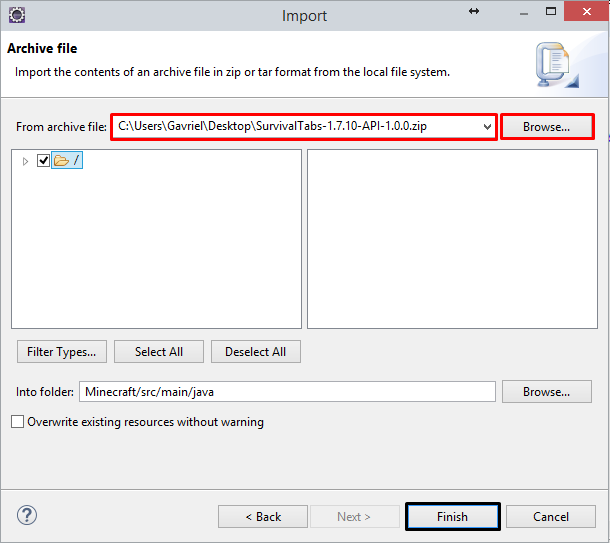
Now, we will create the tab-class (use any name you want), I will call mine "InventoryTab". We will extend it with the SurvivalTabs class from our API!
Then, you will have to add the constructor with the two variables, and we will add the unimplemented methods!
In the method "getTabIconItem()" we will return the item that will be on the tab, I will choose a diamond chestplate.
Now, we will add the Container in the "getContainer()" method.
First, I will add a new vairable of Minecraft in oreder to get the player that is currently playing.
Because I will return a new normal player's inventory container that is built in the game's "ContainerPlayer".
Now I want the GUI to present me the player in the black square that we have in the GUI texture.
In the constructor I will add this command..
this.addPlayer(fromLeftSize, fromTheTop, scale); -> this.addPlayer(51, 75, 30);
InventoryTab Class:
package com.example.examplemod;
import net.minecraft.client.Minecraft;
import net.minecraft.init.Items;
import net.minecraft.inventory.Container;
import net.minecraft.inventory.ContainerPlayer;
import net.minecraft.item.Item;
import net.minecraft.util.ResourceLocation;
import com.iTooly.survivaltabs.api.SurvivalTabs;
public class InventoryTab extends SurvivalTabs {
public static Minecraft mc = Minecraft.getMinecraft();
public InventoryTab(String lable, ResourceLocation guiTexture) {
super(lable, guiTexture);
this.addPlayer(51, 75, 30);
}
@Override
public Item getTabIconItem() {
return Items.diamond_chestplate;
}
@Override
public Container getContainer() {
return new ContainerPlayer(mc.thePlayer.inventory, !mc.theWorld.isRemote, mc.thePlayer);
}
}
Now we will create our own tab from the main class of the mod by using this code of line:
public static final SurvivalTabs inventoryTab = new InventoryTab("inventory", new ResourceLocation("textures/<wbr />gui/container/inventory.png"))<wbr />;
The vraiable name can be as you want..
The first argument is the label name for the tab (This will need to be registered in the lang file as "itemGroup.LabelName").
The second argument is the resource location of your GUI...
Main Class:
package com.example.examplemod;
import com.iTooly.survivaltabs.api.SurvivalTabs;
import net.minecraft.init.Blocks;
import net.minecraft.util.ResourceLocation;
import cpw.mods.fml.common.Mod;
import cpw.mods.fml.common.Mod.EventHandler;
import cpw.mods.fml.common.event.FMLInitializationEvent;
@Mod(modid = ExampleMod.MODID, version = ExampleMod.VERSION)
public class ExampleMod
{
public static final String MODID = "examplemod";
public static final String VERSION = "1.0";
public static final SurvivalTabs inventoryTab = new InventoryTab("inventory", new ResourceLocation("textures/gui/container/inventory.png"));
@EventHandler
public void init(FMLInitializationEvent event)
{
// some example code
System.out.println("DIRT BLOCK >> "+Blocks.dirt.getUnlocalizedName());
}
}
That's it! your tab is ready to go! But don't forget that if you want it to work you need to add the SurvivalTabs mod to your mods folder.
Result:
{width=840 height=525}
{width=840 height=525}
Project description from CurseForge.
Pick your setup
SurvivalTabs by Minecraft version and loader
Choose the version and loader you play, then open the matching release.
Minecraft version
1.7.2
1 loader buildCheck the dependencies, then try the file in a copied instance before changing a world you care about.
Recent files
SurvivalTabs versions and loaders
SurvivalTabs Core 1.7.2
SurvivalTabs-1.7.2-Core-1.0.0.jar
21 Oct 2014
Client Source doesn’t say Server Source doesn’t say Dependencies No extras listed Listed on Release listing
Check the 1.7.2 setup 1.7.2 release
SurvivalTabs Core 1.7.10
SurvivalTabs-1.7.10-Core-1.0.0.jar
21 Oct 2014
Client Source doesn’t say Server Source doesn’t say Dependencies No extras listed Listed on Release listing
Check the 1.7.10 setup 1.7.10 release
SurvivalTabs API 1.0.0
SurvivalTabs-1.7.10-API-1.0.0.zip
21 Oct 2014
Client Source doesn’t say Server Source doesn’t say Dependencies No extras listed Listed on Release listing
Check the 1.7.10 setup 1.7.21.7.10 release
Looking for an older file? The official CurseForge project page is in Resources.
 mod
CurseForge · Minecraft
WH: NPCs - Lang Addon
WHLang adds multilingual NPC dialogue support to Without Honor: NPCs, allowing players to choose their preferred language through a hash-based translation system.
 mod
CurseForge · Minecraft
Grid Inventory
Inventory system with variable-sized items and grid-based placement.
 mod
CurseForge · Minecraft
Minecolonies: Epicfied (Epic Colonies)
EpicColonies is a mod which not only adds support for Epic Fight & Minecolonies, but also adds life-like expressions/Models to the game! Allowing your citizens to feel more alive than ever!