Minecraft version
Back to mods 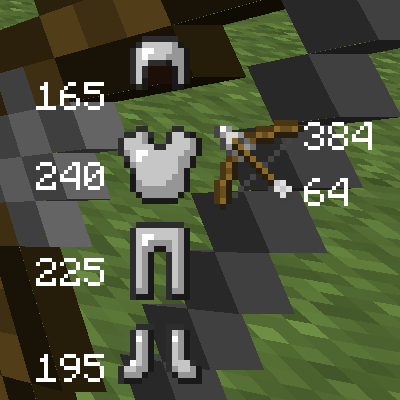
CurseForge · Minecraft mod
Durability Show
Simply shows the durability of tools/armor on your screen.
Choose a version Pick your version below, then grab the matching file.
Quick answer
Which Durability Show release should I use?
Latest stable file [1.12] Durability Show 5.0.0
Game version 1.12
Loader Not required
Durability Show [1.12] Durability Show 5.0.0 targets 1.12. The project page does not say whether this file belongs on the client, dedicated server, or both. No extra mods listed for this file.
Where it goes
Is Durability Show required on the client, server, or both?
The project page does not say whether this file belongs on the client, dedicated server, or both.
Client Source doesn’t say
Dedicated server Source doesn’t say
Loader for this release No loader listed
Required install it here Optional supported, not mandatory Not supported do not install here Source doesn’t say do not assume
The source does not explicitly classify this release as client-only or server-only.
What else does Durability Show [1.12] Durability Show 5.0.0 need?
[1.12] Durability Show 5.0.0. Change the file and its required mods may change too.
This file does not list any required mods. Do not add a library just because a different file uses it.
This file does not list any required or optional mods.
Before you install it
Add Durability Show without breaking your instance.
Built for Durability Show [1.12] Durability Show 5.0.0. Pick another file and the loader, install side or required mods may change.
- 01
Stick to this file
Use [1.12] Durability Show 5.0.0. It targets 1.12; another release may have different loader, side or dependency requirements.
- 02
Bring the mods it needs
This file does not list any required mods. Do not add a library just because a different file uses it.
- 03
Put it on the correct side
The project page does not say whether this file belongs on the client, dedicated server, or both.
- 04
Pick the file you checked
Use the “Get this file” button beside [1.12] Durability Show 5.0.0. It opens that exact file at the source.
About this project
What does Durability Show add?
Durability Show is a simple mod that shows the durability remaining of tools/armor on your screen.
- The Comments section is located on CurseForge. If you are viewing this on curse, please click "Project Site". Please do not post issues in the comments but rather on the issue tracker on GitHub.
By default, the "Toggle Key" is "H"
Press the toggle key on its own to open/close the GUI.
Hold shift while pressing the toggle key to toggle rendering of your character on screen.
Hold control while pressing the toggle key to toggle baubles functionality.
• Features
You can press H by default to open/close the GUI.
Draws information of tools/armor on screen.
Shows durability on tool-tips with advanced tooltips off.
As of 4.0.2, works with Baubles.
• Pictures
{width=1920 height=1018}{width=1920 height=1018}{width=1920 height=1018}{width=1920 height=1018}{width=1920 height=1018}
• Videos (Looking for a new one for 4.0.2, PM me if you make one.)
• Modpack Permission
This mod is allowed in any mod-pack hosted via CurseForge and the curse launcher. If you would like to include it in a mod-pack hosted elsewhere, please provide credit and a link back to the mods page.
Project description from CurseForge.
Pick your setup
Durability Show by Minecraft version and loader
Choose the version and loader you play, then open the matching release.
Minecraft version
1.11.2
1 loader buildMinecraft version
1.11
1 loader buildMinecraft version
1.10.2
1 loader buildMinecraft version
1.10
1 loader buildMinecraft version
1.9.4
1 loader buildMinecraft version
1.8.9
1 loader buildMinecraft version
1.7.10
1 loader buildCheck the dependencies, then try the file in a copied instance before changing a world you care about.
Recent files
Durability Show versions and loaders
[1.12] Durability Show 5.0.0
Durability Show-1.12-5.0.0.jar
11 Jun 2017
Client Source doesn’t say Server Source doesn’t say Dependencies No extras listed Listed on Release listing
Check the 1.12 setup 1.12 release
[1.11.2] Durability Show 4.1.1
Durability Show-1.11.2-4.1.1.jar
3 Jun 2017
Client Source doesn’t say Server Source doesn’t say Dependencies No extras listed Listed on Release listing
Check the 1.11.2 setup 1.11.2 release
[1.11] Durability Show 4.0.2
Durability Show-1.11-4.0.2.jar
9 Dec 2016
Client Source doesn’t say Server Source doesn’t say Dependencies No extras listed Listed on Release listing
Check the 1.11 setup [1.9.4/1.10(.2)] Durability Show 3.1.1
Durability Show-1.9.4-3.1.1.jar
24 May 2016
Client Source doesn’t say Server Source doesn’t say Dependencies No extras listed Listed on Release listing
Check the 1.10.2 setup 1.9.41.10.21.10 release
[1.8.9] Durability Show 2.1.2
Durability Show-1.8.9-2.1.2.jar
31 Dec 2015
Client Source doesn’t say Server Source doesn’t say Dependencies No extras listed Listed on Release listing
Check the 1.8.9 setup 1.8.9 release
[1.7.10] Durability Show 1.2.0
DurabilityShow-1.7.10-1.2.0.jar
31 Jan 2015
Client Source doesn’t say Server Source doesn’t say Dependencies No extras listed Listed on Release listing
Check the 1.7.10 setup 1.7.10 release
Looking for an older file? The official CurseForge project page is in Resources.
 mod
mod CurseForge · Minecraft
Mine and Slash
Turn Minecraft into a hack and slash looter!
 mod
mod CurseForge · Minecraft
online_horror_challenge
this mods adds a new biome that has creepy birds and whale lice hunting and if you stay long enough momo and blue whale will show up
 mod
mod CurseForge · Minecraft
the mango new advent
We've got everything we can with mangoes! Check out the new dimensions, resources, biomes, and mobs through this mod!