Minecraft version
Back to mods 
CurseForge · Minecraft mod
Wireless Item Passaging
No longer will you need a bunch of conduits to transport over long distances. Instead, you can create Item Conduits from Wireless Item Passaging, set their locations to pull from, and save tons of space!
Choose a version Pick your version below, then grab the matching file.
Quick answer
Which Wireless Item Passaging release should I use?
Latest stable file WirelessItemPassaging-1.0.0 (JamOOJam Version).jar
Game version 1.7.10
Loader Not required
Wireless Item Passaging WirelessItemPassaging-1.0.0 (JamOOJam Version).jar targets 1.7.10. The project page does not say whether this file belongs on the client, dedicated server, or both. No extra mods listed for this file.
Where it goes
Is Wireless Item Passaging required on the client, server, or both?
The project page does not say whether this file belongs on the client, dedicated server, or both.
Client Source doesn’t say
Dedicated server Source doesn’t say
Loader for this release No loader listed
Required install it here Optional supported, not mandatory Not supported do not install here Source doesn’t say do not assume
The source does not explicitly classify this release as client-only or server-only.
What else does Wireless Item Passaging WirelessItemPassaging-1.0.0 (JamOOJam Version).jar need?
WirelessItemPassaging-1.0.0 (JamOOJam Version).jar. Change the file and its required mods may change too.
This file does not list any required mods. Do not add a library just because a different file uses it.
This file does not list any required or optional mods.
Before you install it
Add Wireless Item Passaging without breaking your instance.
Built for Wireless Item Passaging WirelessItemPassaging-1.0.0 (JamOOJam Version).jar. Pick another file and the loader, install side or required mods may change.
- 01
Stick to this file
Use WirelessItemPassaging-1.0.0 (JamOOJam Version).jar. It targets 1.7.10; another release may have different loader, side or dependency requirements.
- 02
Bring the mods it needs
This file does not list any required mods. Do not add a library just because a different file uses it.
- 03
Put it on the correct side
The project page does not say whether this file belongs on the client, dedicated server, or both.
- 04
Pick the file you checked
Use the “Get this file” button beside WirelessItemPassaging-1.0.0 (JamOOJam Version).jar. It opens that exact file at the source.
About this project
What does Wireless Item Passaging add?
Hey, everyone, Mitchellbrine here, and this is my entry for JamOOJam Alpha. Wireless Item Passaging was a mod created in a 96 hour modding competition called JamOOJam, in which members of the JamOORev community and invitees make a mod in 96 hours. You can get more information about JamOOJam at the link above.
Voting has begun for JamOOJam and ends 12/2 at 7:00 EST. Be sure to vote for it here.
Wireless Item Passaging is a mod that allows wireless item transportation. No longer will you need a bunch of conduits to transport over long distances. Instead, you can create Item Conduits from Wireless Item Passaging, set their locations to pull from using a GPS, and save tons of space! With an easy to use Inventory Type system, addons are simple and painless, letting mod compatibility be as easy as one line of code.
Requires Minecraft Forge 1240 or later!
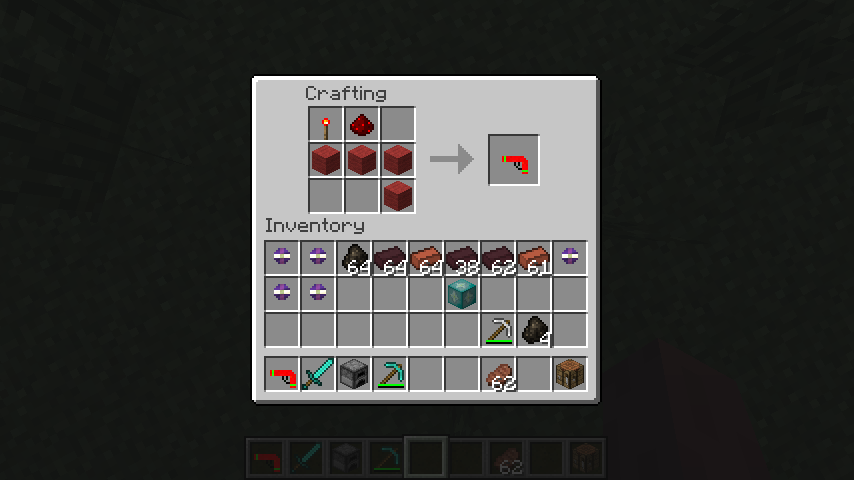
How to use the GPS:
Once you craft your GPS, you can right-click on any block to set coordinates. You can shift-click any block to set it's coordinates as well (if the block does not open a GUI). To give the coordinates to a Item Conduit, you must right-click (while not shifting). If you get no chat message and the conduit's GUI does not open, you have inputted the coordinates correctly. You can also right-click the conduit with any other item to open it's GUI and check if you inputted the coordinates. Coordinates are displayed in the GPS's lore.
How to use the Item Conduit:
The Item Conduit acts as a wireless hopper. It will take items out of the inventory selected (right-click with a GPS that has coordinates to set the location to pull from). If it is powered by redstone, it will not pull items. It will output to a inventory above and can be inputted and outputted like usual with regular hoppers/pipes. It detects the block it's pulling from for a matching inventory type. There are 5 default vanilla inventory types (Furnace, Chest, Hopper, Brewing Stand, and Dispenser/Dropper). Each inventory type has it's own slots to input and output to. Upon changing inventory types, the conduit's contents will be dropped onto the ground.
Crafting Recipes:
GPS:
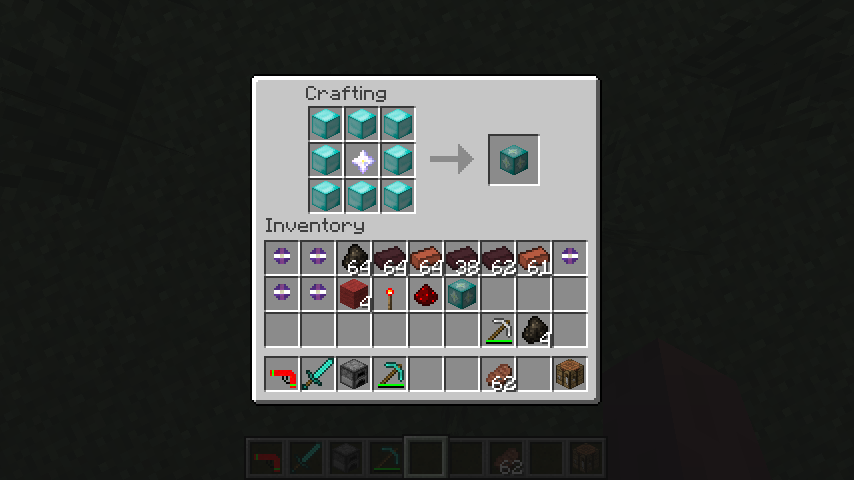
Wither-Infused Diamond Block: (Amount of diamond blocks configurable from 1-8)
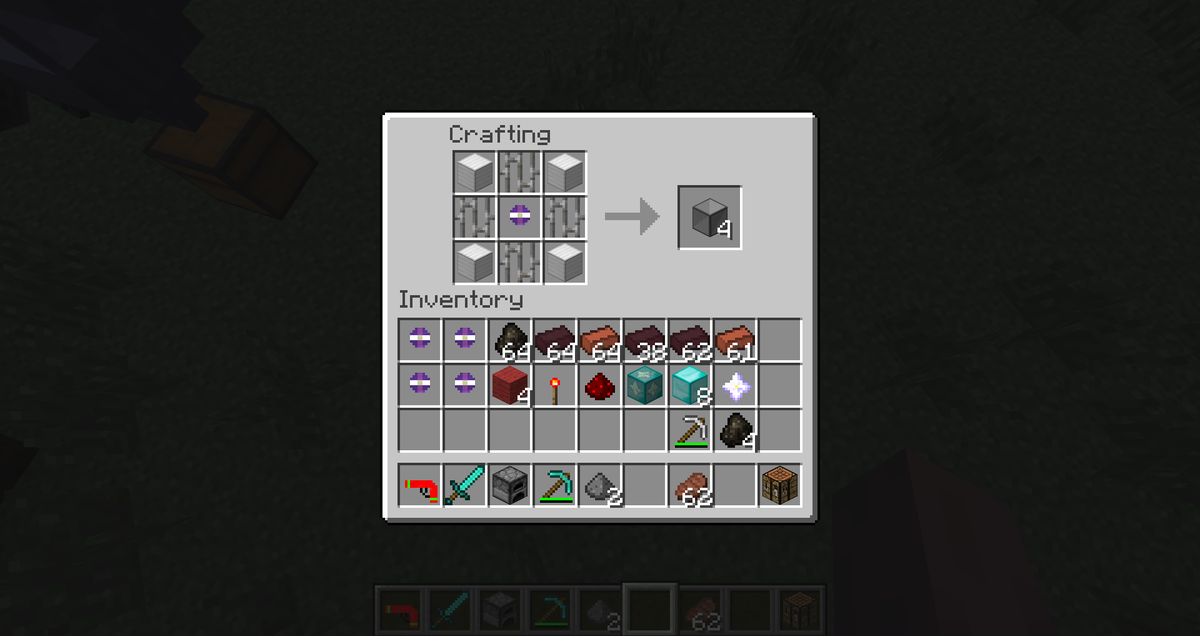
Wireless Transport Core (Multi-block crafting): (Picture made by Yuuki, a member of JamOORev)
{width=600 height=750}
Item Conduit:
Mod Compatibility:
{width=1920 height=1017}
Wireless Item Passaging comes with addons for both Tinker's Construct and Iron Chests naively.
Inventory Types Added:
Iron Chest (Applies to Copper Chests, Silver Chests, and Dirt Chests as well) [Iron Chests]
Gold Chest [Iron Chests]
Diamond Chest (Applies to Crystal Chests and Obsidian Chests as well) [Iron Chests]
Crafting Station [Tinker's Construct]
Slab Furnace [Tinker's Construct]
Smeltery [Tinker's Construct]
How to make an addon for Wireless Item Passaging:
- Set up a regular mod environment as usual
- Create a libs/ folder and put a deobfuscated version of Wireless Item Passaging in it
- Add that deobfuscated version of Wireless Item Passaging to your dependencies in IntelliJ or as an external jar in Eclipse.
- Create a new InventoryType. You only need to create a constructor for an inventory type. (There is documentation in the code about the constructor. There is a metadata-sensitive version of the constructor as well.) If the inventory behavior is set to 0 or 1, skip step 6.
- If you set the inventory behavior as 2, use the event to set what you want to do with the inventories.
- Enjoy!
To Be Added:
More mod compatibility.
Update to 1.8
Modpack Info:
I give permission for anyone to use it in their modpack. Don't ask me. Please. If you want to, tell me about your pack so I can promote it!
Project description from CurseForge.
Pick your setup
Wireless Item Passaging by Minecraft version and loader
Choose the version and loader you play, then open the matching release.
Check the dependencies, then try the file in a copied instance before changing a world you care about.
Recent files
Wireless Item Passaging versions and loaders
WirelessItemPassaging-1.0.0 (JamOOJam Version).jar
23 Dec 2014
Client Source doesn’t say Server Source doesn’t say Dependencies No extras listed Listed on Release listing
Check the 1.7.10 setup 1.7.10 release
Looking for an older file? The official CurseForge project page is in Resources.
 mod
CurseForge + Modrinth · Minecraft
LOD Server Support
Unofficial multiplayer support for Voxy: servers send distant terrain and far-away players to clients. Also fills Xaero's World Map and JourneyMap, and works with Distant Horizons servers. The same mod as Voxy Server Side.
 mod
Modrinth · Minecraft
Sweeper Maid
A lightweight mod that collects all dropped items and unnecessary entities for optimization.
 mod
Modrinth · Minecraft
AccurateFPS+
Lightweight and highly accurate Metrics (not just FPS!) with a fully customizable HUD