Minecraft version
Back to mods 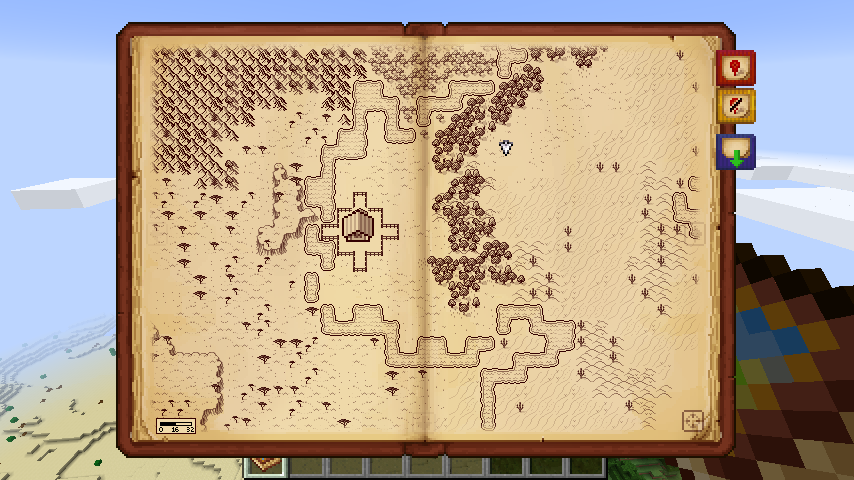
CurseForge · Minecraft mod
Antique Atlas
Antique map featuring infinite scrolling, zoom and custom labeled markers.
Choose a version Pick your version below, then grab the matching file.
Quick answer
Which Antique Atlas release should I use?
Latest stable file Antique Atlas-1.21.1-8.0.1-NeoForge.jar
Game version 1.21.1
Loader NeoForge
Antique Atlas-1.21.1-8.0.1-NeoForge.jar targets 1.21.1 with NeoForge. The project page does not say whether this file belongs on the client, dedicated server, or both. No extra mods listed for this file.
Where it goes
Is Antique Atlas required on the client, server, or both?
The project page does not say whether this file belongs on the client, dedicated server, or both.
Client Source doesn’t say
Dedicated server Source doesn’t say
Loader for this release NeoForge
Required install it here Optional supported, not mandatory Not supported do not install here Source doesn’t say do not assume
The source does not explicitly classify this release as client-only or server-only.
What else does Antique Atlas-1.21.1-8.0.1-NeoForge.jar need?
Antique Atlas-1.21.1-8.0.1-NeoForge.jar. Change the file and its required mods may change too.
This file does not list any required mods. Do not add a library just because a different file uses it.
This file does not list any required or optional mods.
Before you install it
Add Antique Atlas without breaking your instance.
Built for Antique Atlas-1.21.1-8.0.1-NeoForge.jar. Pick another file and the loader, install side or required mods may change.
- 01
Stick to this file
Use Antique Atlas-1.21.1-8.0.1-NeoForge.jar. It targets 1.21.1 with NeoForge; another release may have different loader, side or dependency requirements.
- 02
Bring the mods it needs
This file does not list any required mods. Do not add a library just because a different file uses it.
- 03
Put it on the correct side
The project page does not say whether this file belongs on the client, dedicated server, or both.
- 04
Pick the file you checked
Use the “Get this file” button beside Antique Atlas-1.21.1-8.0.1-NeoForge.jar. It opens that exact file at the source.
About this project
What does Antique Atlas add?

Antique Atlas is a craftable item that enables a special map screen. You can navigate the map via click & drag, zoom via the scroll wheel. Additionally, on-screen buttons let you add/remove/hide markers, export the map to an image file.
Both server and client need to have the mod installed.
You're free to include this mod in mod packs, as long as you're not making money off of it.
Known bugs: https://github.com/AntiqueAtlasTeam/AntiqueAtlas/labels/type: bug
Join our Discord: https://discord.gg/N2H3r9y
The map is generated around the player by selecting a single biome to represent each chunk of 16x16 blocks. Custom biomes added by other mods will be automatically assigned to a default texture set based on their characteristics, but you can add your own texture packs with custom textures: see Editing Textures
You can export the atlas as an PNG image file that shows the current dimension of the player.
Modders can make use of the Atlas API! In order to develop with the API, grab a deobfuscated build here.
Crafting Recipe: +
+  =
= 
Like with Minecraft maps, right-click on empty Atlas to create a usable instance: 
Cloning: + =
Crafting an Atlas with empty Atlases creates clones of the original Atlas. The map content is shared between the clones, so you can always leave a copy at home and go on adventures without ever worrying about losing your Atlas.
Combining:#1 + #2 = #3
2 different Atlases can be crafted together and have the contents of both merged into a new one.
Right-click while holding the Atlas to open it.
Credits:
A huge thanks to everyone who has contributed to the mod!
to Hunternif for creating the mod and the original textures and
to Kenkron for updating and maintaining the mod for several years
to voythas and others from the Quest team for inspiring the original idea
to coolAlias for integrating with ZSS, rewriting network code and providing lots of along the way
to crafteverywhere, CapoFantasma97, Mazdallier, Ruukas for translating texts
to Golrith for his work on a custom texture pack, and to temdur and barrowisp for contributing
to Stereowalker, for porting to 1.21.1
to everyone who made suggestions in the Minecraft Forums thread. They have been really insightful, and some of the suggested features have been implemented.
Project description from CurseForge.
Pick your setup
Antique Atlas by Minecraft version and loader
Choose the version and loader you play, then open the matching release.
Minecraft version
1.20.1
1 loader buildMinecraft version
1.18.2
2 loader buildsMinecraft version
1.17.1
2 loader buildsMinecraft version
1.17
1 loader buildMinecraft version
1.16.5
2 loader buildsMinecraft version
1.16.4
2 loader buildsMinecraft version
1.16.3
2 loader buildsMinecraft version
1.16.2
2 loader buildsMinecraft version
1.16.1
1 loader buildMinecraft version
1.15.2
1 loader buildMinecraft version
1.14.4
1 loader buildCheck the dependencies, then try the file in a copied instance before changing a world you care about.
Recent files
Antique Atlas versions and loaders
Antique Atlas-1.21.1-8.0.1-NeoForge.jar
5 Aug 2025
Client Source doesn’t say Server Source doesn’t say Dependencies No extras listed Listed on Release listing
Check the 1.21.1 · NeoForge setup NeoForge1.21.1 release
Antique Atlas-1.21.1-8.0.1-Forge.jar
5 Aug 2025
Client Source doesn’t say Server Source doesn’t say Dependencies No extras listed Listed on Release listing
Check the 1.21.1 · Forge setup Forge1.21.1 release
Antique Atlas-1.21.1-8.0.1-Fabric.jar
5 Aug 2025
Client Source doesn’t say Server Source doesn’t say Dependencies No extras listed Listed on Release listing
Check the 1.21.1 · Fabric setup Fabric1.21.1 release
Antique Atlas-1.20.1-8.0.1-Forge.jar
5 Aug 2025
Client Source doesn’t say Server Source doesn’t say Dependencies No extras listed Listed on Release listing
Check the 1.20.1 · Forge setup 1.20.1Forge release
Antique Atlas 2-1.21.1-0.0.2-NeoForge.jar
30 Jul 2025
Client Source doesn’t say Server Source doesn’t say Dependencies 3 required · 3 unchecked Listed on Release listing
Check the 1.21.1 · NeoForge setup NeoForge1.21.1 release
Antique Atlas 2-1.21.1-0.0.2-Fabric.jar
30 Jul 2025
Client Source doesn’t say Server Source doesn’t say Dependencies No extras listed Listed on Release listing
Check the 1.21.1 · Fabric setup Fabric1.21.1 release
Antique Atlas 2-1.21.1-0.0.2-Forge.jar
30 Jul 2025
Client Source doesn’t say Server Source doesn’t say Dependencies 3 required · 3 unchecked Listed on Release listing
Check the 1.21.1 · Forge setup Forge1.21.1 release
antiqueatlas-7.1.1-forge-mc1.18.2.jar
30 Mar 2023
Client Source doesn’t say Server Source doesn’t say Dependencies 2 required · 2 unchecked Listed on Release listing
Check the 1.18.2 · Forge setup 1.18.2Forge release
antiqueatlas-7.1.1-fabric-mc1.18.2.jar
30 Mar 2023
Client Source doesn’t say Server Source doesn’t say Dependencies 3 required · 3 unchecked Listed on Release listing
Check the 1.18.2 · Fabric setup Fabric1.18.2 release
antiqueatlas-7.1.0-forge-mc1.18.2.jar
15 Mar 2023
Client Source doesn’t say Server Source doesn’t say Dependencies 2 required · 2 unchecked Listed on Release listing
Check the 1.18.2 · Forge setup 1.18.2Forge release
antiqueatlas-7.1.0-fabric-mc1.18.2.jar
15 Mar 2023
Client Source doesn’t say Server Source doesn’t say Dependencies 3 required · 3 unchecked Listed on Release listing
Check the 1.18.2 · Fabric setup Fabric1.18.2 release
antiqueatlas-6.2.4-forge-mc1.16.5.jar
13 Mar 2023
Client Source doesn’t say Server Source doesn’t say Dependencies 2 required · 2 unchecked Listed on Release listing
Check the 1.16.5 · Forge setup 1.16.31.16.5Forge1.16.4 release
Looking for an older file? The official CurseForge project page is in Resources.
 mod
mod CurseForge + Modrinth · Minecraft
Certain Questing Additions
Small QoL and animation tweaks for FTB Quests.
 mod
mod CurseForge + Modrinth · Minecraft
Goety-Fabric
An unofficial Fabric port of Goety. Perform necromancy and dark rituals using the power of souls
 mod
mod CurseForge + Modrinth · Minecraft
Spellbooks: Unraveling the Spells
Adds the mechanics of learning magic schools and spells from Iron's Spells 'n Spellbooks