Railcraft Optional for Cart Livery CartLivery-1.7.10-0.11.1
optionalMatching file found Matched file: Railcraft 9.12.2.0
CurseForge · Minecraft mod
Decorate your minecarts!
Quick answer
Cart Livery CartLivery-1.7.10-0.11.1 targets 1.7.10. The project page does not say whether this file belongs on the client, dedicated server, or both. No extra mods listed for this file.
Where it goes
The project page does not say whether this file belongs on the client, dedicated server, or both.
The source does not explicitly classify this release as client-only or server-only.
CartLivery-1.7.10-0.11.1. Change the file and its required mods may change too.
This file does not list any required mods. Do not add a library just because a different file uses it.
We only count dependency files that match this setup. A file for another loader does not fill the gap.
Before you install it
Built for Cart Livery CartLivery-1.7.10-0.11.1. Pick another file and the loader, install side or required mods may change.
Use CartLivery-1.7.10-0.11.1. It targets 1.7.10; another release may have different loader, side or dependency requirements.
This file does not list any required mods. Do not add a library just because a different file uses it.
The project page does not say whether this file belongs on the client, dedicated server, or both.
Use the “Get this file” button beside CartLivery-1.7.10-0.11.1. It opens that exact file at the source.
About this project
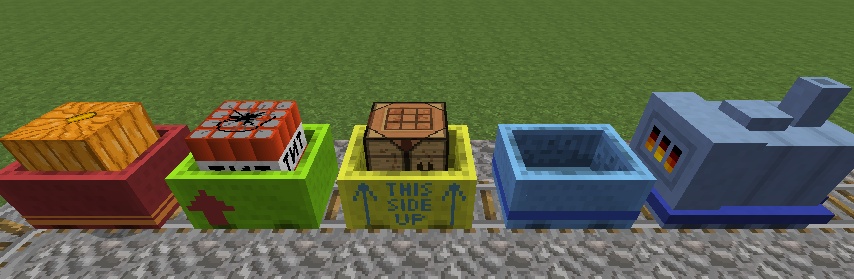
Are you fed up with standard-issue gray minecarts? Have you ever wished you could color your carts so they match your shiny new steam locomotive? Or just stand out from the crowd?
Well, now you can! Cart Livery is a mod that allows you to paint your carts in all 16 glorious sheep colors, and apply colored stickers to them.
{width=464 height=216}
{width=376 height=332}
{width=606 height=332}
{width=1086 height=705}
{width=1086 height=705}
{width=464 height=216}
{width=352 height=332}
Cart Livery is designed with extensibility in mind. The mod itself contains only a few livery stickers, but new ones can be easily added with resource packs. Other mods may also define their own built-in set of stickers if they wish.
The stickers you are able to craft are determined solely by your client - i.e. the sum of all resource packs you have active at the moment. In SMP, other players who don't have the particular pack a sticker comes from will not be able to see it; everything else however will still work (they can color and apply the stickers normally).
My own textures may be bad, but it's my hope that some more artistically minded people will take off with this idea. Creating a pack is quite easy, take a look at the provided pack - which is a subset of those available built-in - to get an idea how it's done.
Basically you need 3 things:
The mod simply draws a textured box around the minecart, with a texture that's mostly transparent. The easiest way to make a texture is to start off from the test.png texture in my pack. There are no technical reasons to use only white, however colored textures may look weird when dyed.
The mod works fine both with and without Railcraft installed (tested version is RC 9.5.0.1 for MC 1.7.10, RC 8.3.2.0 for MC 1.6.4). It also works fine with Extra Carts and Steve's Carts installed.
Support for Waila versions 1.5.0 and higher is included out-of-the-box, it can show you the name of the sticker on a cart, the resource pack it is from (if you have it), the colors, and the emblem on the cart. These may be switched on and off separately.
Sticker coloring recipes do not show up in NEI at the moment.
You may use Cart Livery in any public or private modpacks without any limitation.
You may distribute Cart Livery as part of a public or private modpack, but any form of monetization on the download is forbidden (this refers only to distribution: you may run your servers however you like).
You may not publicly distribute Cart Livery standalone, or hotlink to the underlying files. Use the provided goo.gl redirector link, or simply link to this topic.
If you use it in your pack, a link to this topic or my GitHub page would be much appreciated.
0.11.1 - More Awesomeness!
0.10.8 - Textures and Sounds!
0.10.7a
0.10.6
0.10.4 - Emblems!
0.10.2 - Features!
0.10.0 - Lots of Changes
0.9.3-beta
0.9.2-beta
0.9.1-beta
0.9-beta
Put the JAR in yout /mods folder, you know the drill.
Head to my GitHub project page
Comments & feedback are always welcome!
You can also find me on Github, Minecraft Forum, Curseforge, FTB Forum, BDcraft Forums, and DeviantArt all with the username "kuenzign".
Project description from CurseForge.
Pick your setup
Choose the version and loader you play, then open the matching release.
Check the dependencies, then try the file in a copied instance before changing a world you care about.
Recent files
CartLivery-1.7.10-0.11.1.jar
4 Mar 2015
CartLivery-1.7.10-0.10.8.jar
4 Mar 2015
CartLivery-1.7.10-0.10.7a.jar
4 Mar 2015
CartLivery-1.7.10-0.10.6.jar
4 Mar 2015
CartLivery-1.7.10-0.10.4.jar
4 Mar 2015
CartLivery-1.7.10-0.10.2.jar
4 Mar 2015
CartLivery-1.7.10-0.10.0.jar
4 Mar 2015
CartLivery-1.7.2-0.9.3b.jar
4 Mar 2015
CartLivery-1.6.4-0.9.3b.jar
4 Mar 2015
Looking for an older file? The official CurseForge project page is in Resources.
 mod
modPalladium: Koala is a utility addon for Palladium designed to modify, adjust, and configure superpower addons frequently used across Koala Universe server projects.
 mod
modCraft any wool type in the stone cutter!
 mod
modMakes recipe discovery more immersive and less overwhelming.