Minecraft version
Back to mods 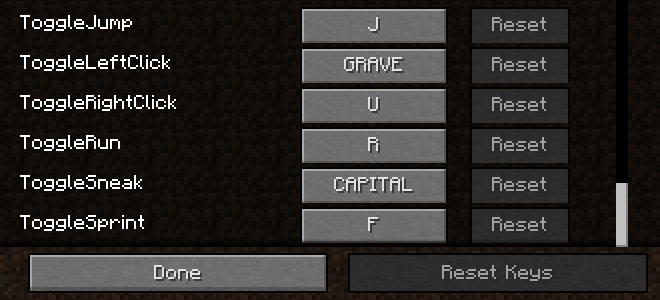
CurseForge · Minecraft mod
Toggler
Toggle click, toggle sneak, toggle run, toggle sprint, toggle jump, hold to attack
Choose a version Pick your version below, then grab the matching file.
Quick answer
Which Toggler release should I use?
Latest stable file toggler-1.8-0.1.jar
Game version 1.8
Loader Not required
toggler-1.8-0.1.jar targets 1.8. The project page does not say whether this file belongs on the client, dedicated server, or both. No extra mods listed for this file.
Where it goes
Is Toggler required on the client, server, or both?
The project page does not say whether this file belongs on the client, dedicated server, or both.
Client Source doesn’t say
Dedicated server Source doesn’t say
Loader for this release No loader listed
Required install it here Optional supported, not mandatory Not supported do not install here Source doesn’t say do not assume
The source does not explicitly classify this release as client-only or server-only.
What else does toggler-1.8-0.1.jar need?
toggler-1.8-0.1.jar. Change the file and its required mods may change too.
This file does not list any required mods. Do not add a library just because a different file uses it.
This file does not list any required or optional mods.
Before you install it
Add Toggler without breaking your instance.
Built for toggler-1.8-0.1.jar. Pick another file and the loader, install side or required mods may change.
- 01
Stick to this file
Use toggler-1.8-0.1.jar. It targets 1.8; another release may have different loader, side or dependency requirements.
- 02
Bring the mods it needs
This file does not list any required mods. Do not add a library just because a different file uses it.
- 03
Put it on the correct side
The project page does not say whether this file belongs on the client, dedicated server, or both.
- 04
Pick the file you checked
Use the “Get this file” button beside toggler-1.8-0.1.jar. It opens that exact file at the source.
About this project
What does Toggler add?
This is a simple mod that saves you from having to hold down buttons on your keyboard. For example, instead of holding down the spacebar to stay afloat while swimming you could simply press the key that you have set for ToggleJump. Now Minecraft will act exactly like you're holding down spacebar until you either press the toggle key again or until you press spacebar yourself.
Sorry, screenshots can't really convey the essence of the mod but someone made a small video explaining the mod in the original Minecraft forum post here. That is an outdated video now and that version didn't a few things such as the hold to attack feature explained below.
FEATURES
Toggle buttons: Tired of holding down buttons?
Want to go on a long run and don't want to hold down W? Press the ToggleRun button once then you will run forward until you press it again or until you manually press forward or back. Staying afloat in the ocean is as simple as pressing ToggleJump. Buttons can configured in the controls menu or manually turned off in toggler.cfg found in your config folder.
Hold to attack: Why spam left click when it's easier just to hold the button down?
By holding down the left mouse button you will continually attack much like when mining you hold down the button. This option can be turned off in toggler.cfg found in you config folder.
Combat Mode: Ever tried to kill a bat only to end up knocking out torches and digging holes in your walls?
If you are holding down the left mouse button and facing a mob, you will automatically switch to Combat Mode. You will now ONLY attack mobs and not touch any blocks that you face. This will continue until you release the button. This also works with ToggleLeftClick active. This option can be turned off in toggler.cfg found in you config folder.
The Controls:
ToggleLeftClick (default key = GRAVE)
The GRAVE key is the ` key just above TAB. Not all keyboards may have this so you may wish to change it in options>controls. When ON you will mine the block in front of you just like if you were holding down the left mouse button. Also if you are aiming at an entity such as a pig, zombie or villager, you will continually attack it just as if you were clicking.
ToggleRightClick (default key = U)
When ON you will use the item you have selected in your hotbar, such as eat the food you are holding or drop a block on the ground just as if you were holding the right mouse button. Not sure how useful this is but it's there if you need it.
ToggleSneak (default key = CAPSLOCK)
When ON you will sneak.
ToggleRun (default key = R)
When ON you will run forward.
ToggleSprint (default key = F)
When ON and running forward you will sprint (if you are still fit enough).
ToggleJump (default key = J)
When ON you will jump. Good for swimming.
All key bindings can be changed in Options>Controls. Pressing the original key should cancel the toggled action, for example if you press jump (spacebar) while ToggleJump is active then you will no longer auto jump.
This mod should only affect the client input so it's unlikely to screw up existing worlds but you should take the usual precautions such as making backups of your worlds before installing. Also as this is only a client side mod you should not install this on the server side.
Latest version is for Minecraft 1.8 and was compiled and tested with Forge 11.14.0.1295.
You may freely include this mod in any ModPacks.
Changelog:
Version 1.8-0.1(20/03/2015)
- Updated for 1.8, Compiled to Forge 11.14.0.1295
- Fixed localisation
Version 1.7.10-0.1
(18/03/2015)
- Updated for 1.7.10, Compiled to Forge 10.13.2.1291.
- Default toggle ToggleRight key changed to "U"
- Removed notification status and debugging code
Version 1.6.4-1.1
(18/03/2015)
- Finally decided to update this mod although still for 1.6.4. Compiled to Forge 9.11.1.965
- Default toggle sprint key changed to "F"
- Hopefully stopped accidently attacking entities after clicking close on a GUI menu
Version 1.6.4-1.0
(27/10/2013)
- Added configuration file. Should be found at: config/Toggler.cfg
- Can now disable controls in the config file if you feel any are a waste of keybindings.
- Chat notifications on Toggles can be turned on in config file. (Disabled by default)
- Hold to Attack can now be disabled in the config file. (Enabled by default)
- Using ToggleRun while manually running forward should now stay on when you let go of the forward button.
- If you are standing still and press ToggleSprint you will now automatically run forward and sprint if possible.
- Pressing the back button while auto running forward will now turn off ToggleRun.
- While ToggleLeftClick is on or if you are manually holding down left click, hitting a mob once will set you to attack only mode.
- NEW Only Attack Mode: you will no longer break blocks until you release the left click or turn off the toggle.
This can be changed in the config file under AutoOnlyAttack (Enabled by default).
Version 1.6.4-0.1
(24/10/2013)
- First release.
Project description from CurseForge.
Pick your setup
Toggler by Minecraft version and loader
Choose the version and loader you play, then open the matching release.
Minecraft version
1.7.10
1 loader buildMinecraft version
1.6.4
1 loader buildCheck the dependencies, then try the file in a copied instance before changing a world you care about.
Recent files
Toggler versions and loaders
toggler-1.8-0.1.jar
20 Mar 2015
Client Source doesn’t say Server Source doesn’t say Dependencies No extras listed Listed on Release listing
Check the 1.8 setup 1.8 release
toggler-17.10-0.1.jar
18 Mar 2015
Client Source doesn’t say Server Source doesn’t say Dependencies No extras listed Listed on Release listing
Check the 1.7.10 setup 1.7.10 release
toggler-1.6.4-1.1.jar
18 Mar 2015
Client Source doesn’t say Server Source doesn’t say Dependencies No extras listed Listed on Release listing
Check the 1.6.4 setup 1.6.4 release
Looking for an older file? The official CurseForge project page is in Resources.