Minecraft version
Back to mods 
CurseForge · Minecraft mod
World Handler - Command GUI
Minecraft ingame GUI for commands
Choose a version Pick your version below, then grab the matching file.
Quick answer
Which World Handler - Command GUI release matches 1.20.3 Forge?
Best match for your filters 1.20.4-3.5.1 Universal
Game version 1.20.3, 1.20.4
Loader Forge
World Handler - Command GUI 1.20.4-3.5.1 Universal targets 1.20.3, 1.20.4 with Forge. The project page does not say whether this file belongs on the client, dedicated server, or both. No extra mods listed for this file.
Where it goes
Is World Handler - Command GUI required on the client, server, or both?
The project page does not say whether this file belongs on the client, dedicated server, or both.
Client Source doesn’t say
Dedicated server Source doesn’t say
Loader for this release Forge
Required install it here Optional supported, not mandatory Not supported do not install here Source doesn’t say do not assume
The source does not explicitly classify this release as client-only or server-only.
What else does World Handler - Command GUI 1.20.4-3.5.1 Universal need?
1.20.4-3.5.1 Universal on 1.20.3 Forge. Every mod below is checked against that same setup.
This file does not list any required mods. Do not add a library just because a different file uses it.
This file does not list any required or optional mods.
Before you install it
Add World Handler - Command GUI without breaking your instance.
Built for World Handler - Command GUI 1.20.4-3.5.1 Universal on 1.20.3 Forge. Pick another file and the loader, install side or required mods may change.
- 01
Stick to this file
Use 1.20.4-3.5.1 Universal. It targets 1.20.3, 1.20.4 with Forge; another release may have different loader, side or dependency requirements.
- 02
Bring the mods it needs
This file does not list any required mods. Do not add a library just because a different file uses it.
- 03
Put it on the correct side
The project page does not say whether this file belongs on the client, dedicated server, or both.
- 04
Pick the file you checked
Use the “Get this file” button beside 1.20.4-3.5.1 Universal. It opens that exact file at the source.
About this project
What does World Handler - Command GUI add?
World Handler - Command GUI
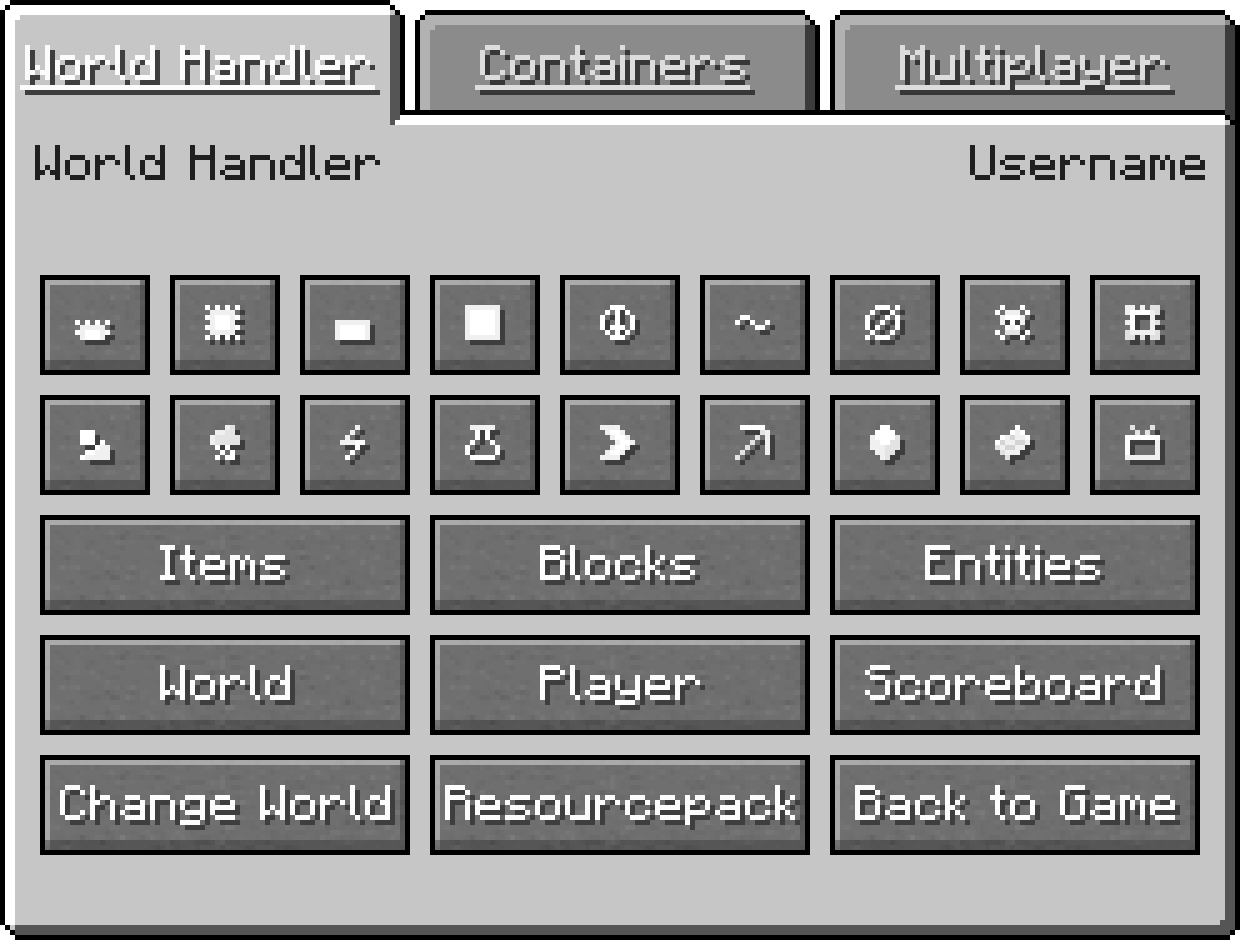
The World Handler provides a simple and easy to use graphical user interface for commands. It lets you create powerful and complex sub-commands alongside NBT-structures within seconds.
Features
- GUI for commands
- Client Commands: advancement, blockdata, clear, clone, difficulty, effect, enchant, fill, gamemode, gamerule, give, kill, recipe, scoreboard, setworldspawn, spawnpoint, summon, tag, team, time, trigger, weather, xp
- Server Commands: ban, deop, kick, op, pardon, save-all, save-off, save-on, whitelist
- World and player information
- /wh for a simplified /fill and /clone
- Expandable GUI with json files and child mods
- Client-side only
Installation
Download World Handler or build from source
Prerequisites
- Make sure Minecraft Forge is installed
Installer
- Run "WorldHandler-[VERSION]-UNIVERSAL.jar"
- Select your Minecraft directory
- Click Install
Manual
- Navigate to "...minecraft\mods"
- Copy the "WorldHandler-[VERSION]-UNIVERSAL.jar"
- Follow the steps below
Launcher Settings
- Select Forge as your profile
- Launch Minecraft
- Join a world or server
- Press "V" to open the World Handler
Configuration
- ≥ 1.14.4: Manual: "...minecraft\config\worldhandler\worldhandler.toml"
- 1.13-1.14.4: Manual: "...minecraft\config\worldhandler.toml"
- 1.9-1.12: Ingame: Mods -> World Handler -> Config (Manual: "...minecraft\config\worldhandler.cfg")
- ≤ 1.8: Manual: "...minecraft\config\worldhandler[CONFIG].cfg"
Installation with ModLoader (1.6.2)
- Navigate to "...minecraft\mods"
- Copy all files of the "World_Handler_GUI_[VERSION].zip" into the "1.6.2ML.jar"
- Run Minecraft
Expansion
The World Handler GUI can also be expanded with custom tabs configured with json and javascript files or as a separate child mod written in java. A description on how to implement a custom json and javascript file can be found here and an example child mod can be found here.
FAQ
- Q: Is this client-side only ?
- A: Yes
- Q: Can you port this to fabric, liteloader, rift, etc ?
- A: No
- Q: Can i add this to my modpack ?
- A: Yes, as long as you give credit
Support
This mod will no longer be updated.
License
GNU GENERAL PUBLIC LICENSE Version 3
Project description from CurseForge.
Pick your setup
World Handler - Command GUI by Minecraft version and loader
Choose the version and loader you play, then open the matching release.
Minecraft version
1.21
1 loader buildMinecraft version
1.20.4
1 loader buildMinecraft version
1.20.3
1 loader buildMinecraft version
1.20.2
1 loader buildMinecraft version
1.20.1
1 loader buildMinecraft version
1.20
1 loader buildMinecraft version
1.19.4
1 loader buildMinecraft version
1.19.3
1 loader buildMinecraft version
1.19.2
1 loader buildMinecraft version
1.19.1
1 loader buildMinecraft version
1.19
1 loader buildShowing the newest 12 of 24 game versions. Older files are in the list below.
Check the dependencies, then try the file in a copied instance before changing a world you care about.
Recent files
World Handler - Command GUI versions and loaders
1.20.4-3.5.1 Universal
WorldHandler-1.20.4-3.5.1.jar
9 Dec 2023
Client Source doesn’t say Server Source doesn’t say Dependencies No extras listed Listed on Release listing
Check the 1.20.3 · Forge setup 1.20.3Forge1.20.4 release
Looking for an older file? The official CurseForge project page is in Resources.