Minecraft version
Back to mods 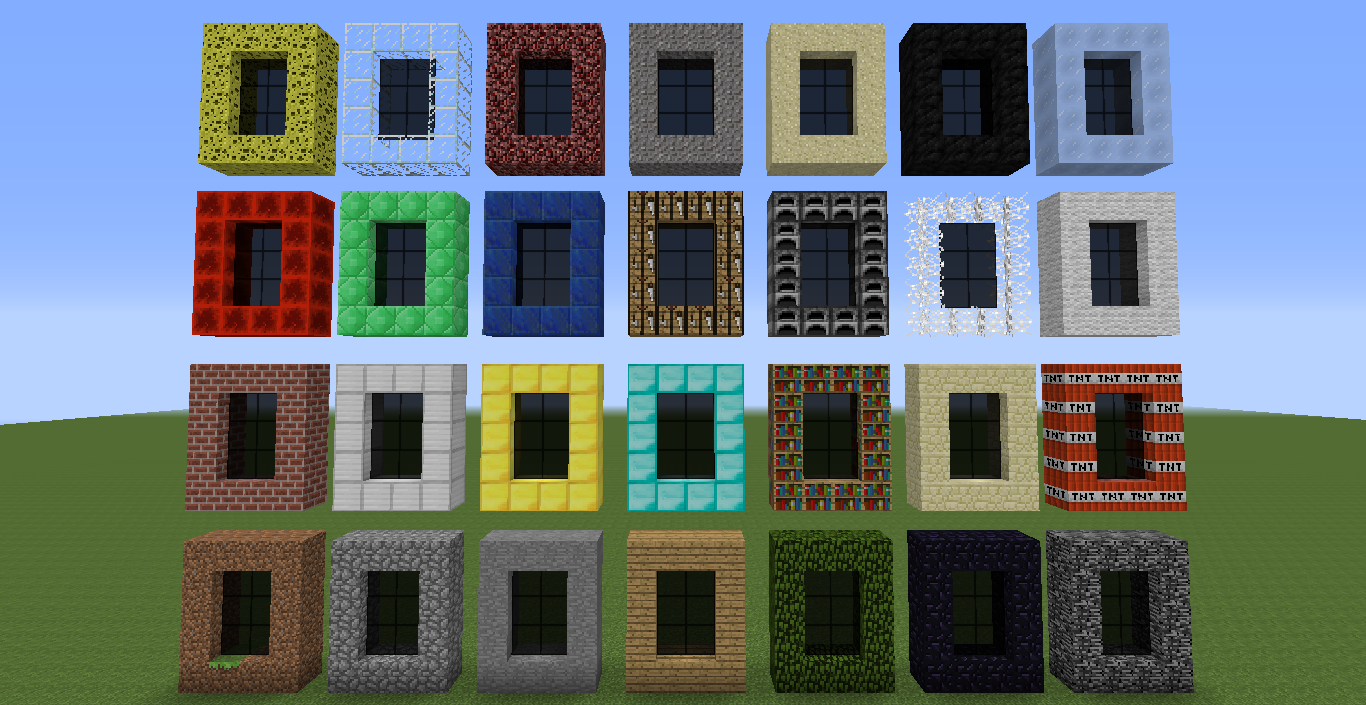
CurseForge · Minecraft mod
Any Dimension Mod!
Make a Dimension of ANY block you want!
Choose a version Pick your version below, then grab the matching file.
Quick answer
Which Any Dimension Mod! release should I use?
beta file Any Dimension Mod beta 3.1
Game version 1.7.10
Loader Not required
Any Dimension Mod! Any Dimension Mod beta 3.1 targets 1.7.10. The project page does not say whether this file belongs on the client, dedicated server, or both. No extra mods listed for this file.
Where it goes
Is Any Dimension Mod! required on the client, server, or both?
The project page does not say whether this file belongs on the client, dedicated server, or both.
Client Source doesn’t say
Dedicated server Source doesn’t say
Loader for this release No loader listed
Required install it here Optional supported, not mandatory Not supported do not install here Source doesn’t say do not assume
The source does not explicitly classify this release as client-only or server-only.
What else does Any Dimension Mod! Any Dimension Mod beta 3.1 need?
Any Dimension Mod beta 3.1. Change the file and its required mods may change too.
This file does not list any required mods. Do not add a library just because a different file uses it.
This file does not list any required or optional mods.
Before you install it
Add Any Dimension Mod! without breaking your instance.
Built for Any Dimension Mod! Any Dimension Mod beta 3.1. Pick another file and the loader, install side or required mods may change.
- 01
Stick to this file
Use Any Dimension Mod beta 3.1. It targets 1.7.10; another release may have different loader, side or dependency requirements.
- 02
Bring the mods it needs
This file does not list any required mods. Do not add a library just because a different file uses it.
- 03
Put it on the correct side
The project page does not say whether this file belongs on the client, dedicated server, or both.
- 04
Pick the file you checked
Use the “Get this file” button beside Any Dimension Mod beta 3.1. It opens that exact file at the source.
About this project
What does Any Dimension Mod! add?
Any Dimension Mod for 1.12.2 is now here! CLICK ME :3
Have you ever wanted to see an entire dimension made of gold? Or TNT? Maybe diamond? Or just curious to be in a nether-like dirt dimension? Then this mod may be just for you! Check out the screenshots below!
{width=316 height=60}
Current Version: beta 3.1
Thanks for 30000+ downloads! Hope you all are enjoying this mod! :)
Brief Description
This mod adds MANY dimensions! This mod adds dimensions made out of any material you want - stone, cobblestone, wood, obsidian, diamonds, bookshelves or even TNT!!!
How to
It's VERY simple. To create the portal, just make a portal frame just as a nether portal would be, with the material you want the dimension to be made of. Next, you need to craft the Igniter, which activates the portal. In the crafting table, put two sticks like you would do to craft a pickaxe, on top of the two sticks put an Ender Pearl, and on the sides put a block of the dimension and a flint and steel. Done!
Igniter Box (or Portable Igniter Box)
It's a block only obtainable from Creative. After being placed, when right-clicked, will open a Menu. From that menu you can get the Igniters without having to look for it in the Creative "Tools" Tab. There is also a Portable version - just right-click while having it in your hand to use it!
KNOWN BUG: When you get an Igniter from the Igniter Box or the Portable Igniter Box, make sure to OPEN YOUR INVENTORY before using it!!! If you right-click before opening your inventory, the game will crash (or at least that's what happens to me!)
Current Dimensions:
Here are ALL of the current included Dimensions (More to come!):
Added in version AnyDimensionModbeta1:
- Dirt Dimension
- Cobblestone Dimension
- Stone Dimension
- Wooden Dimension
- Leaves Dimension
- Obsidian Dimension
- Bedrock Dimension
- Bricks Dimension
- Iron Dimension
- Gold Dimension
- Diamond Dimension
- Bookshelf Dimension
- Sandstone Dimension
- TNT Dimension
Added in version AnyDimensionModbeta2:
- Redstone Dimension
- Emerald Dimension
- Lapis Lazuli Dimension
- Crafting Table Dimension
- Furnace Dimension
- Cobweb Dimension
- Wool Dimension
- Sponge Dimension
- Glass Dimension
- Netherrack Dimension
- Gravel Dimension
- Sand Dimension
- Coal Block Dimension
- Packed Ice Dimension
Added in version AnyDimensionModbeta3:
- Glowstone Dimension
- Quartz Block Dimension
- End Stone Dimension
- Coal Ore Dimension
- Iron Ore Dimension
- Gold Ore Dimension
- Diamond Ore Dimension
- Emerald Ore Dimension
- Redstone Ore Dimension
Mod Review
Check out this cool mod review by Ninjabee Redtricity (make sure to hit the like button if this helped you!).
How to build Sand/Gravel Portal?
This is a video I about a trick to make sand or gravel float, so you can build the gravel and/or sand portal.
Screenshots
Here are ALL of the current Dimensions (as of AnyDimensionMod beta2, there are more in the beta3 version):
{width=800 height=412}
{width=800 height=412}
And some dimensions:
DIAMOND Dimension:
{width=800 height=412}
Leaves Dimension:
{width=800 height=412}
TNT Dimension:
{width=800 height=412}
Redstone Portal and Redstone Igniter (texture of the Igniter made by ninjabee):
{width=800 height=449}
The GUI for the Igniter Box or Portable Igniter Box:
{width=800 height=412}
Crafting for an Igniter (Where the TNT is, put the desired block for the portal):
{width=300 height=141}
Notes:
- Nether Fortresses generate in these dimensions somehow...
- If you have a slow computer, DON'T enter the Leaves Dimension!
- Don't EVER blow up the TNT Dimension!
- Every Dimension has an ore. the Diamond Dimension has TNT, while the Leaves Dimension has Sponges, for example.
- In Creative Mode, the Igniters can be found in the Tools tab.
- Please comment if you want a new dimension! Or if there's a missing one!
You may
- Download this mod.
- Use this mod.
- Show this mod to your friends. :P
- Take screenshots.*
- Make videos. (And publish them to YouTube if you want)*
- Put this mod in modpacks.*
*Only if you credit me and give a link to this page.
You may not
- Modify this mod.
- Use the textures for your own use.
- Duplicate this mod.
- Make this mod yours.
- Give wrong credits or none at all.
Install:
- Search and download the forge installer.
- Execute the installer.
- In the installer, select "Install Client".
- Wait for a popup to say "success!".
- Download this mod.
- Put the downloaded .zip file in minecraft's mods folder (.minecraft\mods). If there is no mods folder, create one. (Don't unzip/extract the .zip file!)
- Open the Minecraft Launcher and select the Forge Profile.
- Click Play.
- Done!
This project was built with Mcreator: https://mcreator.net/
Project description from CurseForge.
Pick your setup
Any Dimension Mod! by Minecraft version and loader
Choose the version and loader you play, then open the matching release.
Minecraft version
1.7.9
1 loader buildCheck the dependencies, then try the file in a copied instance before changing a world you care about.
Recent files
Any Dimension Mod! versions and loaders
Any Dimension Mod beta 3.1
AnyDimensionModbeta3.1.zip
12 May 2015
Client Source doesn’t say Server Source doesn’t say Dependencies No extras listed Listed on Release listing
Check the 1.7.10 setup 1.7.10 beta
AnyDimensionModBeta3
AnyDimensionModbeta3.zip
12 May 2015
Client Source doesn’t say Server Source doesn’t say Dependencies No extras listed Listed on Release listing
Check the 1.7.10 setup 1.7.10 beta
Any Dimension Mod beta2
AnyDimensionModbeta2.zip
10 Apr 2015
Client Source doesn’t say Server Source doesn’t say Dependencies No extras listed Listed on Release listing
Check the 1.7.10 setup 1.7.91.7.10 beta
Any Dimension Mod beta1
AnyDimensionModbeta1.zip
4 Apr 2015
Client Source doesn’t say Server Source doesn’t say Dependencies No extras listed Listed on Release listing
Check the 1.7.10 setup 1.7.91.7.10 beta
Looking for an older file? The official CurseForge project page is in Resources.
 mod
mod CurseForge · Minecraft
TheElementGuy's More Metals and Ores
More ores! More materials! Vanilla-like! Updated for 26.2 (and Fabric)!
 mod
mod CurseForge · Minecraft
Material Lib
A material library making it that much easier to add vanilla-style materials to Minecraft.
 mod
mod CurseForge · Minecraft
Biome Palette!
Paint your world!