Minecraft version
Back to mods 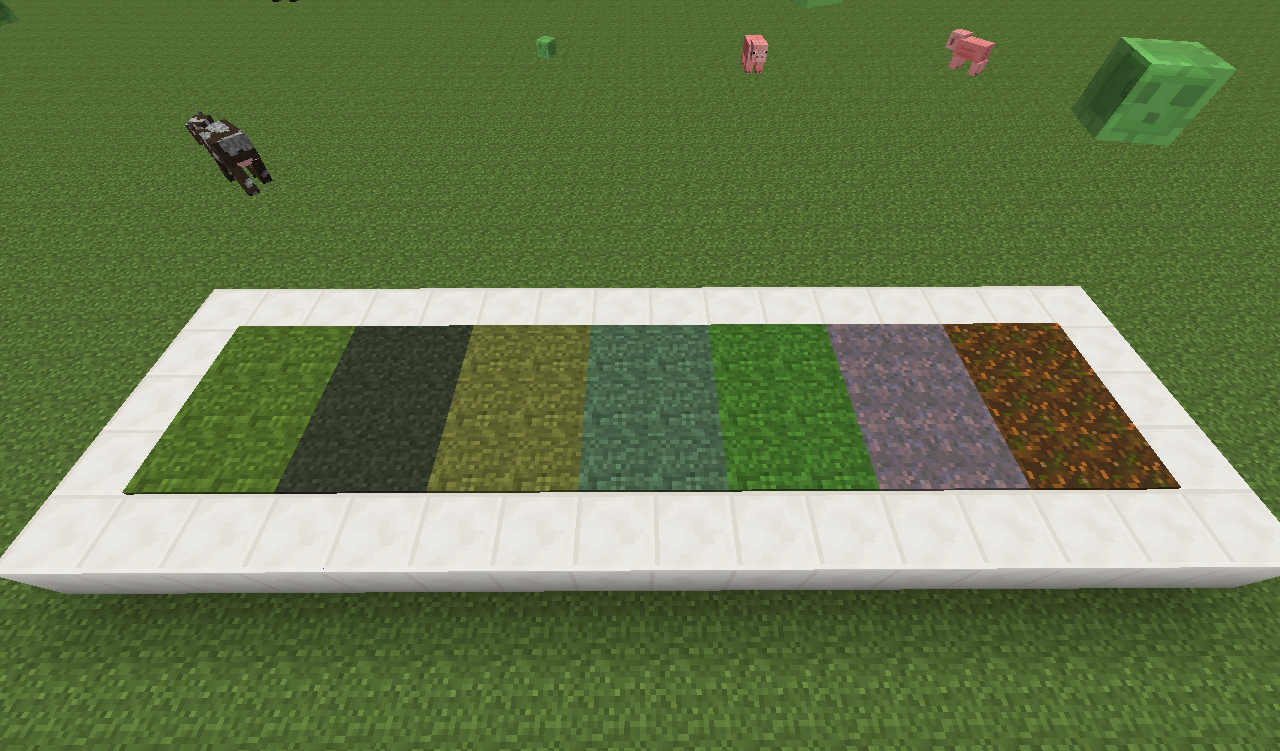
CurseForge · Minecraft mod
TurfMod (Merged with BrassUtils)
Artificial Lawn! Biome independent!
Choose a version Pick your version below, then grab the matching file.
Quick answer
Which TurfMod (Merged with BrassUtils) release should I use?
Latest stable file turfmod-v4.0.jar
Game version 1.7.10
Loader Not required
TurfMod (Merged with BrassUtils) turfmod-v4.0.jar targets 1.7.10. The project page does not say whether this file belongs on the client, dedicated server, or both. No extra mods listed for this file.
Where it goes
Is TurfMod (Merged with BrassUtils) required on the client, server, or both?
The project page does not say whether this file belongs on the client, dedicated server, or both.
Client Source doesn’t say
Dedicated server Source doesn’t say
Loader for this release No loader listed
Required install it here Optional supported, not mandatory Not supported do not install here Source doesn’t say do not assume
The source does not explicitly classify this release as client-only or server-only.
What else does TurfMod (Merged with BrassUtils) turfmod-v4.0.jar need?
turfmod-v4.0.jar. Change the file and its required mods may change too.
This file does not list any required mods. Do not add a library just because a different file uses it.
This file does not list any required or optional mods.
Before you install it
Add TurfMod (Merged with BrassUtils) without breaking your instance.
Built for TurfMod (Merged with BrassUtils) turfmod-v4.0.jar. Pick another file and the loader, install side or required mods may change.
- 01
Stick to this file
Use turfmod-v4.0.jar. It targets 1.7.10; another release may have different loader, side or dependency requirements.
- 02
Bring the mods it needs
This file does not list any required mods. Do not add a library just because a different file uses it.
- 03
Put it on the correct side
The project page does not say whether this file belongs on the client, dedicated server, or both.
- 04
Pick the file you checked
Use the “Get this file” button beside turfmod-v4.0.jar. It opens that exact file at the source.
About this project
What does TurfMod (Merged with BrassUtils) add?
On 1.9 and up? Check here! First and foremost, I would like to say that this mod is based on a suggestion on MCF by Regular hexahedron. The post is here: http://www.minecraftforum.net/forums/minecraft-discussion/suggestions/84569-turf-blocks-flat-grass-carpet-blocks All credit goes to him for the idea for the mod, and without him the mod would not exist.
Basic Info
This mod adds grass 'carpets' that are coloured independent of the biome they are placed in. Turf is available in a variety of flavours, from swampy to mushroom. Additionally, it includes leaf covers, with the same concept, only for leaves. These come in both opaque and transparent versions.
Recipes/Obtaining Turf
Turf is obtained by breaking a grass block with a turf knife. The type of turf you receive is biome dependent. A turf knife is crafted by putting a sword in a crafting table. Additionally, you can craft turf with a dirt block to get a grass block back.
Leaf covers are crafted with two leaves next to each other. Naturally, the type of leaf input determines the type of leaf cover output. Crafting the transparent version with sand will get you the opaque cover.
Project description from CurseForge.
Pick your setup
TurfMod (Merged with BrassUtils) by Minecraft version and loader
Choose the version and loader you play, then open the matching release.
Check the dependencies, then try the file in a copied instance before changing a world you care about.
Recent files
TurfMod (Merged with BrassUtils) versions and loaders
turfmod-v4.0.jar
5 Apr 2015
Client Source doesn’t say Server Source doesn’t say Dependencies No extras listed Listed on Release listing
Check the 1.7.10 setup 1.7.10 release
Looking for an older file? The official CurseForge project page is in Resources.
 mod
mod CurseForge · Minecraft
Not a Bug
Your game isn't broken. At random moments something goes wrong on purpose: inverted controls, a tilting camera, lightning next to you, a mob behind your back. 48 pranks, client-side, works on any server. Panic key: DEL.
 mod
mod CurseForge · Minecraft
Advanced Armor
Advanced armor. This mod provides better armor blocks to cope with the damage from mechanical kinetic artillery, featuring a unique toughness mechanism and optimized explosion resistance
 mod
mod CurseForge · Minecraft
JunjieTraffic
Chinese-style road sign traffic module