Minecraft version
Back to mods 
CurseForge · Minecraft mod
Progression
Tech Trees, Class Systems, Gameplay Choices, Craft Locking, in any combo desired.
Choose a version Pick your version below, then grab the matching file.
Quick answer
Which Progression release should I use?
Latest stable file Progression-1.10.2-0.6.9.jar
Game version 1.10.2
Loader Not required
Progression-1.10.2-0.6.9.jar targets 1.10.2. The project page does not say whether this file belongs on the client, dedicated server, or both. No extra mods listed for this file.
Where it goes
Is Progression required on the client, server, or both?
The project page does not say whether this file belongs on the client, dedicated server, or both.
Client Source doesn’t say
Dedicated server Source doesn’t say
Loader for this release No loader listed
Required install it here Optional supported, not mandatory Not supported do not install here Source doesn’t say do not assume
The source does not explicitly classify this release as client-only or server-only.
What else does Progression-1.10.2-0.6.9.jar need?
Progression-1.10.2-0.6.9.jar. Change the file and its required mods may change too.
This file does not list any required mods. Do not add a library just because a different file uses it.
This file does not list any required or optional mods.
Before you install it
Add Progression without breaking your instance.
Built for Progression-1.10.2-0.6.9.jar. Pick another file and the loader, install side or required mods may change.
- 01
Stick to this file
Use Progression-1.10.2-0.6.9.jar. It targets 1.10.2; another release may have different loader, side or dependency requirements.
- 02
Bring the mods it needs
This file does not list any required mods. Do not add a library just because a different file uses it.
- 03
Put it on the correct side
The project page does not say whether this file belongs on the client, dedicated server, or both.
- 04
Pick the file you checked
Use the “Get this file” button beside Progression-1.10.2-0.6.9.jar. It opens that exact file at the source.
About this project
What does Progression add?
What is progression?
Progression is a mod that allows you to control how a player can interact with the world, or the things they can craft, at the basic level. At the more involved level, it allows you to build and design tech trees, where a player cannot complete something until, something else is done. Be this action crafting an item, or collecting drops or more. You can also reward them for completing specific tasks, instead of restricting what they can do, if you so desire. Progression would also allow you to build class systems, restricting what certain groups of players can do, or give them abilities based upon their class. You could for example, forbid a group of people from ever being able to craft a furnace. While another group can build furnaces, but they walk much slower. You could also make custom shops, or a quest line. This is just a basic overview of the things you can do with progression. With it's requirements, conditions and results, you can create many more different systems than I have listed here, making it a very powerful tool for modpack makers.
How to get Started editing
To get started editing you will need to grab yourself the Progression Editor book, this book is where all the editing is done. For the most part it should be fairly obvious what you need to do, but there are a lot of tooltips that can help you out. If you have any issues feel free to ask. You can also take a look at the Progression section on curseforge, for some examples.
Edit Mode
Display Mode
Enchiridion Support (Requires 3.1.0+)
Progression also comes with some built in support for Enchiridion adding special features and actions, so that you can make better looking editors. As well as being able to place features individually it also comes with a template for a simple book mode, more for quests, where you can write out images and text to display if you wish to have more of a story to go along with your progression. Simply while in edit mode insert the HQM Clone template. While in edit mode you can then right click the open button, which will automatically generate the list of tabs, and opening them will automatically generate criteria, and opening them will generate the information pages. You can add and remove these elements, this is just the autogeneration to make things easier.
Templates
I'd strongly encourage to share and create your own templates, this is very simple, just for sharing tab templates press s while clicking the tab and for criteria you can find the save button in the criteria itself at the top. I'd recommend uploading your templates to the Progression section of curseforge which can be found here. I've created a few examples to get started.
Progression 1.7.10
**What is progression?**
Progression is a mod that allows you to control how a player can interact with the world, or the things they can craft, at the basic level. At the more involved level, it allows you to build and design tech trees, where a player cannot complete something until, something else is done. Be this action crafting an item, or collecting drops or more. You can also reward them for completing specific tasks, instead of restricting what they can do, if you so desire. Progression would also allow you to build class systems, restricting what certain groups of players can do, or give them abilities based upon their class. You could for example, forbid a group of people from ever being able to craft a furnace. While another group can build furnaces, but they walk much slower. This is just a basic overview of the things you can do with progression. With it's requirements, conditions and results, you can create many more different systems than I have listed here, making it a very powerful tool for modpack makers. How to get Started editing
There are two ways to access the editor. You must be in creative to edit. You can either right click a vanilla book, or type the command /progression edit. Please keep in mind when editing, that in order to test properly you are going to want to switch back to survival. You can always craft items, when you are in creative, which is why you should test in survival. To reset player data just use the command /progression reset.
Tree Editor View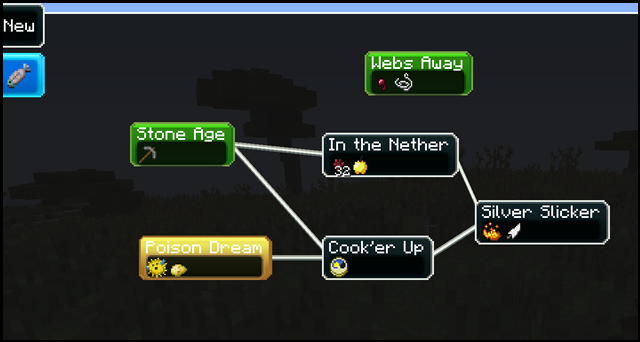
Criteria Editor View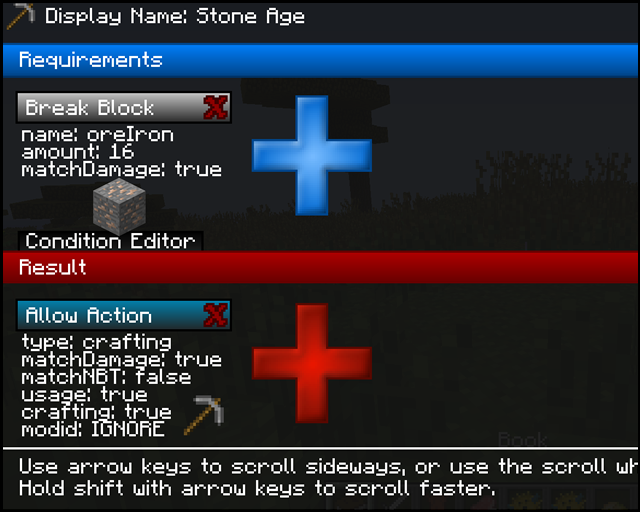
Project description from CurseForge.
Pick your setup
Progression by Minecraft version and loader
Choose the version and loader you play, then open the matching release.
Minecraft version
1.9.4
1 loader buildMinecraft version
1.9
1 loader buildMinecraft version
1.8.9
1 loader buildMinecraft version
1.7.10
1 loader buildCheck the dependencies, then try the file in a copied instance before changing a world you care about.
Recent files
Progression versions and loaders
Progression-1.10.2-0.6.9.jar
22 Aug 2016
Client Source doesn’t say Server Source doesn’t say Dependencies No extras listed Listed on Release listing
Check the 1.10.2 setup 1.10.2 release
Progression-1.9.4-0.6.9.jar
22 Aug 2016
Client Source doesn’t say Server Source doesn’t say Dependencies No extras listed Listed on Release listing
Check the 1.9.4 setup 1.9.4 release
Progression-1.8.9-0.6.9.jar
22 Aug 2016
Client Source doesn’t say Server Source doesn’t say Dependencies No extras listed Listed on Release listing
Check the 1.8.9 setup 1.8.9 release
Progression-1.10.2-0.6.8.jar
14 Aug 2016
Client Source doesn’t say Server Source doesn’t say Dependencies No extras listed Listed on Release listing
Check the 1.10.2 setup 1.10.2 release
Progression-1.9.4-0.6.8.jar
14 Aug 2016
Client Source doesn’t say Server Source doesn’t say Dependencies No extras listed Listed on Release listing
Check the 1.9.4 setup 1.9.4 release
Progression-1.8.9-0.6.8.jar
14 Aug 2016
Client Source doesn’t say Server Source doesn’t say Dependencies No extras listed Listed on Release listing
Check the 1.8.9 setup 1.8.9 release
Progression-1.10.2-0.6.7.jar
8 Jul 2016
Client Source doesn’t say Server Source doesn’t say Dependencies No extras listed Listed on Release listing
Check the 1.10.2 setup 1.10.2 release
Progression-1.9.4-0.6.7.jar
8 Jul 2016
Client Source doesn’t say Server Source doesn’t say Dependencies No extras listed Listed on Release listing
Check the 1.9.4 setup 1.9.4 release
Progression-1.8.9-0.6.7.jar
8 Jul 2016
Client Source doesn’t say Server Source doesn’t say Dependencies No extras listed Listed on Release listing
Check the 1.8.9 setup 1.8.9 release
Progression-1.8.9-0.6.5a.jar
6 Jul 2016
Client Source doesn’t say Server Source doesn’t say Dependencies No extras listed Listed on Release listing
Check the 1.8.9 setup 1.8.9 release
Progression-1.10.2-0.6.6.jar
1 Jul 2016
Client Source doesn’t say Server Source doesn’t say Dependencies No extras listed Listed on Release listing
Check the 1.10.2 setup 1.10.2 beta
Progression-1.9.4-0.6.5.jar
1 Jul 2016
Client Source doesn’t say Server Source doesn’t say Dependencies No extras listed Listed on Release listing
Check the 1.9.4 setup 1.9.4 release
Looking for an older file? The official CurseForge project page is in Resources.
 mod
mod CurseForge · Minecraft
Offline raid protection
This is a command mod that protects bases when the owning team is offline for more then 30 mins (adjustable). Use "/orp help" for options
 mod
mod CurseForge · Minecraft
squadtp-conquest
A Battlefield-style Conquest game mode for squadtp — capture points, ticket bleed, and squad-based teamplay.
 mod
mod CurseForge · Minecraft
TmTmc-ServerBasics
Minecraft server basics for beginners/admins