CD4017BE Library Needed by Automated Redstone AutomatedRedstone-1.12.2-6.1.6.jar
requiredMatching file found Matched file: CD4017BE_lib-1.12.2-6.5.1.jar

CurseForge · Minecraft mod
Advanced Redstone-based measurement and control systems
Quick answer
Automated Redstone AutomatedRedstone-1.12.2-6.1.6.jar targets 1.12.2. The project page does not say whether this file belongs on the client, dedicated server, or both. All 1 required mods have matching files.
Where it goes
The project page does not say whether this file belongs on the client, dedicated server, or both.
The source does not explicitly classify this release as client-only or server-only.
AutomatedRedstone-1.12.2-6.1.6.jar. Change the file and its required mods may change too.
Install CD4017BE Library first. We found matching files for this game-version and loader setup.
We only count dependency files that match this setup. A file for another loader does not fill the gap.
Before you install it
Built for Automated Redstone AutomatedRedstone-1.12.2-6.1.6.jar. Pick another file and the loader, install side or required mods may change.
Use AutomatedRedstone-1.12.2-6.1.6.jar. It targets 1.12.2; another release may have different loader, side or dependency requirements.
Install CD4017BE Library first. We found matching files for this game-version and loader setup.
The project page does not say whether this file belongs on the client, dedicated server, or both.
Use the “Get this file” button beside AutomatedRedstone-1.12.2-6.1.6.jar. It opens that exact file at the source.
About this project
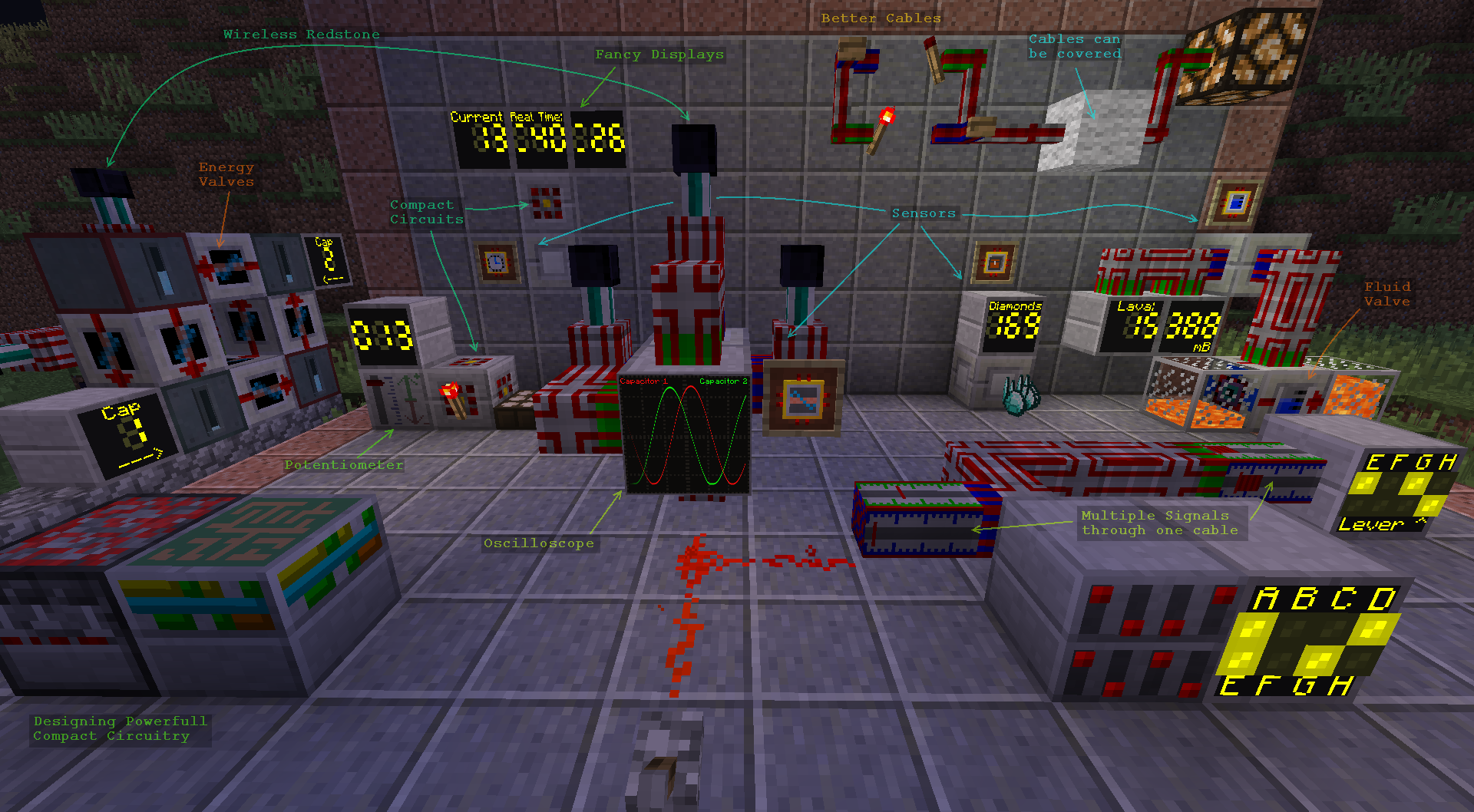
This mod provides:
All signals are transmitted via the vanilla Redstone-System, however this mod breaks the usual strength limit of 0-15 (you can have redstone strength values up in the millions)
Also comes with its own new types of Redstone cables with various special features and that are designed to be very Server and FPS friendly:
No longer do you need massive halls for your circuitry, everything can be build into single blocks using the Circuit Assembler. The Schematic for your circuit is now created with a graphical editor:
Those who already played this mod's older versions probably always dreamed of this ;)
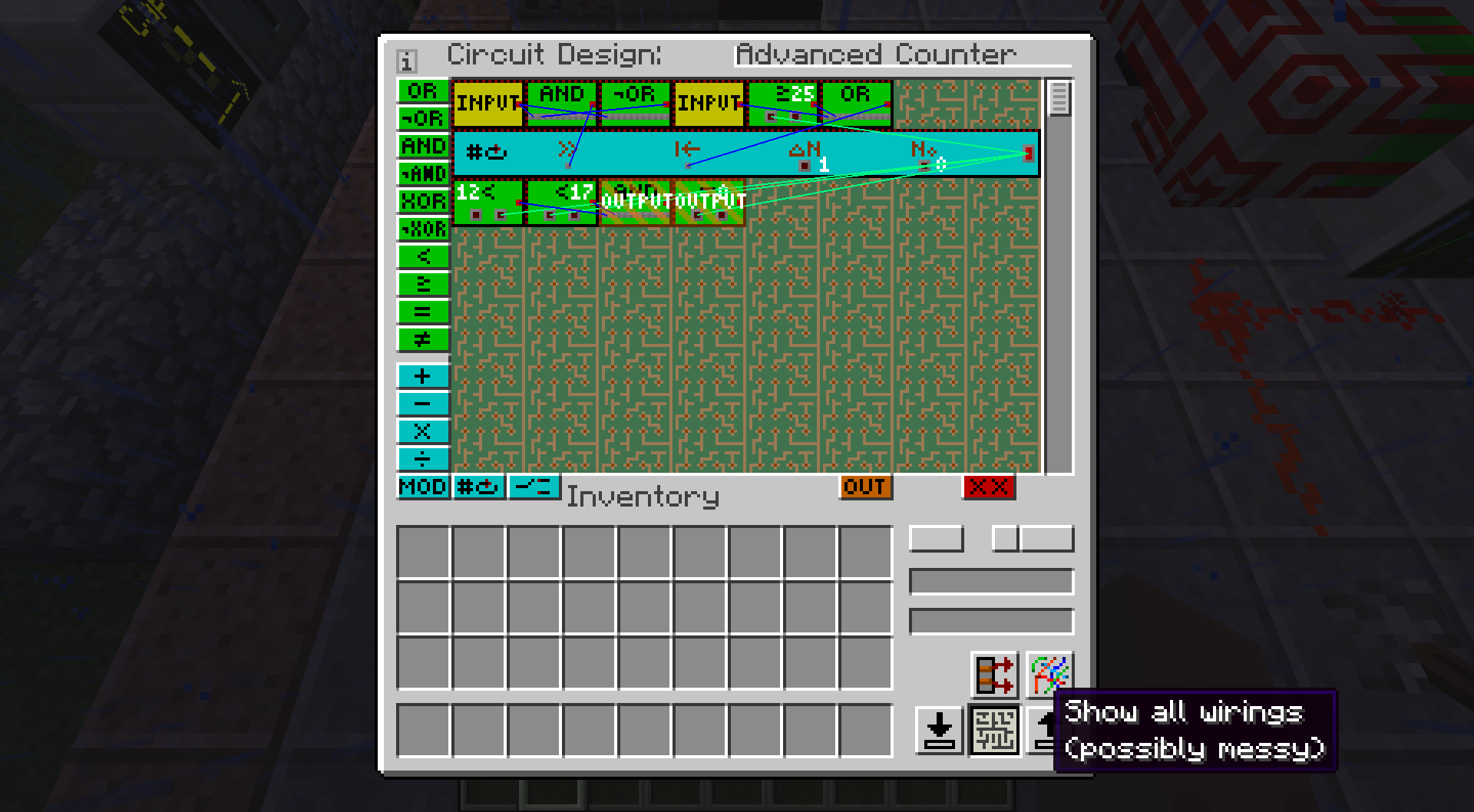
Shows an example setup for a circuit that increments an internal counter each redstone pulse at input 1 and resets it to 0 when input 2 is on or the counter reached 25. It emits at output 1 when counter is at 0 and at output 2 when it is between 12 and 17.
(Most of the mentioned features are new since version 4.4.1)
for MC-1.12.2:
for MC-1.11.2:
for older MC versions:
Download the Mod file for your Minecraft version (see Downloads above)
Download exactly the listed version of CD4017BE_lib
If you haven't already, download and install Forge Modloader for your minecraft version. (http://files.minecraftforge.net)
Validate that your forge installation / Modpack works so far by starting it. (don't continue with next step if the game crashes)
Put both jar-files (mod and lib) into the mods folder of your installation directory.
Start Minecraft again. (In main-menu there is a *Mods-*Button. If this mod is listed there the installation was successfull)
Its strongly recommended to install the NotEnoughItems-Mod, too (Mod Page).
This mod will show the crafting recipes of Items.
Note: NEI has not been updated to 1.8.9 so use JustEnoughItems instead then.
You are allowed to use this mod for any modpack or server you wish.
If you are providing a copy of this mod somewhere else that is public available (public modpacks for ex.), please mention the Author somewhere and provide a link to where you originally got the file(s) from.
This mod is mainly meant as Redstone Control Add-on for larger modpacks, as some features like the Sensors and Valves only make sense if there are mods providing energy and fluid storage/transport systems.
It also works well as add-on mod for InductiveAutomation (MC-1.10 and older) or InductiveLogistics (MC-1.11 and newer)
The extended range for possible redstone strength values should not be a problem with other devices (unless a mod author has the great idea to make something like a power generator that produces energy for free at a rate based on signal strength and forgets to limit it).
In most cases machines will only care whether the signal is on (>0) or off (<= 0) anyway.
You can feel free to manipulate the crafting recipes if you need to, using the config file:
"config/cd4017be/automatedRedstone.rcp"
Note: search the fml-latest-log for the keyword 'ScriptException' afterwards, just in case you did something wrong.
I'm currently working on a complete remake of this mod that you can check out here: Redstone Control
This is also the perfect time to share your opinions about what bothered you in Automated Redstone that should be made different in the new mod, as well as what features you liked the most that must definitely come back in some form.
Project description from CurseForge.
Pick your setup
Choose the version and loader you play, then open the matching release.
Check the dependencies, then try the file in a copied instance before changing a world you care about.
Recent files
4 Feb 2019
24 Jan 2019
9 Oct 2018
28 Apr 2018
28 Apr 2018
24 Feb 2018
24 Feb 2018
14 Jan 2018
14 Jan 2018
21 Dec 2017
21 Dec 2017
20 Nov 2017
Looking for an older file? The official CurseForge project page is in Resources.
 mod
mod69x faster minecarts
 mod
modOver 150 craftable TNTs for Minecraft, from harmless mini TNTs to nukes, meteors, tornadoes, volcanoes, black holes, and the Brutal Cataclysm. Or leave the world with TNT Error 404: say goodbye to your entire world!
 mod
modPut redstone components inside blocks and see them with the Redstone Goggles. Includes retaining and double repeaters, a weather detector, a rotation rod and a lossless wire.