Minecraft version
Back to mods 
CurseForge · Minecraft mod
DangerSense
Adds an item for detecting nearby hostile mobs
Choose a version Pick your version below, then grab the matching file.
Quick answer
Which DangerSense release should I use?
Latest stable file DangerSense-2.0.1+MC1.16.jar
Game version 1.16.5
Loader Forge
DangerSense-2.0.1+MC1.16.jar targets 1.16.5 with Forge. The project page does not say whether this file belongs on the client, dedicated server, or both. No extra mods listed for this file.
Where it goes
Is DangerSense required on the client, server, or both?
The project page does not say whether this file belongs on the client, dedicated server, or both.
Client Source doesn’t say
Dedicated server Source doesn’t say
Loader for this release Forge
Required install it here Optional supported, not mandatory Not supported do not install here Source doesn’t say do not assume
The source does not explicitly classify this release as client-only or server-only.
What else does DangerSense-2.0.1+MC1.16.jar need?
DangerSense-2.0.1+MC1.16.jar. Change the file and its required mods may change too.
This file does not list any required mods. Do not add a library just because a different file uses it.
This file does not list any required or optional mods.
Before you install it
Add DangerSense without breaking your instance.
Built for DangerSense-2.0.1+MC1.16.jar. Pick another file and the loader, install side or required mods may change.
- 01
Stick to this file
Use DangerSense-2.0.1+MC1.16.jar. It targets 1.16.5 with Forge; another release may have different loader, side or dependency requirements.
- 02
Bring the mods it needs
This file does not list any required mods. Do not add a library just because a different file uses it.
- 03
Put it on the correct side
The project page does not say whether this file belongs on the client, dedicated server, or both.
- 04
Pick the file you checked
Use the “Get this file” button beside DangerSense-2.0.1+MC1.16.jar. It opens that exact file at the source.
About this project
What does DangerSense add?
DangerSense adds a single item, the Eye of Hostility. In its default mode it will warn of nearby hostile mobs by visually opening and colouring the edges of the screen. By holding the use key while looking at a mob, the Eye can be focused on that type of mob, only responding to it. To reset to Hostiles mode, hold the use key while not looking at a mob.
The range and definition of hostile can be configured via the configuration file & configuration tags.
Crafting
The Eye of Hostility is crafted shapelessly from 2 Redstone Dust, 2 of certain mob drops, and 1 Spider Eye.
By default the following mob drops can be used: Bones, Bone Meal, Gunpowder, Rotten Flesh, Spider Eyes.
The usable mob drops are configurable via tags.
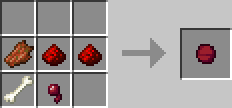
Decay
The organic components of the Eye decay over time, it will turn into a Degraded Eye of Hostility after a default period of 4 days. The decay period is configurable, with a maximum of 2147483647 ticks (~3.5 realtime years).
Degraded Eyes do not function, but remember their focus. Crafting a Degraded Eye with a Spider Eye and 2 valid mob drops will repair it, keeping the focus. Alternatively it can be placed alone in a crafting grid to recover 2 Redstone Dust.
Ingame Screenshot **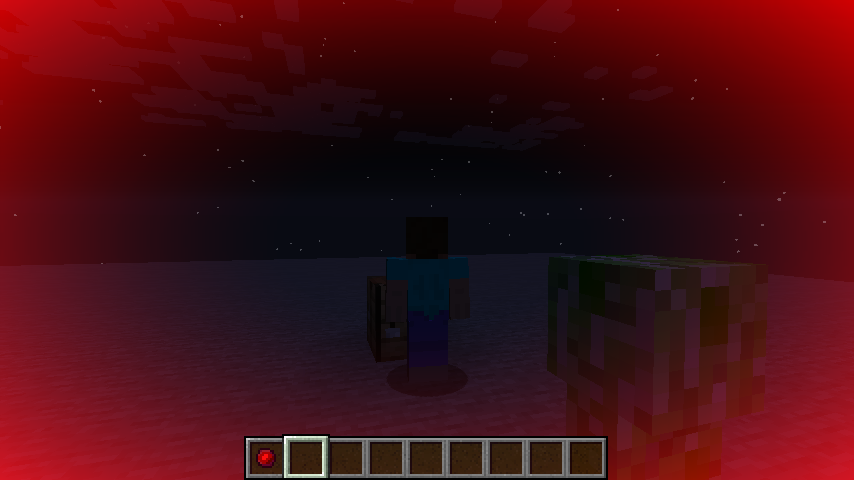 **The overlay colour can be configured via the configuration file
Project description from CurseForge.
Pick your setup
DangerSense by Minecraft version and loader
Choose the version and loader you play, then open the matching release.
Minecraft version
1.10.2
1 loader buildMinecraft version
1.8
1 loader buildMinecraft version
1.7.10
1 loader buildCheck the dependencies, then try the file in a copied instance before changing a world you care about.
Recent files
DangerSense versions and loaders
DangerSense-2.0.1+MC1.16.jar
6 Jul 2021
Client Source doesn’t say Server Source doesn’t say Dependencies No extras listed Listed on Release listing
Check the 1.16.5 · Forge setup 1.16.5Forge release
DangerSense-2.0.0+MC1.16.jar
5 Jun 2021
Client Source doesn’t say Server Source doesn’t say Dependencies No extras listed Listed on Release listing
Check the 1.16.5 · Forge setup 1.16.5Forge release
DangerSense-1.10.2-1.0.1.jar
10 Nov 2016
Client Source doesn’t say Server Source doesn’t say Dependencies No extras listed Listed on Release listing
Check the 1.10.2 setup 1.10.2 release
DangerSense-1.10.2-1.0.0.jar
21 Oct 2016
Client Source doesn’t say Server Source doesn’t say Dependencies No extras listed Listed on Release listing
Check the 1.10.2 setup 1.10.2 release
DangerSense-1.8-0.2.3.0.jar
5 Aug 2015
Client Source doesn’t say Server Source doesn’t say Dependencies No extras listed Listed on Release listing
Check the 1.8 setup DangerSense 1.7.10-0.2.3.0
DangerSense-1.7.10-0.2.3.0.jar
22 Jul 2015
Client Source doesn’t say Server Source doesn’t say Dependencies No extras listed Listed on Release listing
Check the 1.7.10 setup 1.7.10 beta
Looking for an older file? The official CurseForge project page is in Resources.
 mod
CurseForge · Minecraft
abilitysgorw
Abilities Grow Mod adds 50+ unique abilities to Minecraft. Collect powers ranging from simple survival perks to legendary skills like flight, dimension travel, lifesteal, and unlimited storage. Create your own playstyle through random ability progression.
 mod
CurseForge · Minecraft
Dawn Star: Battle Mount
Transform vanilla mounts into fully customized combat companions with alloy armor, modular plugins, and unique skills.
 mod
CurseForge · Minecraft
Snotty's Mod
Adds new block sets and items themed around snot. Press P to pick your nose and get started.