Minecraft version
Back to mods 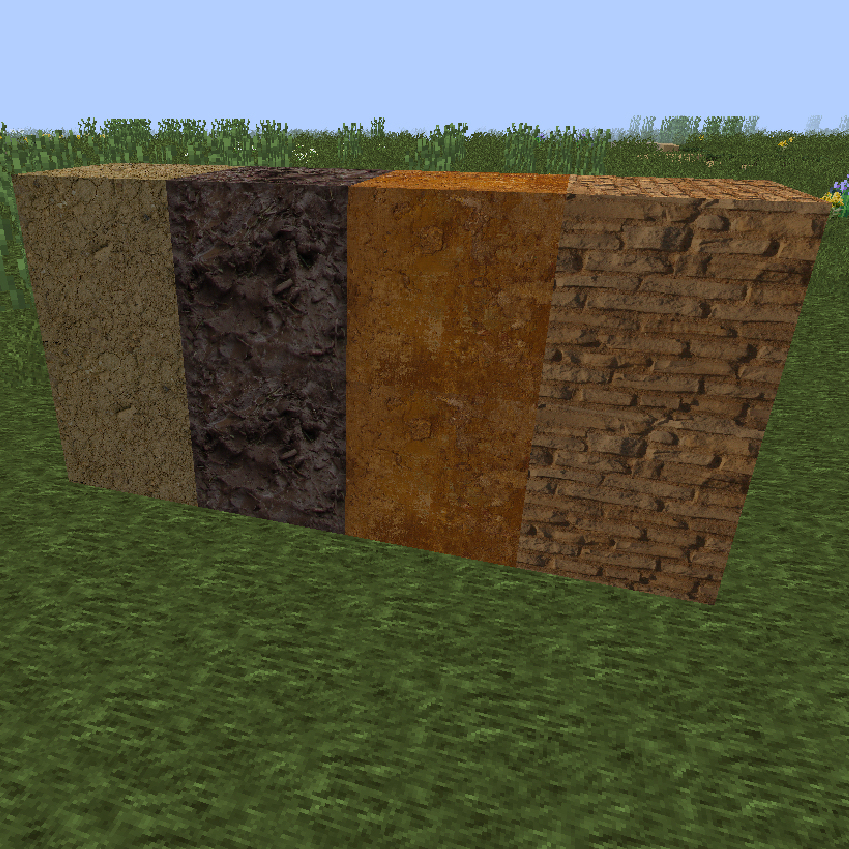
CurseForge · Minecraft mod
The Adobe Mod
Build with adobe and adobe bricks
Choose a version Pick your version below, then grab the matching file.
Quick answer
Which The Adobe Mod release should I use?
Latest stable file The Adobe Mod
Game version 1.7.10
Loader Not required
The Adobe Mod targets 1.7.10. The project page does not say whether this file belongs on the client, dedicated server, or both. No extra mods listed for this file.
Where it goes
Is The Adobe Mod required on the client, server, or both?
The project page does not say whether this file belongs on the client, dedicated server, or both.
Client Source doesn’t say
Dedicated server Source doesn’t say
Loader for this release No loader listed
Required install it here Optional supported, not mandatory Not supported do not install here Source doesn’t say do not assume
The source does not explicitly classify this release as client-only or server-only.
What else does The Adobe Mod need?
The Adobe Mod. Change the file and its required mods may change too.
This file does not list any required mods. Do not add a library just because a different file uses it.
This file does not list any required or optional mods.
Before you install it
Add The Adobe Mod without breaking your instance.
Built for The Adobe Mod. Pick another file and the loader, install side or required mods may change.
- 01
Stick to this file
Use The Adobe Mod. It targets 1.7.10; another release may have different loader, side or dependency requirements.
- 02
Bring the mods it needs
This file does not list any required mods. Do not add a library just because a different file uses it.
- 03
Put it on the correct side
The project page does not say whether this file belongs on the client, dedicated server, or both.
- 04
Pick the file you checked
Use the “Get this file” button beside The Adobe Mod. It opens that exact file at the source.
About this project
What does The Adobe Mod add?
This mod adds four(4) new blocks that enable the use of adobe for building...The first block, Mud...The mud block can be crafted by placing a water bucket in the upper center slot and a block of dirt in the middle slot of the crafting table...Leaving mud in the sun will cause it to dry out and become the second block, the dried mud block...dried mud can be farmed using a stone hoe...Placing mud in the furnace will bake the mud into the the third block, the adobe block...the adobe block can be use to build or can be placed in the upper four, left hand slot of the crafting table to create the fourth block...the adobe brick block...Placing a mud block in the upper center slot of the crafting table, directly above a bucket of water will create muddy water...a bucket of muddy water can be used as fuel in the furnace...
Project description from CurseForge.
Pick your setup
The Adobe Mod by Minecraft version and loader
Choose the version and loader you play, then open the matching release.
Check the dependencies, then try the file in a copied instance before changing a world you care about.
Recent files
The Adobe Mod versions and loaders
The Adobe Mod
wizardmods.zip
16 Apr 2015
Client Source doesn’t say Server Source doesn’t say Dependencies No extras listed Listed on Release listing
Check the 1.7.10 setup 1.7.10 release
Looking for an older file? The official CurseForge project page is in Resources.
 mod
mod CurseForge · Minecraft
[: Forged : metal-working :]
Progress through the game with (more) realistic metal-working!
 mod
mod CurseForge · Minecraft
Cozy Core
A slow, peaceful, cute home to come back to: candles light at dusk, your pets come home, the garden grows and visitors drop by, while creepers and fire break nothing. Plus wood in the stonecutter and re-dyeing.
 mod
mod CurseForge + Modrinth · Minecraft
Quick Skin
Sick of wasting time with Minecraft’s slow launcher just to change your skin? Quick Skin lets you swap skins instantly even on “offline” servers and gives you access to every official Minecraft cape.