Minecraft version
Back to mods 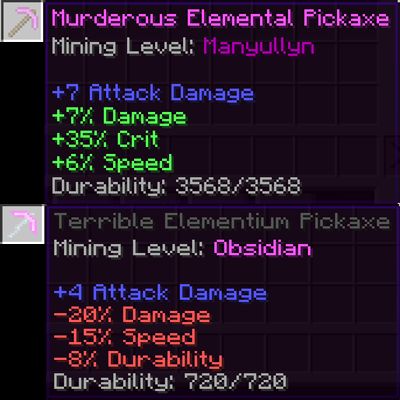
CurseForge · Minecraft mod
Buffed Tools
Buffed tools is a small mod that adds the tool buff system from Terraria into Minecraft
Choose a version Pick your version below, then grab the matching file.
Quick answer
Which Buffed Tools release should I use?
Latest stable file BuffedTools-1.1.1710.7.jar
Game version 1.7.10
Loader Not required
Buffed Tools BuffedTools-1.1.1710.7.jar targets 1.7.10. The project page does not say whether this file belongs on the client, dedicated server, or both. No extra mods listed for this file.
Where it goes
Is Buffed Tools required on the client, server, or both?
The project page does not say whether this file belongs on the client, dedicated server, or both.
Client Source doesn’t say
Dedicated server Source doesn’t say
Loader for this release No loader listed
Required install it here Optional supported, not mandatory Not supported do not install here Source doesn’t say do not assume
The source does not explicitly classify this release as client-only or server-only.
What else does Buffed Tools BuffedTools-1.1.1710.7.jar need?
BuffedTools-1.1.1710.7.jar. Change the file and its required mods may change too.
This file does not list any required mods. Do not add a library just because a different file uses it.
This file does not list any required or optional mods.
Before you install it
Add Buffed Tools without breaking your instance.
Built for Buffed Tools BuffedTools-1.1.1710.7.jar. Pick another file and the loader, install side or required mods may change.
- 01
Stick to this file
Use BuffedTools-1.1.1710.7.jar. It targets 1.7.10; another release may have different loader, side or dependency requirements.
- 02
Bring the mods it needs
This file does not list any required mods. Do not add a library just because a different file uses it.
- 03
Put it on the correct side
The project page does not say whether this file belongs on the client, dedicated server, or both.
- 04
Pick the file you checked
Use the “Get this file” button beside BuffedTools-1.1.1710.7.jar. It opens that exact file at the source.
About this project
What does Buffed Tools add?
Mod reviews:
WanderingSoulOfTime made an awesome review!:
Another review by HelldogMadness(Spanish)!:
A review made by BioMasterZap
Buffed Tools is a small mod, created more for a tutorial, then to be an actual mod. But it makes the game a little bit different, so you may want to include it into your modpack. Buffed tools adds the "buff" system from Terraria into minecraft. For those, who are unaware - the system makes it so when you craft any tool, it will get a random set of buffs - or debuffs to it - making it stronger or weaker.
The mod adds the random buffs feature, that you could see in Terraria. While using this mod the tools you craft will have a random prefix, meaning, that they have sertain features to them.
Currently, there are 43 buffs, and 4 main effects they add. These are:
Durability - make your tools more or less durable. Basically, whenever you break a block (or hit a mob) there is a chance of either not loosing the durability of the tool(if this buff is positive) or to loose more(if the buff is negative)
Speed - increases(or decreases) the mining speed of the tool.
Damage - increases(or decreases) the damage your tool does to mobs. Remember, that the additional damage will be dealt after the main damage, and the blue number in the description of an item will always stay the same.
Crit - gives you a chance to triple the damage you deal to the enemy.
If you want - there is an option to add buffs using the config file.
You can take tool out while holding shift to do not apply any buff to your tool(if you feel unlucky).
To apply a random modifier to an existing tool, or to change the existing you can craft the Reforging Anvil:
{width=241 height=119}
If you have any steel adding mods the Anvil in the recipe will be replaced by a Steel Block. After that you can open the GUI by right-clicking the block. It will have 2 slots - 1 is for your items, and in the second one the reforged item will appear. It costs experience to reforge any tool! And yes, it works with Mod tools!
**Installation:**1. Install MinecraftForge2. Install DummyCore3. Download the mod itself
4. Put the downloaded .zip in mods.
Project description from CurseForge.
Pick your setup
Buffed Tools by Minecraft version and loader
Choose the version and loader you play, then open the matching release.
Check the dependencies, then try the file in a copied instance before changing a world you care about.
Recent files
Buffed Tools versions and loaders
BuffedTools-1.1.1710.7.jar
6 May 2015
Client Source doesn’t say Server Source doesn’t say Dependencies No extras listed Listed on Release listing
Check the 1.7.10 setup 1.7.10 release
Looking for an older file? The official CurseForge project page is in Resources.
 mod
CurseForge · Minecraft
[YM!] Veil Iris Lights Compat (VILC)
Veil light rendering for Iris shaderpacks
 mod
CurseForge · Minecraft
Life-saving experience
A challenge mod where you have to beat the game without hunger or health, using only experience. Experience now controls your health and hunger: running or taking damage consumes your experience. The main thing is to make sure it doesn't reach 0.