Minecraft version
Back to mods 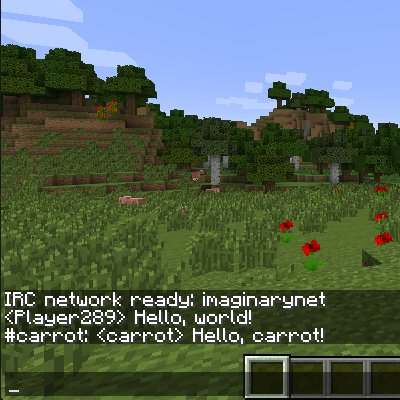
CurseForge · Minecraft mod
Thump
A simple, highly configurable Minecraft chat multiplexer with built in IRC support
Choose a version Pick your version below, then grab the matching file.
Quick answer
Which Thump release should I use?
Latest stable file Thump-1.11.2-4.6.1.5.jar
Game version 1.11.2
Loader Not required
Thump-1.11.2-4.6.1.5.jar targets 1.11.2. The project page does not say whether this file belongs on the client, dedicated server, or both. No extra mods listed for this file.
Where it goes
Is Thump required on the client, server, or both?
The project page does not say whether this file belongs on the client, dedicated server, or both.
Client Source doesn’t say
Dedicated server Source doesn’t say
Loader for this release No loader listed
Required install it here Optional supported, not mandatory Not supported do not install here Source doesn’t say do not assume
The source does not explicitly classify this release as client-only or server-only.
What else does Thump-1.11.2-4.6.1.5.jar need?
Thump-1.11.2-4.6.1.5.jar. Change the file and its required mods may change too.
This file does not list any required mods. Do not add a library just because a different file uses it.
This file does not list any required or optional mods.
Before you install it
Add Thump without breaking your instance.
Built for Thump-1.11.2-4.6.1.5.jar. Pick another file and the loader, install side or required mods may change.
- 01
Stick to this file
Use Thump-1.11.2-4.6.1.5.jar. It targets 1.11.2; another release may have different loader, side or dependency requirements.
- 02
Bring the mods it needs
This file does not list any required mods. Do not add a library just because a different file uses it.
- 03
Put it on the correct side
The project page does not say whether this file belongs on the client, dedicated server, or both.
- 04
Pick the file you checked
Use the “Get this file” button beside Thump-1.11.2-4.6.1.5.jar. It opens that exact file at the source.
About this project
What does Thump add?
Thump is a simple, highly configurable Minecraft chat multiplexer with built in IRC support. It's part of the Willow Chat organisation.
The built-in IRC service uses the Warren IRC framework to send in-game messages and events (like players joining and leaving) to a configured IRC channel, and vice versa.
It's made for use on servers (originally to share ForgeCraft chat to IRC), but it's tested and works on clients too. Most aspects of the mod can be configured, but the defaults are good enough for easy setup and use.
A guide for getting started is available on the wiki: https://github.com/WillowChat/Thump/wiki/Getting-Started
If someone is abusing Thump in your IRC channel, you can choose to ban the bridge completely: https://github.com/WillowChat/Thump/wiki/Abuse
If you use this software and you'd like to support my open-source work, please consider tipping through Patreon.
Current features:
- Minecraft -> IRC integration
- Chat, server chat, /me, join, leave, death 👻, achievement 🌟
- Multiple rooms, multiple networks
- Basic IRC -> Minecraft integration
- Chat, /me
- !players command (with configurable prefix)
- Automatic link support (using Forge's link detection)
- Works with Twitch
- Connection management
- Connect, disconnect, status, reload
- Tab completion support for all sections of all commands, including networks
- Channel statuses (red for not joined, green for joined)
- Configuration
- Commands, Minecraft events, IRC events, message formatting, console logging, multiple networks and channels
- SASL and Nickserv integration
- TLS support, enabled by default, with secure defaults (optionally add forcibly accepted certificates, or accept all certificates)
- Automatic reconnect policy
- Log raw IRC lines to the console for debugging
- Edit config options in-game using Forge
Project description from CurseForge.
Pick your setup
Thump by Minecraft version and loader
Choose the version and loader you play, then open the matching release.
Minecraft version
1.11.2
1 loader buildMinecraft version
1.10.2
1 loader buildMinecraft version
1.10.1
1 loader buildMinecraft version
1.10
1 loader buildMinecraft version
1.9.4
1 loader buildMinecraft version
1.9
1 loader buildMinecraft version
1.8.9
1 loader buildMinecraft version
1.8.8
1 loader buildMinecraft version
1.7.10
1 loader buildCheck the dependencies, then try the file in a copied instance before changing a world you care about.
Recent files
Thump versions and loaders
Thump-1.12-4.7.0.2.jar
15 Jun 2017
Client Source doesn’t say Server Source doesn’t say Dependencies No extras listed Listed on Release listing
Check the 1.12 setup Thump-1.11.2-4.6.1.5.jar
10 May 2017
Client Source doesn’t say Server Source doesn’t say Dependencies No extras listed Listed on Release listing
Check the 1.11.2 setup 1.11.2 release
Thump-1.10.2-4.3.0.3.jar
11 Mar 2017
Client Source doesn’t say Server Source doesn’t say Dependencies No extras listed Listed on Release listing
Check the 1.10.2 setup 1.10.2 release
Thump-1.11.2-4.6.0.3.jar
11 Mar 2017
Client Source doesn’t say Server Source doesn’t say Dependencies No extras listed Listed on Release listing
Check the 1.11.2 setup 1.11.2 release
Thump-1.10.2-4.3.0.4.jar
4 Mar 2017
Client Source doesn’t say Server Source doesn’t say Dependencies No extras listed Listed on Release listing
Check the 1.10.2 setup 1.10.2 release
Thump-1.11.2-4.6.0.45.jar
4 Mar 2017
Client Source doesn’t say Server Source doesn’t say Dependencies No extras listed Listed on Release listing
Check the 1.11.2 setup 1.11.2 release
Thump-1.10.2-4.3.0.12.jar
28 Jan 2017
Client Source doesn’t say Server Source doesn’t say Dependencies No extras listed Listed on Release listing
Check the 1.10.2 setup 1.10.2 release
Thump-1.11.2-4.6.0.14.jar
27 Jan 2017
Client Source doesn’t say Server Source doesn’t say Dependencies No extras listed Listed on Release listing
Check the 1.11.2 setup 1.11.2 release
Thump-1.10.2-4.3.0.9.jar
27 Jan 2017
Client Source doesn’t say Server Source doesn’t say Dependencies No extras listed Listed on Release listing
Check the 1.10.2 setup 1.10.2 release
Thump-1.11.2-4.3.0.19.jar
15 Jan 2017
Client Source doesn’t say Server Source doesn’t say Dependencies No extras listed Listed on Release listing
Check the 1.11.2 setup 1.11.2 release
Thump-1.10.2-4.1.0.138.jar
1 Nov 2016
Client Source doesn’t say Server Source doesn’t say Dependencies No extras listed Listed on Release listing
Check the 1.10.2 setup 1.10.2 release
Thump-1.9.4-4.1.0.4.jar
Thump-1.9.4-1.9.4-4.1.0.4.jar
1 Nov 2016
Client Source doesn’t say Server Source doesn’t say Dependencies No extras listed Listed on Release listing
Check the 1.9.4 setup 1.9.4 release
Looking for an older file? The official CurseForge project page is in Resources.