Minecraft version
Back to mods 
CurseForge · Minecraft mod
Magical Stick
Magical Stick
Choose a version Pick your version below, then grab the matching file.
Quick answer
Which Magical Stick release should I use?
Latest stable file [1.10.2]Magical Stick
Game version 1.10.2
Loader Not required
Magical Stick [1.10.2]Magical Stick targets 1.10.2. The project page does not say whether this file belongs on the client, dedicated server, or both. No extra mods listed for this file.
Where it goes
Is Magical Stick required on the client, server, or both?
The project page does not say whether this file belongs on the client, dedicated server, or both.
Client Source doesn’t say
Dedicated server Source doesn’t say
Loader for this release No loader listed
Required install it here Optional supported, not mandatory Not supported do not install here Source doesn’t say do not assume
The source does not explicitly classify this release as client-only or server-only.
What else does Magical Stick [1.10.2]Magical Stick need?
[1.10.2]Magical Stick. Change the file and its required mods may change too.
This file does not list any required mods. Do not add a library just because a different file uses it.
This file does not list any required or optional mods.
Before you install it
Add Magical Stick without breaking your instance.
Built for Magical Stick [1.10.2]Magical Stick. Pick another file and the loader, install side or required mods may change.
- 01
Stick to this file
Use [1.10.2]Magical Stick. It targets 1.10.2; another release may have different loader, side or dependency requirements.
- 02
Bring the mods it needs
This file does not list any required mods. Do not add a library just because a different file uses it.
- 03
Put it on the correct side
The project page does not say whether this file belongs on the client, dedicated server, or both.
- 04
Pick the file you checked
Use the “Get this file” button beside [1.10.2]Magical Stick. It opens that exact file at the source.
About this project
What does Magical Stick add?
Our new project: Forge Your World
video by me
MAGICAL STICK 1.3a 1.10.2 UPDATE
MAGICAL STICK 1.3 Tnt STICK UPDATE
tnt=t
stick=s
diamon=d
00t
0d0
s00
MAGICAL STICK 1.2 MOB STICK UPDATE
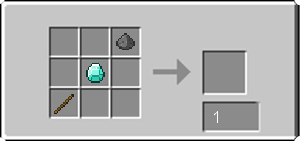
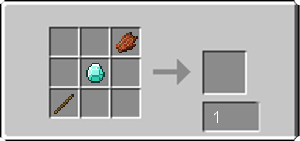
Creeper Stick
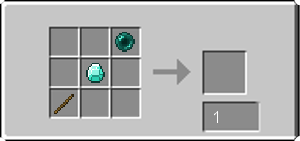
Enderman Stick
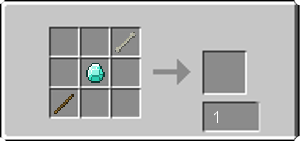
Skeleton Stick
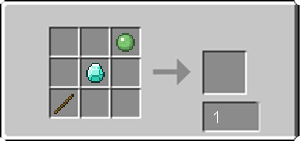
Slime Stick
Spider Stick
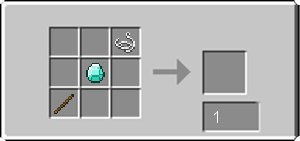
Zombie Stick
français:
Le mod fait spawn et des blocs à l'infini
les présence itmes sont le bâton de lave le bâton d'eau le bâton de flèche et le bâton de Table de craft.
les craft
Rien = 0
Bâton = S
Diamant = D
Seau de lave = W
Seau d'eau = R
flèche = L
arc = G
Table de craft = K
00W
le bâton de lave = 0D0
S00
00R
le bâton d'eau = 0D0
S00
0LG
le bâton de flèche = 0DL
S00
00K
le bâton de Table de craft = 0D0
S00
Petite information pour vous prévenir ce mod ne sera pas mis à jour souvent
English:
The text in English and translated by Google Translate
The mod is spawn and blocks to infinity
the presence itmes are washing the water stick stick the arrow stick and craft table stick.
the craft
None = 0
Stick = S
Diamond = D
Bucket of lava = W
Bucket of water = R
arrow = L
bow = G
Craft table = K
00W
stick lava = 0D0
S00
00R
stick water = 0D0
S00
0LG
stick arrow = 0DL
S00
00K
stick Craft table = 0D0
S00
video :
Project description from CurseForge.
Pick your setup
Magical Stick by Minecraft version and loader
Choose the version and loader you play, then open the matching release.
Minecraft version
1.7.10
1 loader buildCheck the dependencies, then try the file in a copied instance before changing a world you care about.
Recent files
Magical Stick versions and loaders
[1.10.2]Magical Stick
[1.10.2]Magical-Stick-1.3a.jar
26 Nov 2016
Client Source doesn’t say Server Source doesn’t say Dependencies No extras listed Listed on Release listing
Check the 1.10.2 setup 1.10.2 release
Magical Stick 1.3 TNT Stick !!!!!!!!!!!!!!!
Magical Stick 1.3.zip
28 Jul 2015
Client Source doesn’t say Server Source doesn’t say Dependencies No extras listed Listed on Release listing
Check the 1.7.10 setup 1.7.10 release
Magical Stick 1.2 Mob Stick UPDATE
Magical Stick 1.2.zip
11 Jul 2015
Client Source doesn’t say Server Source doesn’t say Dependencies No extras listed Listed on Release listing
Check the 1.7.10 setup 1.7.10 release
Magical Stick 1.1 Bug Fix Update of minecraft 1.7.10
Magical Stick 1.1.zip
8 Jul 2015
Client Source doesn’t say Server Source doesn’t say Dependencies No extras listed Listed on Release listing
Check the 1.7.10 setup 1.7.10 release
Magical Stick 1.0 of minecraft 1.7.10
Magical Stick 1.0.zip
7 Jul 2015
Client Source doesn’t say Server Source doesn’t say Dependencies No extras listed Listed on Release listing
Check the 1.7.10 setup 1.7.10 release
Looking for an older file? The official CurseForge project page is in Resources.
 mod
CurseForge · Minecraft
Myriad Legends (formerly FantasyWeapons)
Discover rare legendary items with custom design and gameplay. Available in Chinese and English.
 mod
CurseForge · Minecraft
Dragonworks: Create x Ice and Fire
Ties Ice and Fire dragons into Create: dragon blood and Dragonsteel by mixer, dragon jet fuels, Dragonfang cannon shells and dragon gun rounds.
 mod
CurseForge · Minecraft
MineLeague
A MOBA-style 5v5 lane battle: 51 champions, towers, minions, jungle, shop, dragons, bots and fog of war.