Minecraft version
Back to mods 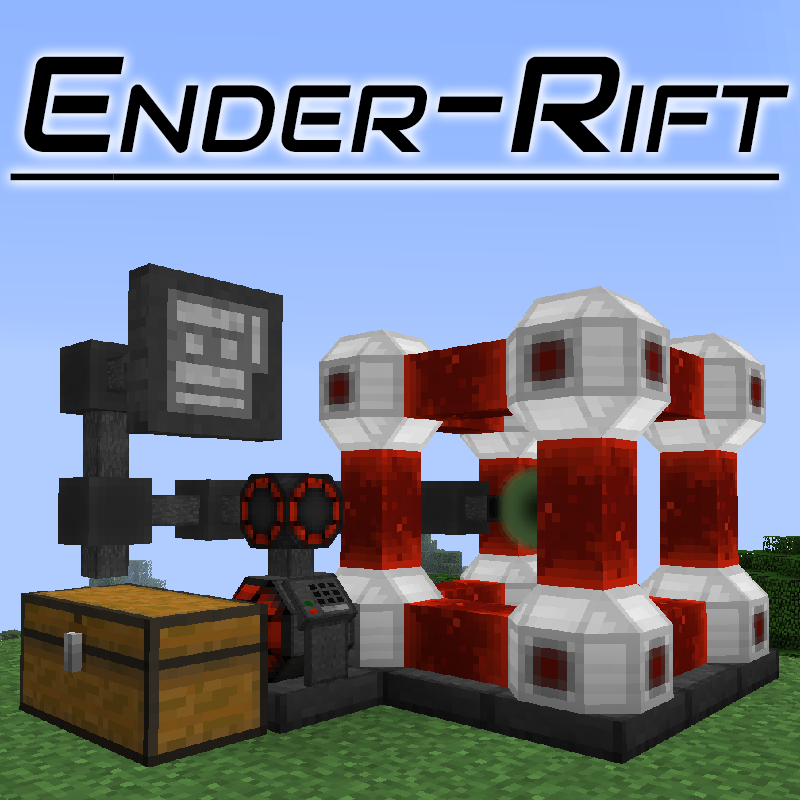
CurseForge · Minecraft mod
Ender-Rift
The Powered Bottomless Storage System
Choose a version Pick your version below, then grab the matching file.
Quick answer
Which Ender-Rift release should I use?
Latest stable file EnderRift-1.21.4-2.10.0.jar
Game version 1.21.4
Loader NeoForge
Ender-Rift EnderRift-1.21.4-2.10.0.jar targets 1.21.4 with NeoForge. The project page does not say whether this file belongs on the client, dedicated server, or both. No extra mods listed for this file.
Where it goes
Is Ender-Rift required on the client, server, or both?
The project page does not say whether this file belongs on the client, dedicated server, or both.
Client Source doesn’t say
Dedicated server Source doesn’t say
Loader for this release NeoForge
Required install it here Optional supported, not mandatory Not supported do not install here Source doesn’t say do not assume
The source does not explicitly classify this release as client-only or server-only.
What else does Ender-Rift EnderRift-1.21.4-2.10.0.jar need?
EnderRift-1.21.4-2.10.0.jar. Change the file and its required mods may change too.
This file does not list any required mods. Do not add a library just because a different file uses it.
This file does not list any required or optional mods.
Before you install it
Add Ender-Rift without breaking your instance.
Built for Ender-Rift EnderRift-1.21.4-2.10.0.jar. Pick another file and the loader, install side or required mods may change.
- 01
Stick to this file
Use EnderRift-1.21.4-2.10.0.jar. It targets 1.21.4 with NeoForge; another release may have different loader, side or dependency requirements.
- 02
Bring the mods it needs
This file does not list any required mods. Do not add a library just because a different file uses it.
- 03
Put it on the correct side
The project page does not say whether this file belongs on the client, dedicated server, or both.
- 04
Pick the file you checked
Use the “Get this file” button beside EnderRift-1.21.4-2.10.0.jar. It opens that exact file at the source.
About this project
What does Ender-Rift add?
ATTENTION (NEW!): Data loss issue in v2.6.4 (neoforge 1.20.4)
There was a data loss bug in 2.6.4 that caused stacks to be overwritten with air when loading saved data generated by v2.6.4. I have identified the reason and fixed it, meaning the issue should no longer be present in v2.6.5.
Manual
Starting with v2.0, Ender-Rift supports an ingame manual, through the use of the Guidebook mod. If this mod is installed, the recipe for the book will be available.
Backstory
What happens when you trap an in-flight ender pearl in a redstone field, and then send a redstone flux to it? Someone found the answer during what seemed like a catastrophic failure of an experiment.
The ender pearl shatters and in its place a rift is opened into the between-space used by the endermen to teleport. Harnessing this rift, you are able to keep an unlimited amount of items in a seemingly tiny space.
WARNING: Although the ender field is self-sustaining, if the ender field is destroyed, the rift closes, and if all the shared rifts close, it has been proven impossible to reach the same between-space ever again!*
* Except by the all-powerful gods of that universe.
Description
Ender-Rift provides a virtually unlimited storage solution. This storage has no default way of accessing it (no GUI), and instead relies on external blocks providing inventory access. For this purpose, the mod provides an inventory network system, with a limited but automatable interface, and a searchable browser block that can't be automated. This network requires its own power separate from the energy needed to maintain the rift.
Feature List
The Ender-Rift: A bottomless storage system that uses energy to maintain a pocket of storage space in the between-space created by an ender pearl's teleport effect.
- Assemble the multiblock structure as explained in the Wiki pages, and then rightclick the rift core block with a rift orb. If the orb was bound to an existing rift, it will give access to that rift, otherwise, a new rift will be created.
- Right-click an existing assembled rift with an unbound rift orb to bind the orb to the existing rift. This allows ender-chest-like access to the same items from multiple locations.
- Note that each rift needs to be powered independently in order to allow access from that structure.
The Rudimentary Generator: Takes a while to heat up to maximum efficiency, and it has no control circuit, so it will keep generating energy even if the storage buffer fills up. A temporary solution for when no other power sources are available.
The Rift Browser: allows accessing the inventory of a Rift, and also other inventories such as chests.
- With searchbox: You can now filter the items by any information shown in the tooltip.
Rift Crafting Browser: an upgraded browser with integrated crafting table. Note however: it does not auto-refill itself from the inventories, it's just a plain old crafting grid.
The Rift Interface: allows accessing the rift's contents in an automated way, either by exporting a predefined kind of item, or by inserting items into it.
Rift Proxies: extend the range of Rift Browsers and Interfaces, allowing connections with more than one target, and to targets that are further away. Note however that the scanning range is limited to 32 blocks.
Rift Driver: provides power to the inventory networks, allowing one or more interfaces to access the contents of the attached inventories.
Powered by the Forge Energy capability (READ ME).
The TeslaAPI is also optionally supported.
The old RF API however, is not, and will never be.
Future Plans
- Fluid rifts. No idea how those would work.
- Maybe each independent rift could act as a tank with a single fluid?
- Crazy idea: Configurable contents?
- An items module would add storage for N item stacks, and have a passive cost.
- A fluid module would add storage for N buckets of one fluid, and have a passive cost.
- Other modules?
- Alternative idea: store fluids as non-stackable "items", with up to 1B capacity, alongside the normal items?
- Downside: requires a special "fluid item", and it would be awkward to manage the inventory.
If you need to recover a rift
It is possible to lose the rift by destroying the orb item by mistake. If that happened to you, it is still possible to recover the rift by using cheat/op commands to spawn a rift item with the right ID, like so:
/give <playername> enderrift:itemEnderRift 1 0 {RiftId:<number>}
Or in 1.13+
/give @p enderrift:rift_orb{RiftId:<number>}
The rifts are numbered starting at 0, and always growing, so if a new rift would have id 5, that means the previous one was id 4, and so on.
Note that although it is possible to spawn rifts with numbers larger than the last created, it is strongly recommended against, because those numbers will eventually be repeated during normal rift generation.
Can I use this in <X>?
Yes. Unless <X>'s license is incompatible with this mod's, which is unlikely.
Help and Support
For bug reports and feature requests, visit the issue tracker (link above)
You can also find me on discord, in my little discord server (please use the support forum channels! DO NOT DM me unless strictly necessary).
I've got a Patreon!
Help me continue making games and mods! Click here
Project description from CurseForge.
Pick your setup
Ender-Rift by Minecraft version and loader
Choose the version and loader you play, then open the matching release.
Minecraft version
1.21.1
1 loader buildMinecraft version
1.21
1 loader buildMinecraft version
1.20.6
1 loader buildMinecraft version
1.20.4
1 loader buildMinecraft version
1.20.1
1 loader buildMinecraft version
1.20
1 loader buildMinecraft version
1.19.2
1 loader buildMinecraft version
1.19.1
1 loader buildMinecraft version
1.19
1 loader buildMinecraft version
1.18.2
1 loader buildMinecraft version
1.18.1
1 loader buildShowing the newest 12 of 27 game versions. Older files are in the list below.
Check the dependencies, then try the file in a copied instance before changing a world you care about.
Recent files
Ender-Rift versions and loaders
EnderRift-1.21.4-2.10.0.jar
19 Feb 2025
Client Source doesn’t say Server Source doesn’t say Dependencies No extras listed Listed on Release listing
Check the 1.21.4 · NeoForge setup 1.21.4NeoForge release
EnderRift-1.21-2.9.2.jar
12 Jul 2024
Client Source doesn’t say Server Source doesn’t say Dependencies No extras listed Listed on Release listing
Check the 1.21.1 · NeoForge setup 1.21NeoForge1.21.1 release
EnderRift-1.20.6-2.9.1.jar
27 May 2024
Client Source doesn’t say Server Source doesn’t say Dependencies No extras listed Listed on Release listing
Check the 1.20.6 · NeoForge setup NeoForge1.20.6 release
EnderRift-1.20.6-2.9.0.jar
25 May 2024
Client Source doesn’t say Server Source doesn’t say Dependencies No extras listed Listed on Release listing
Check the 1.20.6 · NeoForge setup NeoForge1.20.6 release
EnderRift-1.20.4-2.8.1.jar
24 May 2024
Client Source doesn’t say Server Source doesn’t say Dependencies No extras listed Listed on Release listing
Check the 1.20.4 · NeoForge setup NeoForge1.20.4 release
EnderRift-1.20.4-2.6.5.jar
14 Mar 2024
Client Source doesn’t say Server Source doesn’t say Dependencies No extras listed Listed on Release listing
Check the 1.20.4 · NeoForge setup NeoForge1.20.4 release
EnderRift-1.20.4-2.6.3.jar
1 Jan 2024
Client Source doesn’t say Server Source doesn’t say Dependencies No extras listed Listed on Release listing
Check the 1.20.4 · NeoForge setup NeoForge1.20.4 release
EnderRift-1.20.4-2.6.2.jar
29 Dec 2023
Client Source doesn’t say Server Source doesn’t say Dependencies No extras listed Listed on Release listing
Check the 1.20.4 · NeoForge setup NeoForge1.20.4 release
EnderRift-1.20-2.6.1.jar
12 Jun 2023
Client Source doesn’t say Server Source doesn’t say Dependencies No extras listed Listed on Release listing
Check the 1.20.1 · Forge setup 1.20.1Forge1.20 release
EnderRift-1.19-2.6.0.jar
24 Jul 2022
Client Source doesn’t say Server Source doesn’t say Dependencies No extras listed Listed on Release listing
Check the 1.19.2 · Forge setup 1.19.2Forge1.19.11.19 release
EnderRift-1.19-2.5.1.jar
11 Jun 2022
Client Source doesn’t say Server Source doesn’t say Dependencies No extras listed Listed on Release listing
Check the 1.19 · Forge setup Forge1.19 release
EnderRift-1.19-2.5.0.jar
11 Jun 2022
Client Source doesn’t say Server Source doesn’t say Dependencies No extras listed Listed on Release listing
Check the 1.19 · Forge setup Forge1.19 release
Looking for an older file? The official CurseForge project page is in Resources.
 mod
mod CurseForge · Minecraft
TechVari
A multifunctional technology block with storage, crafting, fast smelting, item organization, trash disposal, and x4 duplication.
 mod
mod Modrinth · Minecraft
Logic Gate
All-in-one, toggleable logic gate as a redstone component.
 mod
mod Modrinth · Minecraft
Better Skyblock Profile Viewer
A skyblock profile viewer, but better!