Minecraft version
Back to mods 
CurseForge · Minecraft mod
Capsule
Bring your base! Capsules can capture a region containing any blocks or machines, then deploy and undeploy at will. Inspired by Dragon Ball capsules.
Choose a version Pick your version below, then grab the matching file.
Quick answer
Which Capsule release matches 1.16.5 Forge?
Best match for your filters Capsule mod v5.0.94 - for mc 1.16.5
Game version 1.16.5
Loader Forge
Capsule mod v5.0.94 - for mc 1.16.5 targets 1.16.5 with Forge. The project page does not say whether it belongs on the client. The project page does not say whether it belongs on the dedicated server. No extra mods listed for this file.
Where it goes
Is Capsule required on the client, server, or both?
The project page does not say whether it belongs on the client. The project page does not say whether it belongs on the dedicated server.
Client Source doesn’t say
Dedicated server Source doesn’t say
Loader for this release Forge
Required install it here Optional supported, not mandatory Not supported do not install here Source doesn’t say do not assume
The source does not explicitly classify this release as client-only or server-only.
What else does Capsule mod v5.0.94 - for mc 1.16.5 need?
Capsule mod v5.0.94 - for mc 1.16.5 on 1.16.5 Forge. Every mod below is checked against that same setup.
This file does not list any required mods. Do not add a library just because a different file uses it.
This file does not list any required or optional mods.
Before you install it
Add Capsule without breaking your instance.
Built for Capsule mod v5.0.94 - for mc 1.16.5 on 1.16.5 Forge. Pick another file and the loader, install side or required mods may change.
- 01
Stick to this file
Use Capsule mod v5.0.94 - for mc 1.16.5. It targets 1.16.5 with Forge; another release may have different loader, side or dependency requirements.
- 02
Bring the mods it needs
This file does not list any required mods. Do not add a library just because a different file uses it.
- 03
Put it on the correct side
The project page does not say whether it belongs on the client. The project page does not say whether it belongs on the dedicated server.
- 04
Pick the file you checked
Use the “Get this file” button beside Capsule mod v5.0.94 - for mc 1.16.5. It opens that exact file at the source.
About this project
What does Capsule add?
Capsule mod

Bring your base! Capsules can capture a region containing any blocks or machines, then deploy and undeploy at will. Inspired by Dragon Ball capsules.
Join us on Discord ! https://discord.gg/wZpBVdr
Detailed documentation on the wiki : https://github.com/Lythom/capsule/wiki
Biggest Features
- Move you base! An entire base packed in a 31x31x31 can be moved entirely including machines. You can be a real traveler now.
- Build faster with blueprints! Blueprint capsules can take materials from chests or other inventories to duplicate a structure. It supports rotation and mirror.
- Modpack making options, so that player can be rewarded with ready to deploy structures or loot them in chests.
- A ton of possibilities ! Capsules can be used as early backpack moving a chest, as portable ladder, to deploy protecting walls to recover during a fight, to move machines or multiblocks, and more… unleash your creativity !
Getting started
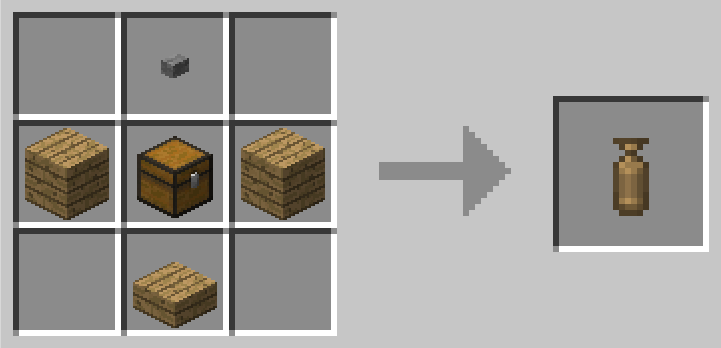
The first capsule you will have access to is made of wood. It's size is 1x1x1 which enables the "instant mode".
"Wooden capsule" recipe
It means you can capture any block (ie. a chest or a crafting table) by right clicking it, then deploy and undeploy it instantly by right clicking again with the capsule in hand.
If right click open a GUI, try to capture from a distance or while sneaking.
Getting bigger
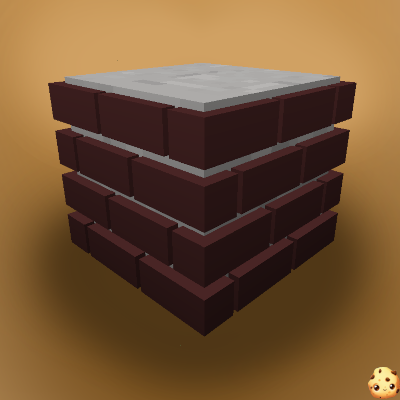
To get to the big things, you first need a capture base. This is where you can initialize a capsule with it's first content. You'll be able to capture the region on top of it.
"Capture Base" recipe
Then you need an empty capsule (the top item is a stone button) :
"Iron Empty Capsule" recipe, default capture size : 3x3x3
"Gold Empty Capsule" recipe, default capture size : 5x5x5
"Diamond Empty Capsule" recipe, default capture size : 7x7x7
Obsidian (9x9x9) and Emerald (11x11x11) capsules also exists, check JEI !
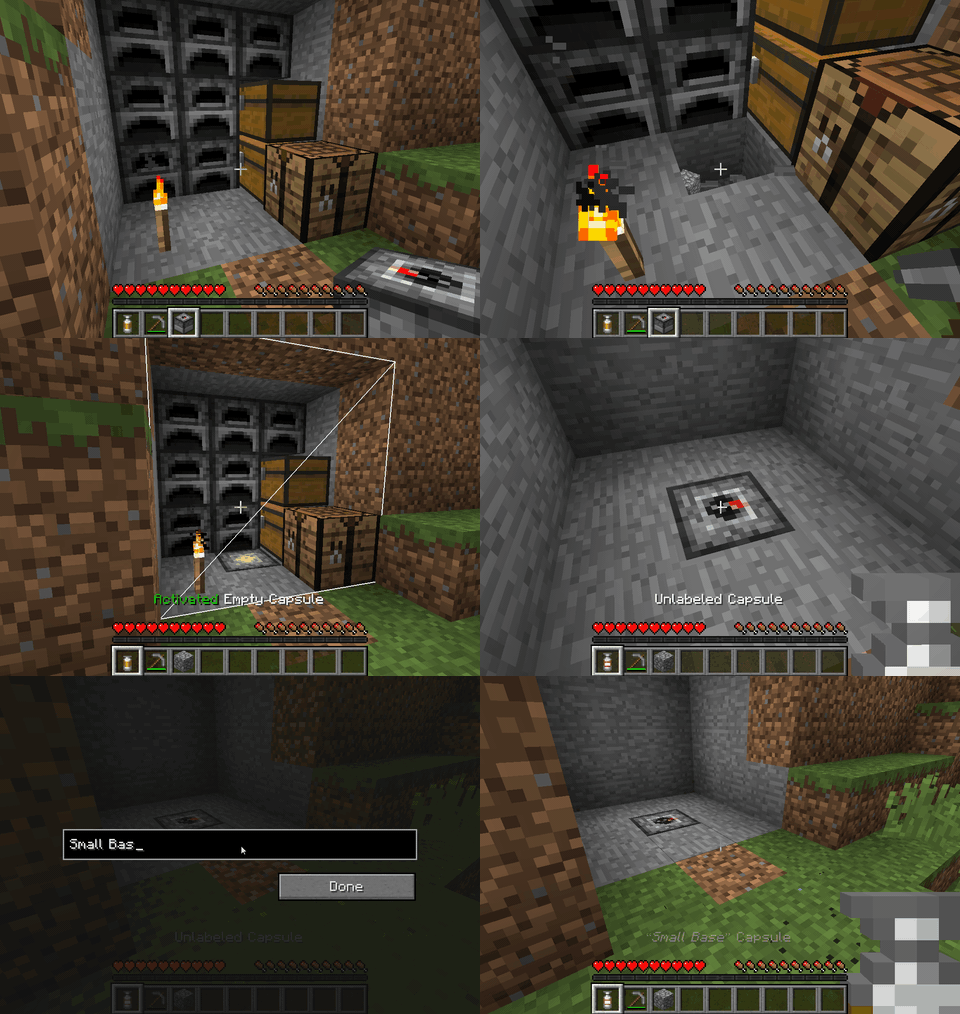
Empty Capsule
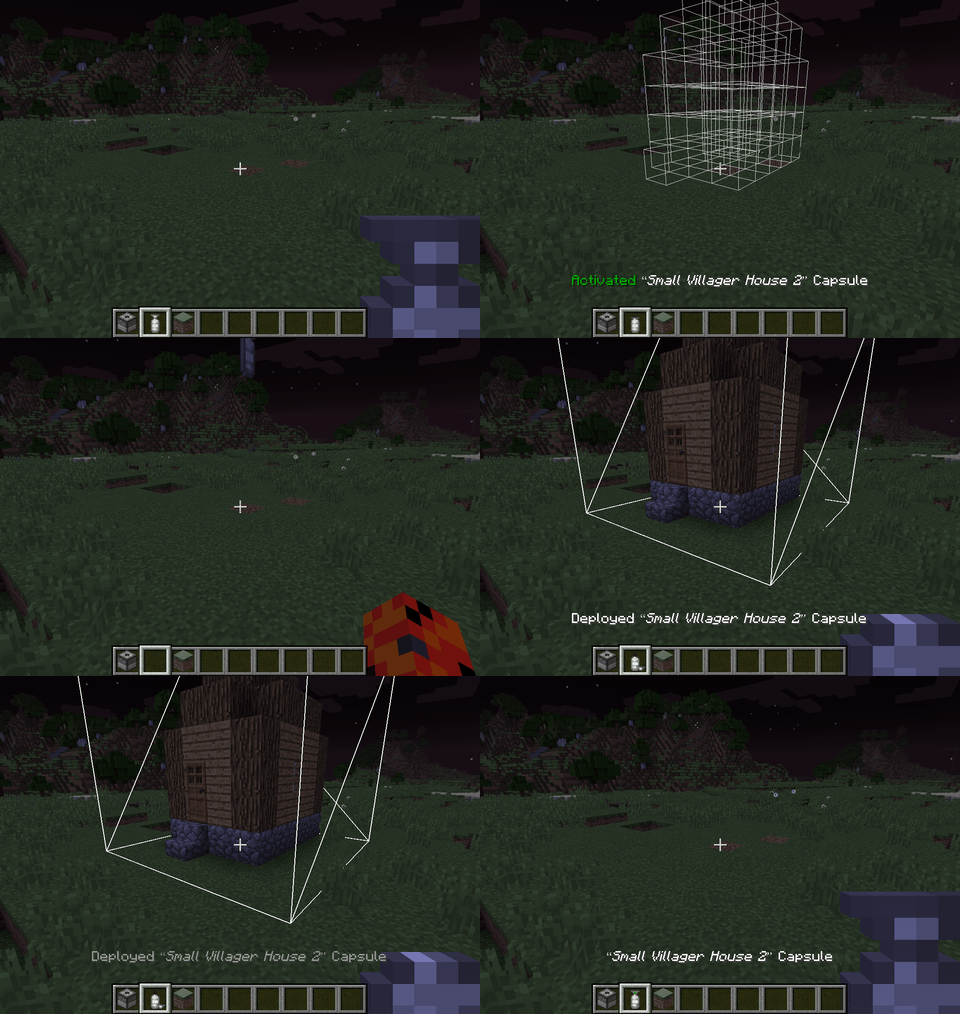
Throw it near the capture base !
- Right click : activate
- Right click while activated : throw the capsule.
- Once the content is captured, the capsule can be deployed or undeployed at will.
Initial capture
Note that all the capsule can be dyed (affect the base color) and labeled (sneak + right click).
Linked capsule
- Deploy : Right click once to activate, right click again to throw at the preview positions (are ahead not aiming a block).
- Undeploy : Right click the "Deployed" capsule and the content will be stored again into the capsule, whereever it currently is.
- Label : Sneak + Right click to open the label editing screen.
Deploy / undeploy
Rotations
Linked capsules can be rotated and mirrored by players using left click / shift+left click while previewing deloyment. All vanilla blocks and non-living entities (minecarts,etc) are supported but modded blocks with specific behaviours (machines, etc.) will prevent a rotation by default to prevent messing with specific considerations with their orientation that capsule cannot know.
The "canRotate" state might need to be updated when you first acquire a standard capsule (blueprints will always rotate), if rotation is locked and you think it should work, deploy and undeploy the capsule to update it and be able to rotate. If it still can't: there is a special block in the content that does not support rotation.
As a modpack maker, if you want capsule to still try to rotate some specific modded block, you can whitelist them for blueprints and it will allow the block both to rotate in regular capsules and be used in blueprints. Checkout the [Blueprint whitelist section](https://github.com/Lythom/capsule/wiki/Modpack-making#whitelist).
Other features and modpack doc
Wiki
Project description from CurseForge.
Pick your setup
Capsule by Minecraft version and loader
Choose the version and loader you play, then open the matching release.
Minecraft version
1.20.4
1 loader buildMinecraft version
1.20.1
1 loader buildMinecraft version
1.19.2
1 loader buildMinecraft version
1.19
1 loader buildMinecraft version
1.18.2
1 loader buildMinecraft version
1.16.5
1 loader buildMinecraft version
1.15.2
2 loader buildsMinecraft version
1.12.2
2 loader buildsMinecraft version
1.11.2
1 loader buildMinecraft version
1.10.2
1 loader buildMinecraft version
1.9.4
1 loader buildShowing the newest 12 of 15 game versions. Older files are in the list below.
Check the dependencies, then try the file in a copied instance before changing a world you care about.
Recent files
Capsule versions and loaders
Capsule mod v5.0.94 - for mc 1.16.5
Capsule-1.16.5-5.0.94.jar
3 Aug 2022
Client Source doesn’t say Server Source doesn’t say Dependencies No extras listed Listed on Release listing
Check the 1.16.5 · Forge setup 1.16.5Forge release
Capsule mod v5.0.86 - for mc 1.16.5
Capsule-1.16.5-5.0.86.jar
29 May 2022
Client Source doesn’t say Server Source doesn’t say Dependencies No extras listed Listed on Release listing
Check the 1.16.5 · Forge setup 1.16.5Forge release
Capsule mod v5.0.75 - for mc 1.16.5
Capsule-1.16.5-5.0.75.jar
21 Sept 2021
Client Source doesn’t say Server Source doesn’t say Dependencies No extras listed Listed on Release listing
Check the 1.16.5 · Forge setup 1.16.5Forge release
Capsule mod v5.0.73 - for mc 1.16.5
Capsule-1.16.5-5.0.73.jar
4 Sept 2021
Client Source doesn’t say Server Source doesn’t say Dependencies No extras listed Listed on Release listing
Check the 1.16.5 · Forge setup 1.16.5Forge release
Looking for an older file? The official CurseForge project page is in Resources.