Industrial Craft Optional for IC2 Crop-Breeding Plugin IC2 Crop Plugin Version 1.7.10-1.3.1
optionalMatching file found Matched file: industrialcraft-2-2.2.828-experimental.jar

CurseForge · Minecraft mod
Adds a Ingame Breeding Calculator into the Game
Quick answer
IC2 Crop-Breeding Plugin IC2 Crop Plugin Version 1.7.10-1.3.1 targets 1.7.10. The project page does not say whether this file belongs on the client, dedicated server, or both. No extra mods listed for this file.
Where it goes
The project page does not say whether this file belongs on the client, dedicated server, or both.
The source does not explicitly classify this release as client-only or server-only.
IC2 Crop Plugin Version 1.7.10-1.3.1. Change the file and its required mods may change too.
This file does not list any required mods. Do not add a library just because a different file uses it.
14 extra mods were pulled in by other dependencies. Indented rows show who needs each one. We only count dependency files that match this setup. A file for another loader does not fill the gap.
Before you install it
Built for IC2 Crop-Breeding Plugin IC2 Crop Plugin Version 1.7.10-1.3.1. Pick another file and the loader, install side or required mods may change.
Use IC2 Crop Plugin Version 1.7.10-1.3.1. It targets 1.7.10; another release may have different loader, side or dependency requirements.
This file does not list any required mods. Do not add a library just because a different file uses it.
The project page does not say whether this file belongs on the client, dedicated server, or both.
Use the “Get this file” button beside IC2 Crop Plugin Version 1.7.10-1.3.1. It opens that exact file at the source.
About this project
This IC2 Addon allows you to simulate the CropBreeding.
How to access that.
Go get yourself a CropAnalyzer from IC2 and Press the SideInventory key. The Tooltip in them tells you automatically which key it is that you need to press. (Ofcourse you need to hold it in the main or offhand)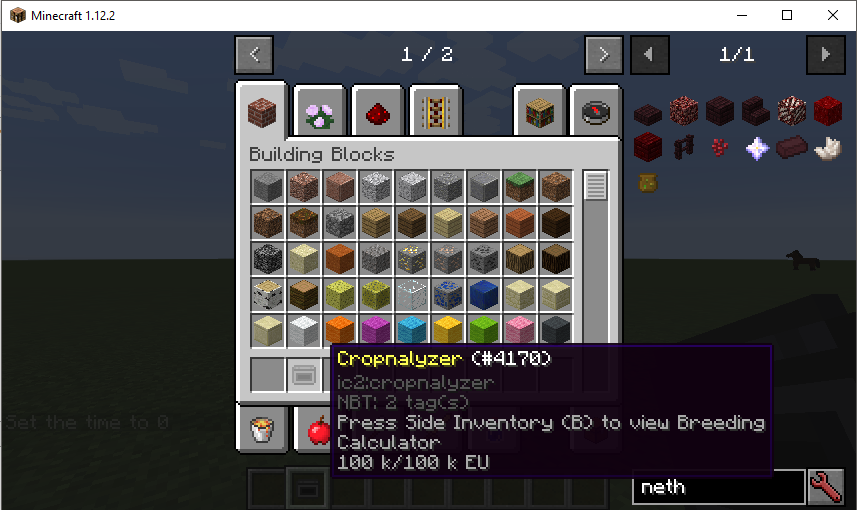
Once that is done you get a new Gui which has 9 slots at the top & bottom and 4 slots in the middle.
The top row is a creative inventory that allows you to pick random crops that you want to breed with them. (Scrollweel or the buttons to switch along the list)
To pick a crop you just click at the top. It will be transfered to the middle and once you have 2 or more selected you can basically hit the calculate button and the results will appear.
The 4 slots represent the cropsticks that you have (max of 4 crops can breed together)
The Results will be displayed in points and chance per breed and it will show all possible results too.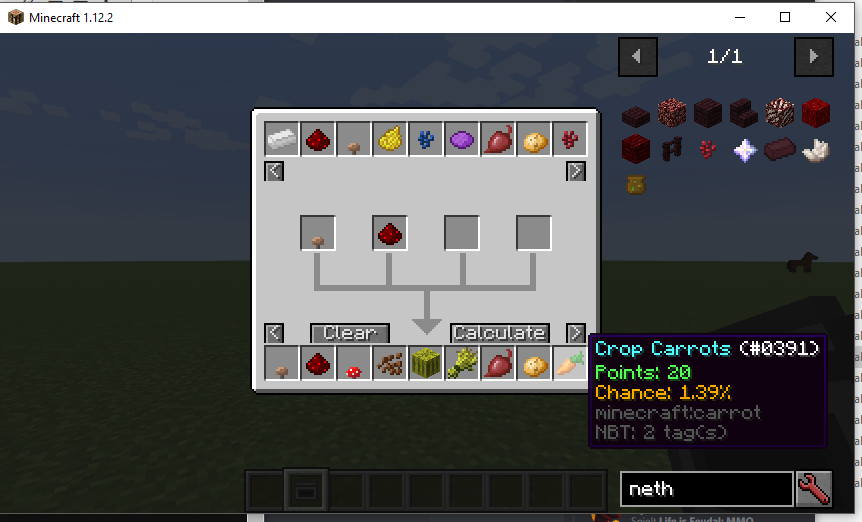
Keep in mind if you do more then 2 there is only a chance that more then 2 will actually breed together at once. (Its only garanteed that a breed contains 2 crops its also the most common use case anyway)
Also this plugin doesnt show not the hidden requirements that some crops have so be aware of these in general.
Project description from CurseForge.
Pick your setup
Choose the version and loader you play, then open the matching release.
Check the dependencies, then try the file in a copied instance before changing a world you care about.
Recent files
IC2 Crop Plugin Version 1.7.10-1.3.1.jar
27 Apr 2020
IC2 Crop Plugin Version 1.7.10-1.3.jar
16 Apr 2020
IC2 Nei Plugin Version 1.7.10-1.2.2.jar
1 Mar 2019
IC2 Nei Plugin Version 1.7.10-1.2.1.jar
27 Feb 2019
IC2 Nei Plugin Version 1.7.10-1.2.jar
26 Feb 2019
IC2CropBreeding Plugin V1.12-1.1.jar
7 Apr 2018
IC2 Nei Plugin Version 1.1.0.jar
3 Apr 2016
IC2 Nei Plugin Version 1.0.9.jar
12 Nov 2015
IC2 Nei Plugin Version 1.0.8.jar
21 Oct 2015
2 Oct 2015
Looking for an older file? The official CurseForge project page is in Resources.