Minecraft version
Back to mods 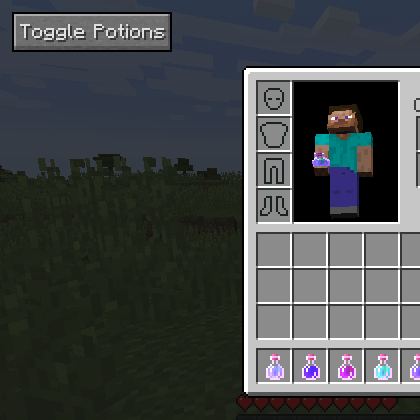
CurseForge · Minecraft mod
Potion Storage - pause your effects and save them for later
Adds a button that simply puts your active potion effects on hold
Choose a version Pick your version below, then grab the matching file.
Quick answer
Which Potion Storage - pause your effects and save them for later release should I use?
Latest stable file PotionStorage-1.8-1.0.4.jar
Game version 1.8
Loader Not required
Potion Storage - pause your effects and save them for later PotionStorage-1.8-1.0.4.jar targets 1.8. The project page does not say whether this file belongs on the client, dedicated server, or both. No extra mods listed for this file.
Where it goes
Is Potion Storage - pause your effects and save them for later required on the client, server, or both?
The project page does not say whether this file belongs on the client, dedicated server, or both.
Client Source doesn’t say
Dedicated server Source doesn’t say
Loader for this release No loader listed
Required install it here Optional supported, not mandatory Not supported do not install here Source doesn’t say do not assume
The source does not explicitly classify this release as client-only or server-only.
What else does Potion Storage - pause your effects and save them for later PotionStorage-1.8-1.0.4.jar need?
PotionStorage-1.8-1.0.4.jar. Change the file and its required mods may change too.
This file does not list any required mods. Do not add a library just because a different file uses it.
This file does not list any required or optional mods.
Before you install it
Add Potion Storage - pause your effects and save them for later without breaking your instance.
Built for Potion Storage - pause your effects and save them for later PotionStorage-1.8-1.0.4.jar. Pick another file and the loader, install side or required mods may change.
- 01
Stick to this file
Use PotionStorage-1.8-1.0.4.jar. It targets 1.8; another release may have different loader, side or dependency requirements.
- 02
Bring the mods it needs
This file does not list any required mods. Do not add a library just because a different file uses it.
- 03
Put it on the correct side
The project page does not say whether this file belongs on the client, dedicated server, or both.
- 04
Pick the file you checked
Use the “Get this file” button beside PotionStorage-1.8-1.0.4.jar. It opens that exact file at the source.
About this project
What does Potion Storage - pause your effects and save them for later add?
Adds a button that simply puts your active potion effects on hold.
It is in the upper left of the screen. Clicking this takes any active potions you have and pauses them (saved to your player NBT data) for later. Click again to reapply.
This is great for survival for when you eat a gold apple, or say you drink an 8 minute speed potion. But then, you are done using the speed effect with 3 minutes left, and it goes to waste while you stand around crafting or fighting. Well, now you can pause that timer and turn it back on later.
In other words
- If you click the button while ANY potion effects are in storage, it always gives them back to you. So, if you put some in storage and drink more, then pushing the button will put more in storage.
Update v 1.0.1:
- Now a config (with ingame support) to enable or disable potion effect merging (add the times together). So now you can drink and store Speed II potions over and over to get a super long effect timer!
Update v 1.0.2:
By default, saved potions now persist through death. Can be disabled in config
Bugfix different levels - so you can no longer merge Speed I and Speed II and have their timers add together
Version 1.0.3 was removed, it had an error in that sometimes crashed the game.
Update v 1.0.4:
Add a hotkey to toggle the potions, so you don't have to use that inventory button. Default key is 'Y'
Also a config option to hide the button.
Added a config file black list of effect ids (csv) so you can make this mod ignore effects. By default it ignores negative ones like hunger and slowness and mining fatigue, so it will not store these.
Project description from CurseForge.
Pick your setup
Potion Storage - pause your effects and save them for later by Minecraft version and loader
Choose the version and loader you play, then open the matching release.
Minecraft version
1.7.10
1 loader buildCheck the dependencies, then try the file in a copied instance before changing a world you care about.
Recent files
Potion Storage - pause your effects and save them for later versions and loaders
PotionStorage-1.8-1.0.4.jar
18 Oct 2015
Client Source doesn’t say Server Source doesn’t say Dependencies No extras listed Listed on Release listing
Check the 1.8 setup 1.8 release
PotionStorage-1.8-1.0.2.jar
12 Oct 2015
Client Source doesn’t say Server Source doesn’t say Dependencies No extras listed Listed on Release listing
Check the 1.8 setup 1.8 release
PotionStorage-1.8-1.0.1.jar
10 Oct 2015
Client Source doesn’t say Server Source doesn’t say Dependencies No extras listed Listed on Release listing
Check the 1.8 setup 1.8 release
PotionStorage-1.7.10-1.0.0.jar
10 Oct 2015
Client Source doesn’t say Server Source doesn’t say Dependencies No extras listed Listed on Release listing
Check the 1.7.10 setup 1.7.10 release
PotionStorage-1.8-1.0.0.jar
9 Oct 2015
Client Source doesn’t say Server Source doesn’t say Dependencies No extras listed Listed on Release listing
Check the 1.8 setup 1.8 release
Looking for an older file? The official CurseForge project page is in Resources.
 mod
CurseForge · Minecraft
Zelda: Hyrule Terrors
Zelda-inspired Armor, Weapons, Mobs, and iconic gear from BOTW and TOTK!
 mod
Modrinth · Minecraft
Integrated Dungeons and Structures
Integrated Dungeons and Structures (aka IDAS) is a mod that adds heavily detailed structures using blocks and mobs from Quark, Biomes O’ Plenty, Alex’s Mobs, and Create.
 mod
Modrinth · Minecraft
Nerd's Potions
Adds custom potions with powerful effects.