Minecraft version
Back to mods 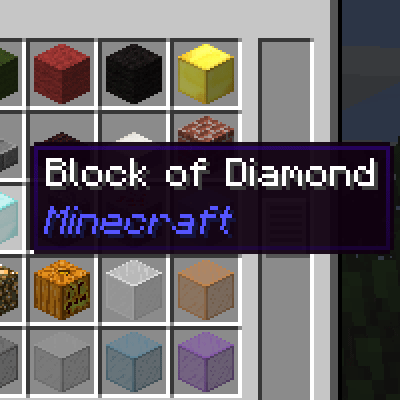
CurseForge · Minecraft mod
Mod Name Tooltip
Minecraft mod that shows an ItemStack's mod name on its tooltip.
Choose a version Pick your version below, then grab the matching file.
Quick answer
Which Mod Name Tooltip release should I use?
Latest stable file modnametooltip-26.2-neoforge-2.10.0.jar
Game version 26.2
Loader NeoForge
Mod Name Tooltip modnametooltip-26.2-neoforge-2.10.0.jar targets 26.2 with NeoForge. The project page does not say whether this file belongs on the client, dedicated server, or both. No extra mods listed for this file.
Where it goes
Is Mod Name Tooltip required on the client, server, or both?
The project page does not say whether this file belongs on the client, dedicated server, or both.
Client Source doesn’t say
Dedicated server Source doesn’t say
Loader for this release NeoForge
Required install it here Optional supported, not mandatory Not supported do not install here Source doesn’t say do not assume
The source does not explicitly classify this release as client-only or server-only.
What else does Mod Name Tooltip modnametooltip-26.2-neoforge-2.10.0.jar need?
modnametooltip-26.2-neoforge-2.10.0.jar. Change the file and its required mods may change too.
This file does not list any required mods. Do not add a library just because a different file uses it.
This file does not list any required or optional mods.
Before you install it
Add Mod Name Tooltip without breaking your instance.
Built for Mod Name Tooltip modnametooltip-26.2-neoforge-2.10.0.jar. Pick another file and the loader, install side or required mods may change.
- 01
Stick to this file
Use modnametooltip-26.2-neoforge-2.10.0.jar. It targets 26.2 with NeoForge; another release may have different loader, side or dependency requirements.
- 02
Bring the mods it needs
This file does not list any required mods. Do not add a library just because a different file uses it.
- 03
Put it on the correct side
The project page does not say whether this file belongs on the client, dedicated server, or both.
- 04
Pick the file you checked
Use the “Get this file” button beside modnametooltip-26.2-neoforge-2.10.0.jar. It opens that exact file at the source.
About this project
What does Mod Name Tooltip add?
Mod Name Tooltip shows which mod an ItemStack came from on its tooltip.
{width=278 height=136}
FAQ:
- Why are you making small mods?
- Unlike bigger mods, this one has no interaction with other mods so it is extremely reliable.
- Can I use this in my mod pack?
- Feel free!
Project description from CurseForge.
Pick your setup
Mod Name Tooltip by Minecraft version and loader
Choose the version and loader you play, then open the matching release.
Minecraft version
26.1.1
1 loader buildMinecraft version
1.21.9
1 loader buildMinecraft version
1.21.8
1 loader buildMinecraft version
1.21.7
1 loader buildMinecraft version
1.21.6
1 loader buildMinecraft version
1.21.5
1 loader buildMinecraft version
1.21.1
1 loader buildMinecraft version
1.21
1 loader buildMinecraft version
1.20.6
1 loader buildMinecraft version
1.20.4
1 loader buildMinecraft version
1.20.1
1 loader buildShowing the newest 12 of 44 game versions. Older files are in the list below.
Check the dependencies, then try the file in a copied instance before changing a world you care about.
Recent files
Mod Name Tooltip versions and loaders
modnametooltip-26.2-neoforge-2.10.0.jar
28 Jun 2026
Client Source doesn’t say Server Source doesn’t say Dependencies No extras listed Listed on Release listing
Check the 26.2 · NeoForge setup NeoForge26.2 release
modnametooltip-26.1.2-neoforge-2.9.0.jar
28 Jun 2026
Client Source doesn’t say Server Source doesn’t say Dependencies No extras listed Listed on Release listing
Check the 26.1.1 · NeoForge setup NeoForge26.1.1 release
modnametooltip-1.21.9-neoforge-2.8.0.jar
2 Oct 2025
Client Source doesn’t say Server Source doesn’t say Dependencies No extras listed Listed on Release listing
Check the 1.21.9 · NeoForge setup 1.21.51.21.81.21.9NeoForge release
modnametooltip-1.21.8-neoforge-2.7.0.jar
2 Oct 2025
Client Source doesn’t say Server Source doesn’t say Dependencies No extras listed Listed on Release listing
Check the 1.21.8 · NeoForge setup 1.21.51.21.8NeoForge1.21.7 release
modnametooltip-1.21.7-neoforge-2.6.0.jar
14 Jul 2025
Client Source doesn’t say Server Source doesn’t say Dependencies No extras listed Listed on Release listing
Check the 1.21.7 · NeoForge setup NeoForge1.21.7 release
modnametooltip-1.21.6-neoforge-2.5.0.jar
13 Jul 2025
Client Source doesn’t say Server Source doesn’t say Dependencies No extras listed Listed on Release listing
Check the 1.21.6 · NeoForge setup NeoForge1.21.6 release
modnametooltip-1.21.5-neoforge-2.4.0.jar
29 May 2025
Client Source doesn’t say Server Source doesn’t say Dependencies No extras listed Listed on Release listing
Check the 1.21.5 · NeoForge setup 1.21.5NeoForge release
modnametooltip-1.21.1-neoforge-2.3.0.jar
29 May 2025
Client Source doesn’t say Server Source doesn’t say Dependencies No extras listed Listed on Release listing
Check the 1.21.1 · NeoForge setup 1.21NeoForge1.21.1 release
modnametooltip-1.21-neoforge-2.2.0.jar
17 Jun 2024
Client Source doesn’t say Server Source doesn’t say Dependencies No extras listed Listed on Release listing
Check the 1.21.1 · NeoForge setup 1.21NeoForge1.21.1 release
modnametooltip-1.20.6-neoforge-2.1.0.jar
12 Jun 2024
Client Source doesn’t say Server Source doesn’t say Dependencies No extras listed Listed on Release listing
Check the 1.20.6 · NeoForge setup NeoForge1.20.6 release
modnametooltip-1.20.4-neoforge-2.0.0.jar
12 Jun 2024
Client Source doesn’t say Server Source doesn’t say Dependencies No extras listed Listed on Release listing
Check the 1.20.4 · NeoForge setup NeoForge1.20.4 release
modnametooltip-1.20.1-1.20.0.jar
19 Jul 2023
Client Source doesn’t say Server Source doesn’t say Dependencies No extras listed Listed on Release listing
Check the 1.20.1 · Forge setup 1.19.31.19.41.19.21.20.1 release
Looking for an older file? The official CurseForge project page is in Resources.
 mod
mod CurseForge · Minecraft
Tepox Survival Map
A mod designed to provide a functional and balanced world map and minimap for Survival Mode. It also includes several configuration options, allowing you to customize the experience to your liking.
 mod
mod CurseForge · Minecraft
Recall Coords - Coordinate Saver & Death Tracker
Save and recall important coordinates, including death locations, to easily find your way with Recall Coords
 mod
mod CurseForge · Minecraft
Auto Window Size
Minecraft 1.20.1 / Forge client-side mod. Auto window size + center on launch, minimum-size lock, fixed window size, and optional auto-fullscreen / auto-maximize for modpack UI consistency.