Minecraft version
Back to mods 
CurseForge · Minecraft mod
ToroHealth Damage Indicators
Shows health and damage received for mobs, NPCs, and players
Choose a version Pick your version below, then grab the matching file.
This page is having a moment, so a few details may be a little behind.
Quick answer
Which ToroHealth Damage Indicators release should I use?
Latest stable file torohealth-1.19-fabric-1.jar
Game version 1.19
Loader Fabric
ToroHealth Damage Indicators torohealth-1.19-fabric-1.jar targets 1.19 with Fabric. The project page does not say whether it belongs on the client. The project page does not say whether it belongs on the dedicated server. No extra mods listed for this file.
Where it goes
Is ToroHealth Damage Indicators required on the client, server, or both?
The project page does not say whether it belongs on the client. The project page does not say whether it belongs on the dedicated server.
Client Source doesn’t say
Dedicated server Source doesn’t say
Loader for this release Fabric
Required install it here Optional supported, not mandatory Not supported do not install here Source doesn’t say do not assume
The source does not explicitly classify this release as client-only or server-only.
What else does ToroHealth Damage Indicators torohealth-1.19-fabric-1.jar need?
torohealth-1.19-fabric-1.jar. Change the file and its required mods may change too.
This file does not list any required mods. Do not add a library just because a different file uses it.
This file does not list any required or optional mods.
Before you install it
Add ToroHealth Damage Indicators without breaking your instance.
Built for ToroHealth Damage Indicators torohealth-1.19-fabric-1.jar. Pick another file and the loader, install side or required mods may change.
- 01
Stick to this file
Use torohealth-1.19-fabric-1.jar. It targets 1.19 with Fabric; another release may have different loader, side or dependency requirements.
- 02
Bring the mods it needs
This file does not list any required mods. Do not add a library just because a different file uses it.
- 03
Put it on the correct side
The project page does not say whether it belongs on the client. The project page does not say whether it belongs on the dedicated server.
- 04
Pick the file you checked
Use the “Get this file” button beside torohealth-1.19-fabric-1.jar. It opens that exact file at the source.
About this project
What does ToroHealth Damage Indicators add?
ToroHealth
Damage Indicators
With ToroHealth Damage Indicators a health bar will appear in the top left corner for the entity in the player's crosshairs.
Fabric and Forge Support!
Open the Files Tab to download the correct version.
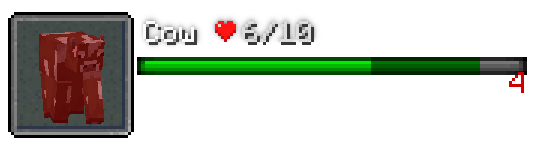
The health bar HUD shows a small rendering of the entity, its name, health in numeric and bar format. When the entity takes damage, a number is displayed to the right of the bar show the amount. The bar will also animate helping to show the health that was removed (show above as dark green).
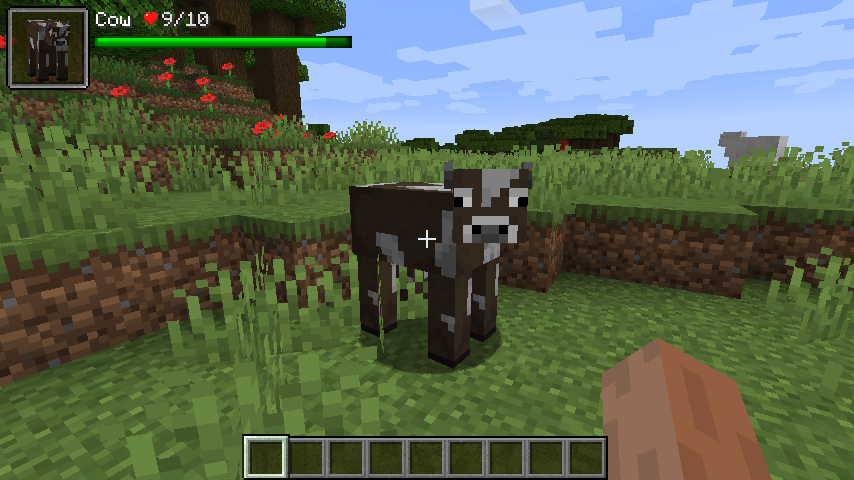
Damage Particles
As of version 1.16.3-4, damage particles are back! They can be turned off with the particle.show config if you would prefer not to have them.
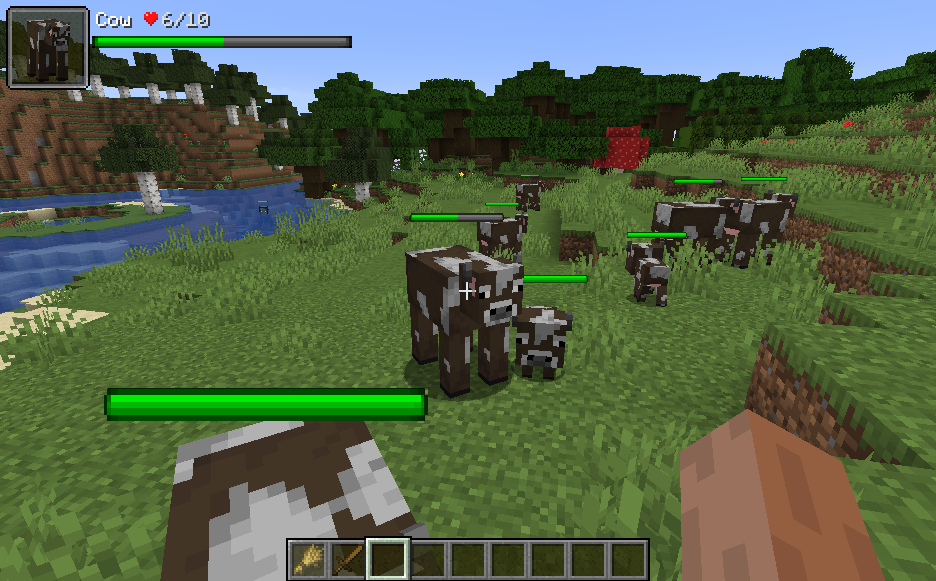
In-World Health Bars
In-world health bars displayed directly above entities can be enabled via the mod config.
Modpack Usage
Please feel free to include ToroHealth in any modpack. No need to ask for permission.
Config File
The config system has been changed out with a unified one as of 1.16.3 version 3 for both Fabric and Forge versions. The config file can no longer be edited from with-in the game and a text editor such as NotePad must be used. The config file is located at MINECRAFT_FOLDER/config/torohealth.jso n and is auto-created the first time the mod runs. Changes to this file should be reflected in real time if the game is running while the file is edited. The default file is shown below:
{
"watchForChanges": true,
"hud": {
"distance": 60,
"x": 4.0,
"y": 4.0,
"scale": 1.0,
"hideDelay": 20,
"anchorPoint": "TOP_LEFT",
"showEntity": true,
"showBar": true,
"showSkin" true
},
"bar": {
"damageNumberType": "LAST",
"friendColor": 16711935,
"friendColorSecondary": 8388863,
"foeColor": -16776961,
"foeColorSecondary": -2147483393
},
"inWorld": {
"mode": "NONE",
"distance": 60.0,
"onlyWhenLookingAt": false,
"onlyWhenHurt": false
}
"particle": {
"show": true
}
}
Values for inWorld.mode
NONE, WHEN_HOLDING_WEAPON, ALWAYS
Values for bar.damageNumberType
NONE, LAST, CUMULATIVE
Values for hud.anchorPoint
TOP_LEFT, TOP_CENTER, TOP_RIGHT, BOTTOM_LEFT, BOTTOM_CENTER, BOTTOM_RIGHT
Project description from CurseForge.
Pick your setup
ToroHealth Damage Indicators by Minecraft version and loader
Choose the version and loader you play, then open the matching release.
Minecraft version
1.19
2 loader buildsMinecraft version
1.18.2
2 loader buildsMinecraft version
1.18.1
2 loader buildsMinecraft version
1.18
2 loader buildsMinecraft version
1.17.1
2 loader buildsMinecraft version
1.17
1 loader buildMinecraft version
1.16.5
2 loader buildsMinecraft version
1.16.4
3 loader buildsMinecraft version
1.16.3
2 loader buildsMinecraft version
1.16.2
2 loader buildsMinecraft version
1.16.1
2 loader buildsShowing the newest 12 of 21 game versions. Older files are in the list below.
Check the dependencies, then try the file in a copied instance before changing a world you care about.
Recent files
ToroHealth Damage Indicators versions and loaders
torohealth-1.19-forge-2.jar
23 Jul 2022
Client Source doesn’t say Server Source doesn’t say Dependencies No extras listed Listed on Release listing
Check the 1.19.1 · Forge setup Forge1.19.1 beta
torohealth-1.19-forge-1.jar
2 Jul 2022
Client Source doesn’t say Server Source doesn’t say Dependencies No extras listed Listed on Release listing
Check the 1.19 · Forge setup Forge1.19 beta
torohealth-1.19-fabric-1.jar
19 Jun 2022
Client Source doesn’t say Server Source doesn’t say Dependencies No extras listed Listed on Release listing
Check the 1.19 · Fabric setup Fabric1.19 release
torohealth-1.18-forge-2.jar
10 Dec 2021
Client Source doesn’t say Server Source doesn’t say Dependencies No extras listed Listed on Release listing
Check the 1.18.2 · Forge setup 1.18.11.18.2Forge1.18 beta
torohealth-1.18-fabric-2.jar
10 Dec 2021
Client Source doesn’t say Server Source doesn’t say Dependencies No extras listed Listed on Release listing
Check the 1.18.2 · Fabric setup 1.18.1Fabric1.18.21.18 release
torohealth-1.18-forge-1.jar
9 Dec 2021
Client Source doesn’t say Server Source doesn’t say Dependencies No extras listed Listed on Release listing
Check the 1.18 · Forge setup Forge1.18 beta
torohealth-1.18-fabric-1.jar
8 Dec 2021
Client Source doesn’t say Server Source doesn’t say Dependencies No extras listed Listed on Release listing
Check the 1.18 · Fabric setup Fabric1.18 release
torohealth-1.17.1-fabric-12.jar
19 Aug 2021
Client Source doesn’t say Server Source doesn’t say Dependencies No extras listed Listed on Release listing
Check the 1.17.1 · Fabric setup 1.17.1Fabric beta
torohealth-1.17.1-forge-1.jar
18 Aug 2021
Client Source doesn’t say Server Source doesn’t say Dependencies No extras listed Listed on Release listing
Check the 1.17.1 · Forge setup 1.17.1Forge alpha
torohealth-1.17.1-fabric-11.jar
2 Aug 2021
Client Source doesn’t say Server Source doesn’t say Dependencies No extras listed Listed on Release listing
Check the 1.17.1 · Fabric setup 1.17.1Fabric beta
torohealth-1.16.5-fabric-6.jar
1 Aug 2021
Client Source doesn’t say Server Source doesn’t say Dependencies No extras listed Listed on Release listing
Check the 1.16.5 · Fabric setup Fabric1.16.5 beta
torohealth-1.17.1-fabric-10.jar
26 Jul 2021
Client Source doesn’t say Server Source doesn’t say Dependencies No extras listed Listed on Release listing
Check the 1.17.1 · Fabric setup 1.17.1Fabric beta
Looking for an older file? The official CurseForge project page is in Resources.
 mod
mod CurseForge · Minecraft
Smooth FreeCam
A smooth spectator-style freecam. Fly the camera freely while your player stays frozen, then glide back into gameplay with a smooth transition.
 mod
mod CurseForge · Minecraft
Kingdom Keys 2
A mod which adds elements from the Kingdom Hearts games
 mod
mod CurseForge · Minecraft
SwemCull — SWEM Horse Performance Fix
Massive FPS boost for SWEM horses — up to 3x with horses still visible. Client-side, no server needed.