Minecraft version
Back to mods 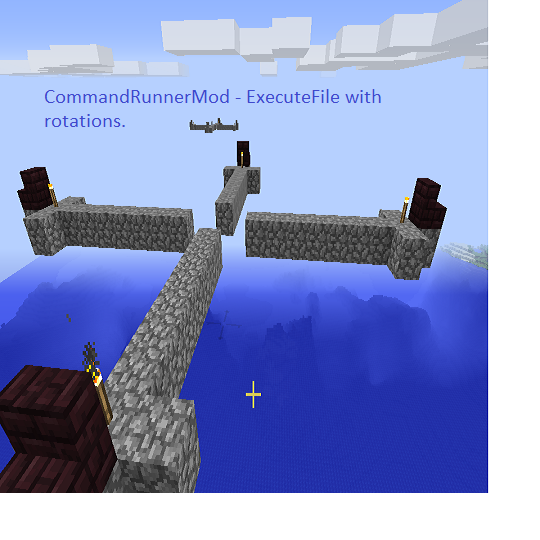
CurseForge · Minecraft mod
CommandRunnerMod
Gives the ExecuteFile and BlockDump commands in two mods - Fixed 7 Aug Runs execute commands and rotates commands in files repeating. Always use the latest.
Choose a version Pick your version below, then grab the matching file.
Quick answer
Which CommandRunnerMod release should I use?
Latest stable file CommandRunnerMod
Game version 1.9.4, 1.10.2, 1.10
Loader Not required
CommandRunnerMod targets 1.9.4, 1.10.2, 1.10. The project page does not say whether this file belongs on the client, dedicated server, or both. No extra mods listed for this file.
Where it goes
Is CommandRunnerMod required on the client, server, or both?
The project page does not say whether this file belongs on the client, dedicated server, or both.
Client Source doesn’t say
Dedicated server Source doesn’t say
Loader for this release No loader listed
Required install it here Optional supported, not mandatory Not supported do not install here Source doesn’t say do not assume
The source does not explicitly classify this release as client-only or server-only.
What else does CommandRunnerMod need?
CommandRunnerMod. Change the file and its required mods may change too.
This file does not list any required mods. Do not add a library just because a different file uses it.
This file does not list any required or optional mods.
Before you install it
Add CommandRunnerMod without breaking your instance.
Built for CommandRunnerMod. Pick another file and the loader, install side or required mods may change.
- 01
Stick to this file
Use CommandRunnerMod. It targets 1.9.4, 1.10.2, 1.10; another release may have different loader, side or dependency requirements.
- 02
Bring the mods it needs
This file does not list any required mods. Do not add a library just because a different file uses it.
- 03
Put it on the correct side
The project page does not say whether this file belongs on the client, dedicated server, or both.
- 04
Pick the file you checked
Use the “Get this file” button beside CommandRunnerMod. It opens that exact file at the source.
About this project
What does CommandRunnerMod add?
CommandRunnerMod gives the executefile command - Runs execute commands and rotates commands in files. 1.9.4 runs in forge 1.9 to 1.10.2 Use the latest versions. BlockDumpMod dumps an area into either /setblock commands or /execute @p ~ ~ ~ setblock commands into a .caleb file. blockdump is a companion command to executefile.
Recommend downloading barad.zip for samples. https://www.youtube.com/watch?v=o66KGUibA4E
The commands must be in lower case. New 1.9.4 August 7th fixed now repeats and cascade is fixed. Still beta.
This is my first mod for minecraft. It's written for 1.8, 1.9-1.9.4, 1.10-1.10.2 and called Caleb's CommandRunnermod. It uses the new 1.8 APIs and 1.9.4, but supports 1.10 blocks. It runs files with a set of minecraft or mod commands for simple world generation support as a command "executefile. Any command that can be put in a server or command and run with execute. In the files the command executefile can call executefile files. With new 1.8+ commands that allow placement of items in chests, and blockdata, etc, the commands become useful. (Hint use 1.9+ repeating command blocks for looping, or repeat sections, testfor, etc. ) A forge config file allows you to set the files directory. Syntax is executefile File filename.
A later version is planned to run from a URL. Files in the config defined directory can be named ".caleb" to show up in an autocomplete list. Where do I place jars for download? Just here and the commandrunnermod.com. I don't adfly or run ads. Free is free. Right now it's on my http://www.commandrunnermod.com for the download files and notes and on Curse. No ads. Using /execute in the files is optional, but recommended.
You can't yet just write /fill ... it's /execute then the command fill. The # sign allows you to comment in the .caleb file. The concatenation is not yet supported.
.
Rotation is now supported to a limited extent (Some commands aren't). Try /executefile File arrow.caleb byline rotatewest or rotateplayerfacing. This now includes vanilla minecraft block rotation (e.g. stairs, redstone, all) WHEN DATATAGS ARE SUPPLIED (e.g. minecraft:chest 2). Cascading rotation is supported for vanilla blocks. Try City2.caleb with build2.caleb.
try /executefile File City2.Caleb byline rotateSouth cascade.
Filling 100,000 blocks in 20 lines will take time. Be warned.
There are some samples below or make your own with blockdump.
/blockdump exfile ~-2 ~-2 ~-2 ~2 ~2 ~2 saveto.caleb
Any non-fraudulent use is permitted. Only commandrunnermod.com or curse is a recommended download site.
arrow.caleb is (stairs full side is north facing).
New version 8/7/2016
# hello
/execute @p ~ ~ ~ fill ~ ~1 ~2 ~ ~1 ~10 minecraft:cobblestone
/execute @p ~ ~ ~ fill ~-1 ~1 ~9 ~-1 ~1 ~9 minecraft:cobblestone
/execute @p ~ ~ ~ fill ~1 ~1 ~9 ~1 ~1 ~9 minecraft:cobblestone
/execute @p ~ ~ ~ fill ~0 ~2 ~10 ~0 ~2 ~10 minecraft:stone_stairs 3
Project description from CurseForge.
Pick your setup
CommandRunnerMod by Minecraft version and loader
Choose the version and loader you play, then open the matching release.
Minecraft version
1.10
1 loader buildMinecraft version
1.9.4
1 loader buildMinecraft version
1.9
1 loader buildCheck the dependencies, then try the file in a copied instance before changing a world you care about.
Recent files
CommandRunnerMod versions and loaders
CommandRunnerMod
CommandRunnerMod-1.9.4.jar
7 Aug 2016
Client Source doesn’t say Server Source doesn’t say Dependencies No extras listed Listed on Release listing
Check the 1.10.2 setup 1.9.41.10.21.101.9 release
BlockDumpMod writes setblock commands to a file
BlockDumpMod-1.9.4.jar
23 Jul 2016
Client Source doesn’t say Server Source doesn’t say Dependencies No extras listed Listed on Release listing
Check the 1.10.2 setup 1.9.41.10.21.101.9 beta
Sample files. Try barad.caleb
barad.zip
4 Jul 2016
Client Source doesn’t say Server Source doesn’t say Dependencies No extras listed Listed on Release listing
Check the 1.10.2 setup 1.9.41.10.21.101.9 alpha
Looking for an older file? The official CurseForge project page is in Resources.
 mod
mod CurseForge · Minecraft
ItemRename
Rename your items easily!
 mod
mod CurseForge · Minecraft
Factions ReForged
Claim chunks, declare allies and enemies, and hold territory you can see the edge of. A modern rebuild of the faction mechanic that defined a generation of servers chunk claims, war and alliance, a faction bank, faction chat, and particle borders.
 mod
mod CurseForge · Minecraft
SableCraft Standards
Do you have Standards? Every server command you end up needing, and an economy other mods can drive. /fly, /god, /home, /warp, /tpa, /back, /top, /kit, /vanish, /invsee, mail, mutes, bans - the set every server installs , built to work WITH other mods!