
Minecraft version
Back to mods 
CurseForge · Minecraft mod
Beta Days
Make your Minecraft old school with classic configurable options like disabling hunger, sprinting, experience drops, 1.9 combat system, nether fog and more.
Choose a version Pick your version below, then grab the matching file.
Quick answer
Which Beta Days release should I use?
Latest stable file Beta Days 26.1.2-v1.4.0
Game version 26.1.2
Loader NeoForge
Beta Days 26.1.2-v1.4.0 targets 26.1.2 with NeoForge. The project page does not say whether this file belongs on the client, dedicated server, or both. No extra mods listed for this file.
Where it goes
Is Beta Days required on the client, server, or both?
The project page does not say whether this file belongs on the client, dedicated server, or both.
Client Source doesn’t say
Dedicated server Source doesn’t say
Loader for this release NeoForge
Required install it here Optional supported, not mandatory Not supported do not install here Source doesn’t say do not assume
The source does not explicitly classify this release as client-only or server-only.
What else does Beta Days 26.1.2-v1.4.0 need?
Beta Days 26.1.2-v1.4.0. Change the file and its required mods may change too.
This file does not list any required mods. Do not add a library just because a different file uses it.
This file does not list any required or optional mods.
Before you install it
Add Beta Days without breaking your instance.
Built for Beta Days 26.1.2-v1.4.0. Pick another file and the loader, install side or required mods may change.
- 01
Stick to this file
Use Beta Days 26.1.2-v1.4.0. It targets 26.1.2 with NeoForge; another release may have different loader, side or dependency requirements.
- 02
Bring the mods it needs
This file does not list any required mods. Do not add a library just because a different file uses it.
- 03
Put it on the correct side
The project page does not say whether this file belongs on the client, dedicated server, or both.
- 04
Pick the file you checked
Use the “Get this file” button beside Beta Days 26.1.2-v1.4.0. It opens that exact file at the source.
About this project
What does Beta Days add?







Do you want to take a trip down memory lane? This mod is for you if you would like to emulate Minecraft Beta functionality and features inside of modern Minecraft.
For even more nostalgia, we recommend pairing this with any resource pack (try our Minecraft Beta resource pack - Legacy Default) that adds old textures and sounds, and this mod with Beta+ by therealMRBURGERUS, which is a replica of the old Beta and Alpha generator. You could use old seeds with it like Glacier and worstseedever.
🛠️ Features
Old Hud
Gives the classic HUD, removing the hunger bar, and adjusting the position of the armor bar. Enabling this is only the aesthetic of the HUD. You may want to disable hunger, which will make food give you health when eaten.

Enable Beta Main Menu
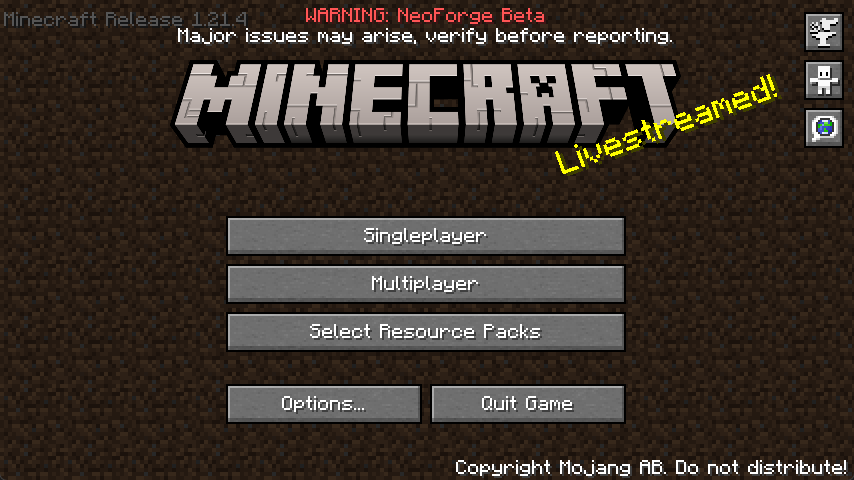
This will replace your main menu with the one from beta with minor tweaks. The version number is at the top left, and the background is the classic tiling dirt background.
Classic Beta Style Bow
Allows you to shoot the bow without having to recharge, just like in beta.

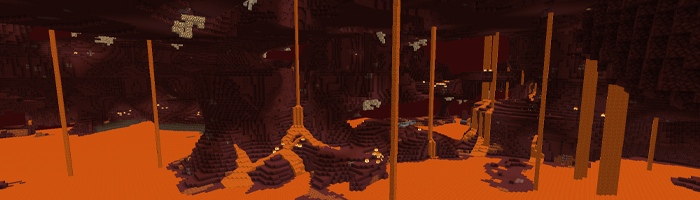
Disable Nether Fog
Disables the Nether fog and allows you to see more clearly and far in the Nether.
Disable 1.9+ Combat System
Spam click with your weapons to your heart's content. The classic system is back. I can hear your mice now!
Disable Sprinting
Useful if you want to capture the beta experience. This also disables the new swimming in 1.14.4+.
Disable Hunger
Useful if you want to capture the beta experience. This will make food give you health points instead of hunger points and will be eaten instantly.
Disable Experience Drops
Useful if you want to capture the beta experience. Killing mobs will stop them from dropping XP.
Custom Dimension Messages
Will display classic messages on the loading screen like “Entering the Nether” and “Entering the End,” just how beta did it back in the day.
… And More!
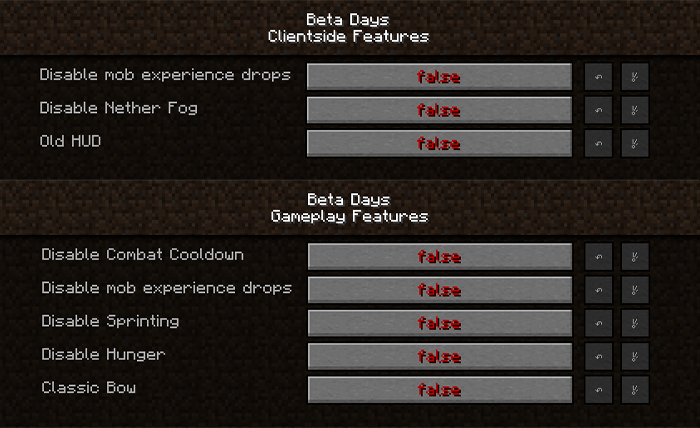
Configuring Beta Days for Minecraft 1.21.3+
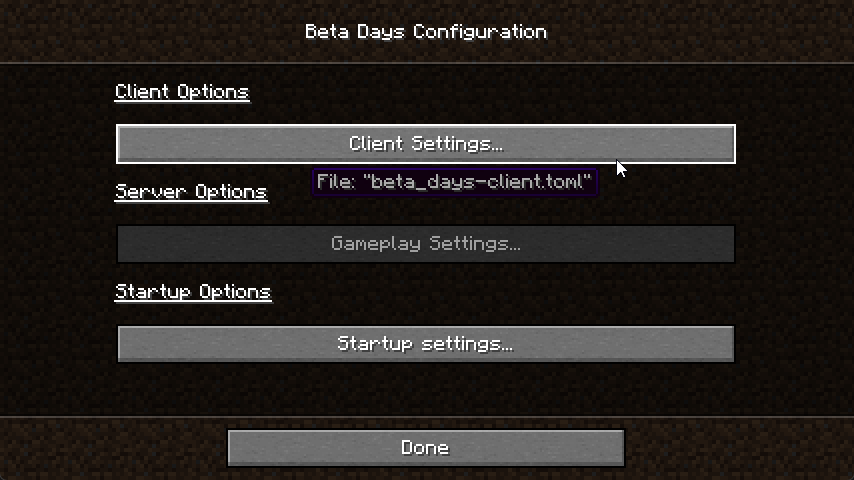
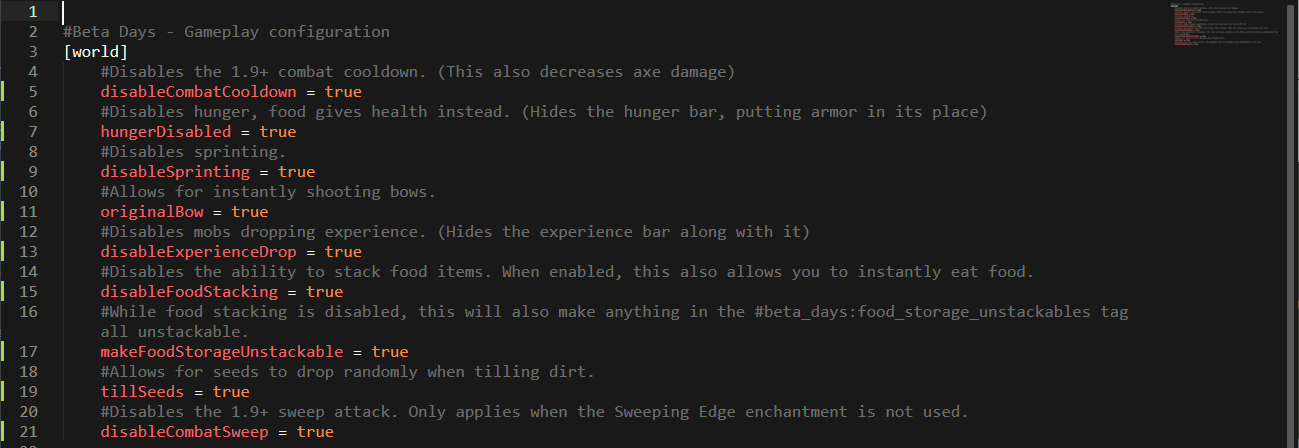
You can find the beta_days-client.toml in the config folder and beta_days-server.toml inside of your Minecraft world/serverconfig folder. You can also configure the mod easily in NeoForge by clicking the "Mods" button, selecting the mod, and clicking "Configure".
beta_days-client.toml
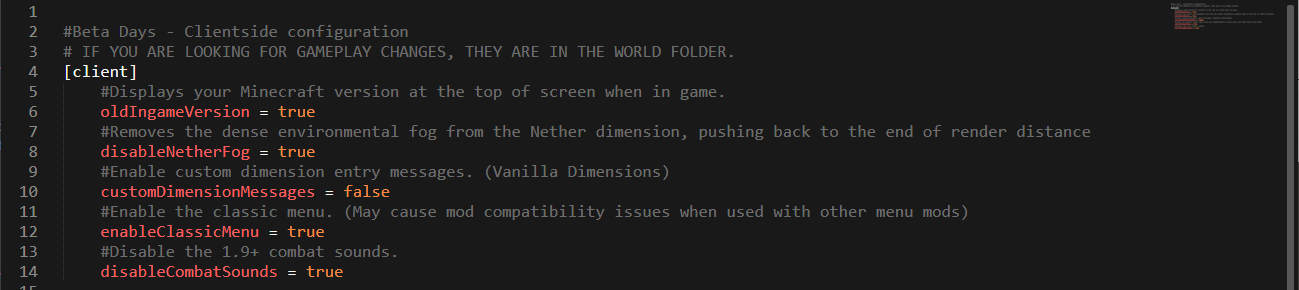
beta_days-server.toml
Configuring Beta Days for Minecraft 1.19.x
You can find the beta_days-client.toml in the config folder and beta_days-server.toml inside of your Minecraft world/serverconfig folder. You can also configure the mod easily in NeoForge by clicking the "Mods" button, selecting the mod, and clicking "Configure".
beta_days-client.toml
beta_days-server.toml
Configuring Beta Days for Minecraft 1.16.4
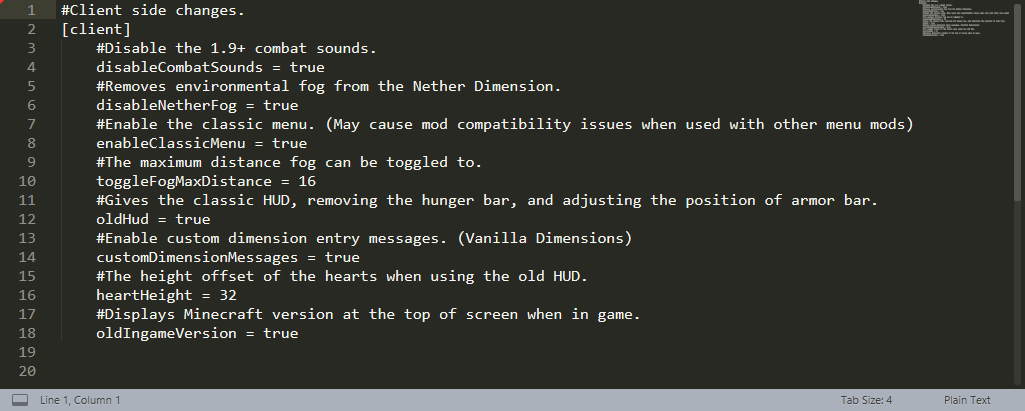
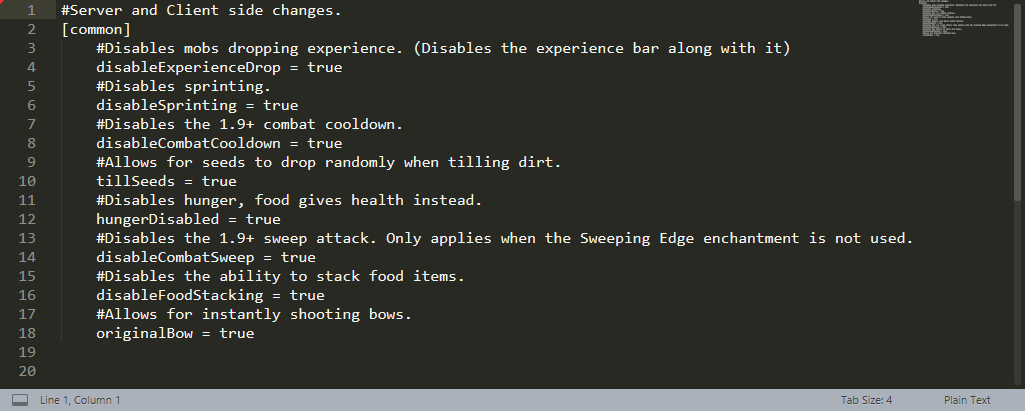
In your Minecraft folder, and then inside of the config folder, edit the beta_days-client.toml and beta_days-common.toml files.
beta_days-client.toml
beta_days-common.toml
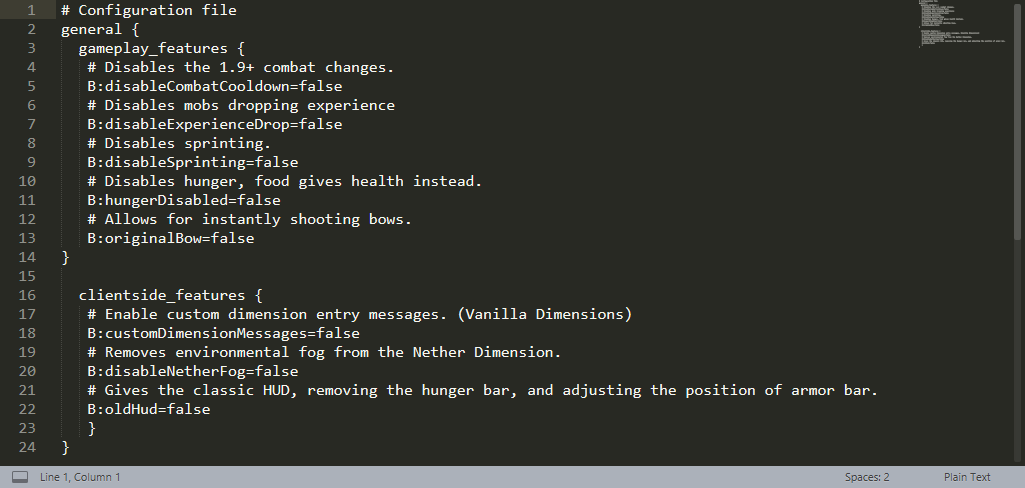
Configuring Beta Days for Minecraft 1.12.2
You can configure the 1.12.2 version in-game or by editing the beta_days.cfg files in your config folder.
In-Game Config Editing
Make sure you edit the config at the Main Menu as you cannot edit some things while loaded in a world! Click your “Mods” button and click on “Beta Days,” and then the “Config” button.
beta_days.cfg for Minecraft 1.12.2
🤚 Support: If you have questions or any issues with our mods, read the FAQ! You can also either submit an issue on the issue tracker, or come into our Discord server where we can help you!

Project description from CurseForge.
Pick your setup
Beta Days by Minecraft version and loader
Choose the version and loader you play, then open the matching release.
Minecraft version
1.21.8
1 loader buildMinecraft version
1.21.7
1 loader buildMinecraft version
1.21.4
1 loader buildMinecraft version
1.21.3
1 loader buildMinecraft version
1.19.4
1 loader buildMinecraft version
1.19.3
1 loader buildMinecraft version
1.19.2
1 loader buildMinecraft version
1.16.5
1 loader buildMinecraft version
1.16.4
1 loader buildMinecraft version
1.16.3
1 loader buildMinecraft version
1.16.2
1 loader buildShowing the newest 12 of 21 game versions. Older files are in the list below.
Check the dependencies, then try the file in a copied instance before changing a world you care about.
Recent files
Beta Days versions and loaders
Beta Days 26.1.2-v1.4.0
beta_days-26.1.2-1.4.0.jar
2 May 2026
Client Source doesn’t say Server Source doesn’t say Dependencies No extras listed Listed on Release listing
Check the 26.1.2 · NeoForge setup NeoForge26.1.2 release
Beta Days 1.21.7-v1.4.0
beta_days-1.21.7-1.4.0.jar
30 Jun 2025
Client Source doesn’t say Server Source doesn’t say Dependencies No extras listed Listed on Release listing
Check the 1.21.8 · NeoForge setup 1.21.8NeoForge1.21.7 release
Beta Days 1.21.3/4-v1.4.0
beta_days-1.21.3-1.4.0.jar
10 Dec 2024
Client Source doesn’t say Server Source doesn’t say Dependencies No extras listed Listed on Release listing
Check the 1.21.4 · NeoForge setup 1.21.4NeoForge1.21.3 release
Beta Days 1.19.4-v1.3.1
beta_days-1.19.4-1.3.1.jar
22 May 2023
Client Source doesn’t say Server Source doesn’t say Dependencies No extras listed Listed on Release listing
Check the 1.19.4 · Forge setup 1.19.4Forge release
Beta Days 1.19.3-v1.3.0
beta_days-1.19.3-1.3.0.jar
22 Dec 2022
Client Source doesn’t say Server Source doesn’t say Dependencies No extras listed Listed on Release listing
Check the 1.19.3 · Forge setup 1.19.3Forge release
Beta Days 1.19.2-v1.3.0
beta_days-1.19.2-1.3.0.jar
21 Nov 2022
Client Source doesn’t say Server Source doesn’t say Dependencies No extras listed Listed on Release listing
Check the 1.19.2 · Forge setup 1.19.2Forge release
Beta Days 1.16.4-v1.2.0
beta_days-1.16.4-1.2.0.jar
2 Nov 2020
Client Source doesn’t say Server Source doesn’t say Dependencies No extras listed Listed on Release listing
Check the 1.16.5 setup 1.16.51.16.4 release
Beta Days 1.16.3-v1.2.0
beta_days-1.16.3-1.2.0.jar
27 Oct 2020
Client Source doesn’t say Server Source doesn’t say Dependencies No extras listed Listed on Release listing
Check the 1.16.3 setup 1.16.3 release
Beta Days 1.16.3-v1.1.4
beta_days-1.16.3-1.1.4.jar
26 Sept 2020
Client Source doesn’t say Server Source doesn’t say Dependencies No extras listed Listed on Release listing
Check the 1.16.3 setup 1.16.3 release
Beta Days 1.16.2-v1.1.3
beta_days-1.16.2-1.1.3.jar
8 Sept 2020
Client Source doesn’t say Server Source doesn’t say Dependencies No extras listed Listed on Release listing
Check the 1.16.2 setup 1.16.2 release
Beta Days 1.16.1-v1.1.2
beta_days-1.16.1-1.1.2.jar
28 Jun 2020
Client Source doesn’t say Server Source doesn’t say Dependencies No extras listed Listed on Release listing
Check the 1.16.1 setup 1.16.1 beta
Beta Days 1.15.2-v1.1.2
beta_days-1.15.2-1.1.2.jar
26 Jan 2020
Client Source doesn’t say Server Source doesn’t say Dependencies No extras listed Listed on Release listing
Check the 1.15.2 · Forge setup 1.15.2Forge release
Looking for an older file? The official CurseForge project page is in Resources.
 mod
mod CurseForge + Modrinth · Minecraft
LocalizedWeather
A Fabric mod that replaces Minecraft's global weather with localized weather zones. Each 256×256 block region gets its own weather, rain, snow, and thunderstorms happen independently across the world with biome-aware rules, smooth transitions, and blocky
 mod
mod CurseForge · Minecraft
Queen of the blood
A boss-hunting adventure mod featuring Aurore the Divinity, the new Delium resource, and powerful legendary equipment.
 mod
mod CurseForge · Minecraft
Just Another Witchery Remake
A remake of an old beloved witchcraft mod, aiming to make sense in the current modding scene