Minecraft version
Back to mods 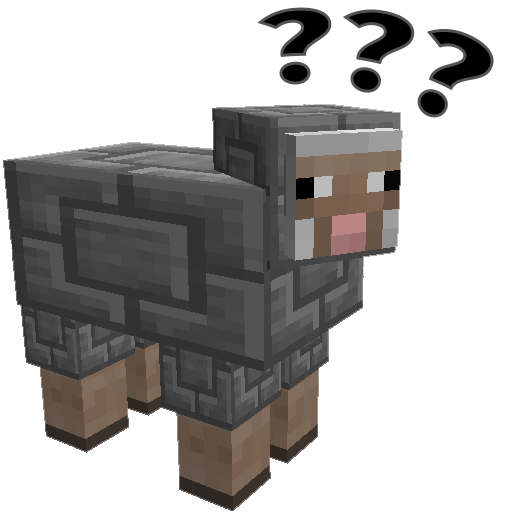
CurseForge · Minecraft mod
Shear Madness
Chisel - For Sheep
Choose a version Pick your version below, then grab the matching file.
Quick answer
Which Shear Madness release should I use?
Latest stable file shearmadness-1.16.(3,4)-1.7.2.12.jar
Game version 1.16.3, 1.16.4
Loader Forge
Shear Madness shearmadness-1.16.(3,4)-1.7.2.12.jar targets 1.16.3, 1.16.4 with Forge. The project page does not say whether this file belongs on the client, dedicated server, or both. No extra mods listed for this file.
Where it goes
Is Shear Madness required on the client, server, or both?
The project page does not say whether this file belongs on the client, dedicated server, or both.
Client Source doesn’t say
Dedicated server Source doesn’t say
Loader for this release Forge
Required install it here Optional supported, not mandatory Not supported do not install here Source doesn’t say do not assume
The source does not explicitly classify this release as client-only or server-only.
What else does Shear Madness shearmadness-1.16.(3,4)-1.7.2.12.jar need?
shearmadness-1.16.(3,4)-1.7.2.12.jar. Change the file and its required mods may change too.
This file does not list any required mods. Do not add a library just because a different file uses it.
This file does not list any required or optional mods.
Before you install it
Add Shear Madness without breaking your instance.
Built for Shear Madness shearmadness-1.16.(3,4)-1.7.2.12.jar. Pick another file and the loader, install side or required mods may change.
- 01
Stick to this file
Use shearmadness-1.16.(3,4)-1.7.2.12.jar. It targets 1.16.3, 1.16.4 with Forge; another release may have different loader, side or dependency requirements.
- 02
Bring the mods it needs
This file does not list any required mods. Do not add a library just because a different file uses it.
- 03
Put it on the correct side
The project page does not say whether this file belongs on the client, dedicated server, or both.
- 04
Pick the file you checked
Use the “Get this file” button beside shearmadness-1.16.(3,4)-1.7.2.12.jar. It opens that exact file at the source.
About this project
What does Shear Madness add?
Shear Madness
A stupid mod about making sheep more aesthetically pleasing.
Manual for chiselling sheep
Prerequisites
Versions for Mineraft 1.15 and lower REQUIRE chisel 0.0.7.7 or higher to use this mod. For Minecraft 1.16+ the mod will work with chisel, but can work on it's own.
Chiseling a sheep
- Make a iron or diamond chisel, (or a "Not a chisel" if neither of them are available) and right click to open the chisel preview.
- Insert the block you wish to chisel the sheep with into the preview slot on the top-left hand side
- Leave the menu
- Left-Click on the Sheep you wish to chisel.
- Sheep should now be very confused, and a block will be removed from the chisel.
Unchiseling a sheep
- Left-Click on a sheep when no item is in the preview slot, the block will be returned to you.
Functional Sheep (1.1.0 and higher)
Certain sheep now have behaviours associated with them:
- Redstone Sheep will trigger redstone signals
- TNT Sheep will explode if exposed to redstone
- Glowstone Sheep will light the area around them
- This is disabled by default because of the stuttering of it recalculating chunk lighting.
- Chisel blocks with "working" fans cause sheep to fly
- Crafting Table sheep work as crafting tables
- Anvil sheep work as Anvils
- Cactus sheep deal cactus damage and will destroy items
- Magma sheep deal "walking on fire" damage.
- Crafting Table Sheep will auto-craft according to the recipe.
- Leave your items in the sheep and it will eat any items it sees to produce the result.
- (1.5.0) Chance Cube Sheep
Commands
/shearmadness chancecubes
Opts in or out for Chance Cube sheep.
Configuration Options
Shearing Behaviour
Shear Madness supports changing the behaviour of what happens when you attempt to shear a sheep, this option can be modified in shearmadness.cfg in the /config/ directory.
S:behaviour controls the shearing behaviour.
By default, shearing a sheep will return it to a vanilla sheep, but the following other options are available:
- RevertSheep - The Default, changes the sheep back to a vanilla sheep
- ChiselFarm - You can farm blocks by allowing the sheep to regrow. Not recommended for server owners as it currently allows users to grow diamond, iron and redstone blocks from sheep.
- CannotShear - Shearing is completely disabled for these sheep. They will need to be reverted to normal before they can be sheared again.
Breeding Behaviour (1.7.0)
S:breedingBehaviour will determine what happens when two sheep mate with each other.
- Unchiseled - The default, baby sheep will be normal sheep
- SimpleBreeding - Baby sheep will be chiselled the same as either the mother or the father (50% chance)
Functional Behaviours
You can change whether specialized sheep function or not using their configuration sections. Check the shearmadness.cfg file for details.
Future Development
I have lots of ideas for other shearing behaviours and other features. Feel free to drop ideas or bugs to my GitHub tracker, other feedback is welcome here and on Twitter.
FAQ
Will I be able to chisel pigs and other mobs in the future?
I'm not really planning on it, sheep have a nice layering system that separates the body from it's wool.
Your mod is one big dupe glitch!
I know, that's why I released 1.0 with shearing behaviours. Set it appropriately.
A huge thanks to TTFTCUTS for the name
Project description from CurseForge.
Pick your setup
Shear Madness by Minecraft version and loader
Choose the version and loader you play, then open the matching release.
Minecraft version
1.16.3
2 loader buildsMinecraft version
1.16.2
1 loader buildMinecraft version
1.12.2
1 loader buildMinecraft version
1.12.1
1 loader buildMinecraft version
1.11.2
1 loader buildMinecraft version
1.10.2
1 loader buildMinecraft version
1.10.1
1 loader buildMinecraft version
1.10
1 loader buildCheck the dependencies, then try the file in a copied instance before changing a world you care about.
Recent files
Shear Madness versions and loaders
shearmadness-1.16.(3,4)-1.7.2.12.jar
19 Nov 2020
Client Source doesn’t say Server Source doesn’t say Dependencies No extras listed Listed on Release listing
Check the 1.16.4 · Forge setup 1.16.3Forge1.16.4 release
shearmadness-1.16.3-1.7.2.10.jar
6 Oct 2020
Client Source doesn’t say Server Source doesn’t say Dependencies No extras listed Listed on Release listing
Check the 1.16.3 setup 1.16.31.16.2 beta
shearmadness-1.12.2-1.7.2.4.jar
18 Oct 2018
Client Source doesn’t say Server Source doesn’t say Dependencies 1 required · 1 unchecked Listed on Release listing
Check the 1.12.2 setup 1.12.11.12.2 release
shearmadness-1.11.2-1.7.1.7.jar
22 May 2018
Client Source doesn’t say Server Source doesn’t say Dependencies 2 required · 2 unchecked Listed on Release listing
Check the 1.11.2 setup 1.11.2 release
shearmadness-1.10.2-1.7.1.6.jar
22 May 2018
Client Source doesn’t say Server Source doesn’t say Dependencies 2 required · 2 unchecked Listed on Release listing
Check the 1.10.2 setup 1.10.2 release
shearmadness-1.12.1-1.7.0.3.jar
21 Sept 2017
Client Source doesn’t say Server Source doesn’t say Dependencies 1 required · 1 unchecked Listed on Release listing
Check the 1.12.2 setup 1.12.11.12.2 release
shearmadness-1.11.2-1.7.0.6.jar
9 May 2017
Client Source doesn’t say Server Source doesn’t say Dependencies 1 required · 1 unchecked Listed on Release listing
Check the 1.11.2 setup 1.11.2 release
shearmadness-1.10.2-1.7.0.4.jar
9 May 2017
Client Source doesn’t say Server Source doesn’t say Dependencies 1 required · 1 unchecked Listed on Release listing
Check the 1.10.2 setup 1.10.2 release
shearmadness-1.11.2-1.6.0.4.jar
24 Apr 2017
Client Source doesn’t say Server Source doesn’t say Dependencies 1 required · 1 unchecked Listed on Release listing
Check the 1.11.2 setup 1.11.2 beta
shearmadness-1.10.2-1.5.1.jar
12 Apr 2017
Client Source doesn’t say Server Source doesn’t say Dependencies 1 required · 1 unchecked Listed on Release listing
Check the 1.10.2 setup 1.10.2 release
shearmadness-1.10.2-1.5.0.jar
9 Mar 2017
Client Source doesn’t say Server Source doesn’t say Dependencies 1 required · 1 unchecked Listed on Release listing
Check the 1.10.2 setup 1.10.2 release
shearmadness-1.10.2-1.4.1.jar
5 Jan 2017
Client Source doesn’t say Server Source doesn’t say Dependencies 1 required · 1 unchecked Listed on Release listing
Check the 1.10.2 setup 1.10.2 release
Looking for an older file? The official CurseForge project page is in Resources.
 mod
mod CurseForge · Minecraft
Functional-Storage-JS
Allows you to add new Functional Storage Drawers and Upgrades using KubeJS!
 mod
mod CurseForge · Minecraft
Punishment Gear
Become a war-hardened vigilante. Tiered ballistic armor for TaCZ that turns bullet resistance into real progression, with a last-resort mechanic for when the odds turn against you.
 mod
mod CurseForge · Minecraft
TFC Food Sync Fix
Client-side fix for TFC food ingredients missing in JEI usage index on dedicated servers