Quick answer
Which In-Game Art (IGA) release should I use?
Latest stable file Custom Paintings 1.11-3b
Game version 1.11
Loader Not required
In-Game Art (IGA) Custom Paintings 1.11-3b targets 1.11. The project page does not say whether this file belongs on the client, dedicated server, or both. All 1 required mods have matching files.
Where it goes
Is In-Game Art (IGA) required on the client, server, or both?
The project page does not say whether this file belongs on the client, dedicated server, or both.
Client Source doesn’t say
Dedicated server Source doesn’t say
Loader for this release No loader listed
Required install it here Optional supported, not mandatory Not supported do not install here Source doesn’t say do not assume
The source does not explicitly classify this release as client-only or server-only.
What else does In-Game Art (IGA) Custom Paintings 1.11-3b need?
Custom Paintings 1.11-3b. Change the file and its required mods may change too.
Install HammerLib first. We found matching files for this game-version and loader setup.
HammerLib Needed by In-Game Art (IGA) Custom Paintings 1.11-3b requiredMatching file found Matched file: [1.11] HammerCore - 1.2.1
We only count dependency files that match this setup. A file for another loader does not fill the gap.
Before you install it
Add In-Game Art (IGA) without breaking your instance.
Built for In-Game Art (IGA) Custom Paintings 1.11-3b. Pick another file and the loader, install side or required mods may change.
- 01
Stick to this file
Use Custom Paintings 1.11-3b. It targets 1.11; another release may have different loader, side or dependency requirements.
- 02
Bring the mods it needs
Install HammerLib first. We found matching files for this game-version and loader setup.
- 03
Put it on the correct side
The project page does not say whether this file belongs on the client, dedicated server, or both.
- 04
Pick the file you checked
Use the “Get this file” button beside Custom Paintings 1.11-3b. It opens that exact file at the source.
About this project
What does In-Game Art (IGA) add?
What this mod does:
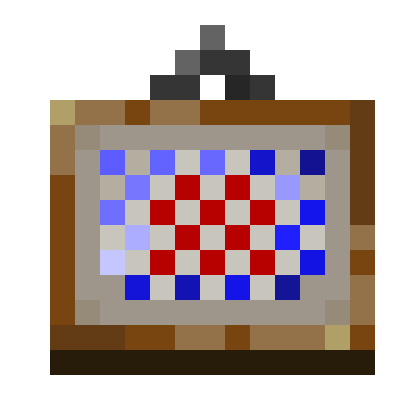
- It expands Minecraft's predefined paintings, by allowing players to draw their unique paintings.
Advantages:
- Allows for the creation of user-drawn 16 by 16 paintings, that can be placed on any wall to decorate it.
- Paintings don't have any borders normally. Can be drawn, of course.
- Paintings load to OpenGL as a texture and cause no lags.
- You can copy-paste images from paint.net, or browser. It fits images into a 16x16 draw grid.
How to use:
- Obtain yourself a "Painting Canvas", place it, and start drawing.
- Once you have finished your art, hold "Custom Painting" in your hand, and right-click on the top side of "Painting Canvas".
- Place painting into the world.
- Enjoy!
Good luck with drawing!

Permissions:
- You can use this mod in your modpack.
- You are not allowed to re-publish this mod to other sites without providing a CurseForge download link and my permission (PM to
 Zeitheron, or via Discord)
- You are not allowed to include this (or any other mods of the DragonForge team) in your own mod. Building add-ons, however, is allowed, but a friendly PM would be good.
Note:
- The only supported version of Minecraft is the latest one that this mod exists for. DO NOT ASK TO DOWNGRADE!

Want to discuss anything? Need help with APIs?
Join the discord server and follow Zeitheron on  Twitter!
If you would like to support my work, you can become a patron via  Patreon.
Project description from CurseForge.
Pick your setup
In-Game Art (IGA) by Minecraft version and loader
Choose the version and loader you play, then open the matching release.
Minecraft version
1.11
1
loader build Minecraft version
1.10.2
1
loader build Check the dependencies, then try the file in a copied instance before changing a world you care about.
Recent files
In-Game Art (IGA) versions and loaders
Custom Paintings 1.11-3b.jar
16 Dec 2016
Client Source doesn’t say Server Source doesn’t say Dependencies 1 required · matched Listed on Release listing
Check the 1.11 setup → Custom Paintings 1.10.2-2b.jar
1 Nov 2016
Client Source doesn’t say Server Source doesn’t say Dependencies 1 required · 1 unchecked Listed on Release listing
Check the 1.10.2 setup → Custom Paintings 1.10.2-1a.jar
1 Nov 2016
Client Source doesn’t say Server Source doesn’t say Dependencies 1 required · 1 unchecked Listed on Release listing
Check the 1.10.2 setup →