Minecraft version
Back to mods 
CurseForge · Minecraft mod
SignPicture
The sign tells us how beautiful it is!
Choose a version Pick your version below, then grab the matching file.
Quick answer
Which SignPicture release should I use?
Latest stable file SignPicture-1.12.1-2.8.1
Game version 1.12.1, 1.12.2
Loader Not required
SignPicture-1.12.1-2.8.1 targets 1.12.1, 1.12.2. The project page does not say whether this file belongs on the client, dedicated server, or both. No extra mods listed for this file.
Where it goes
Is SignPicture required on the client, server, or both?
The project page does not say whether this file belongs on the client, dedicated server, or both.
Client Source doesn’t say
Dedicated server Source doesn’t say
Loader for this release No loader listed
Required install it here Optional supported, not mandatory Not supported do not install here Source doesn’t say do not assume
The source does not explicitly classify this release as client-only or server-only.
What else does SignPicture-1.12.1-2.8.1 need?
SignPicture-1.12.1-2.8.1. Change the file and its required mods may change too.
This file does not list any required mods. Do not add a library just because a different file uses it.
This file does not list any required or optional mods.
Before you install it
Add SignPicture without breaking your instance.
Built for SignPicture-1.12.1-2.8.1. Pick another file and the loader, install side or required mods may change.
- 01
Stick to this file
Use SignPicture-1.12.1-2.8.1. It targets 1.12.1, 1.12.2; another release may have different loader, side or dependency requirements.
- 02
Bring the mods it needs
This file does not list any required mods. Do not add a library just because a different file uses it.
- 03
Put it on the correct side
The project page does not say whether this file belongs on the client, dedicated server, or both.
- 04
Pick the file you checked
Use the “Get this file” button beside SignPicture-1.12.1-2.8.1. It opens that exact file at the source.
About this project
What does SignPicture add?
What's this mod about?
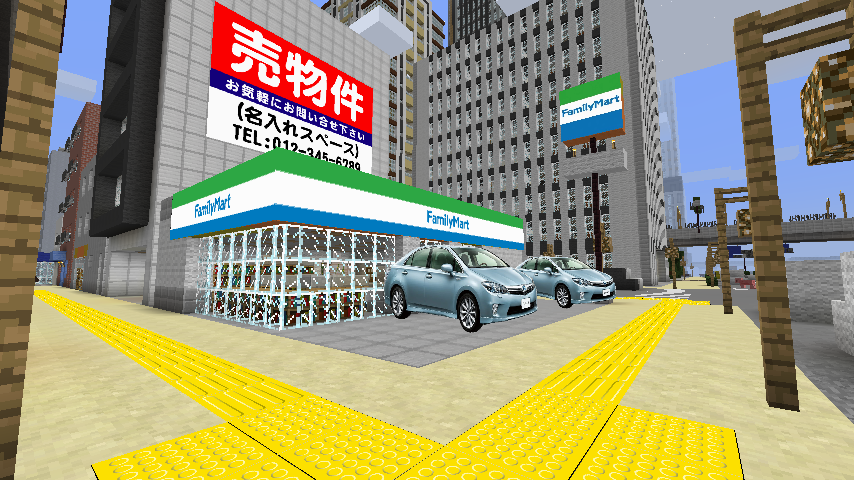
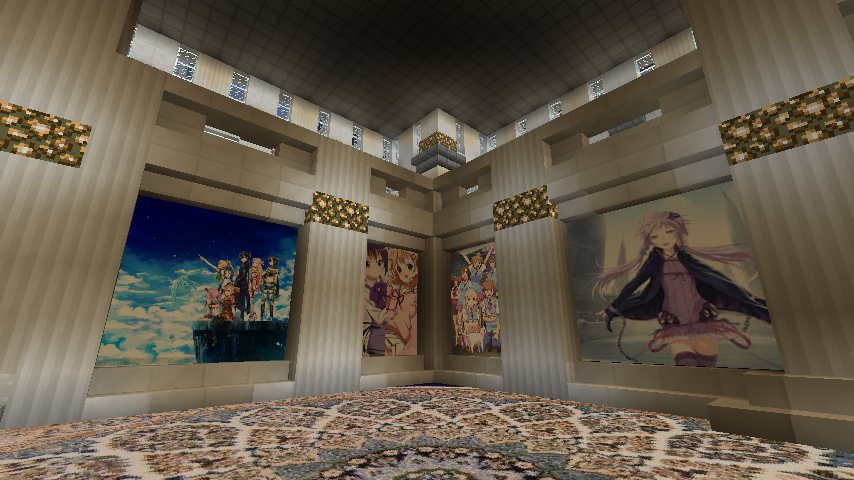
This client-sided mod invites you into a world of image, in both singleplayer and multiplayer. It works out of the box, and will show you a new wonderful world!
- It displays a sign along a particular format as an image.
- It provides a GUI to make the sign of the image easily.
- It is a pure client-sided mod, no need to place it in a server, it appears in the same way to all players who have this mod on.
Documentation
Installing the mod
1. Make sure Forge is installed
2. Put the .jar in your mods folder
3. Run the game!
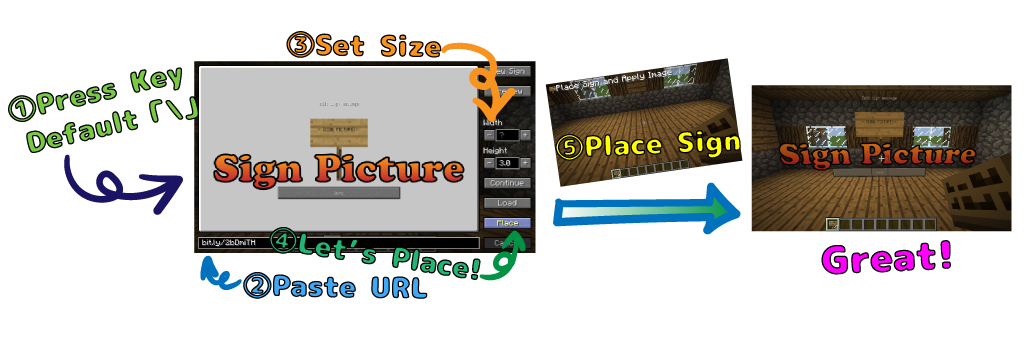
How to use the mod

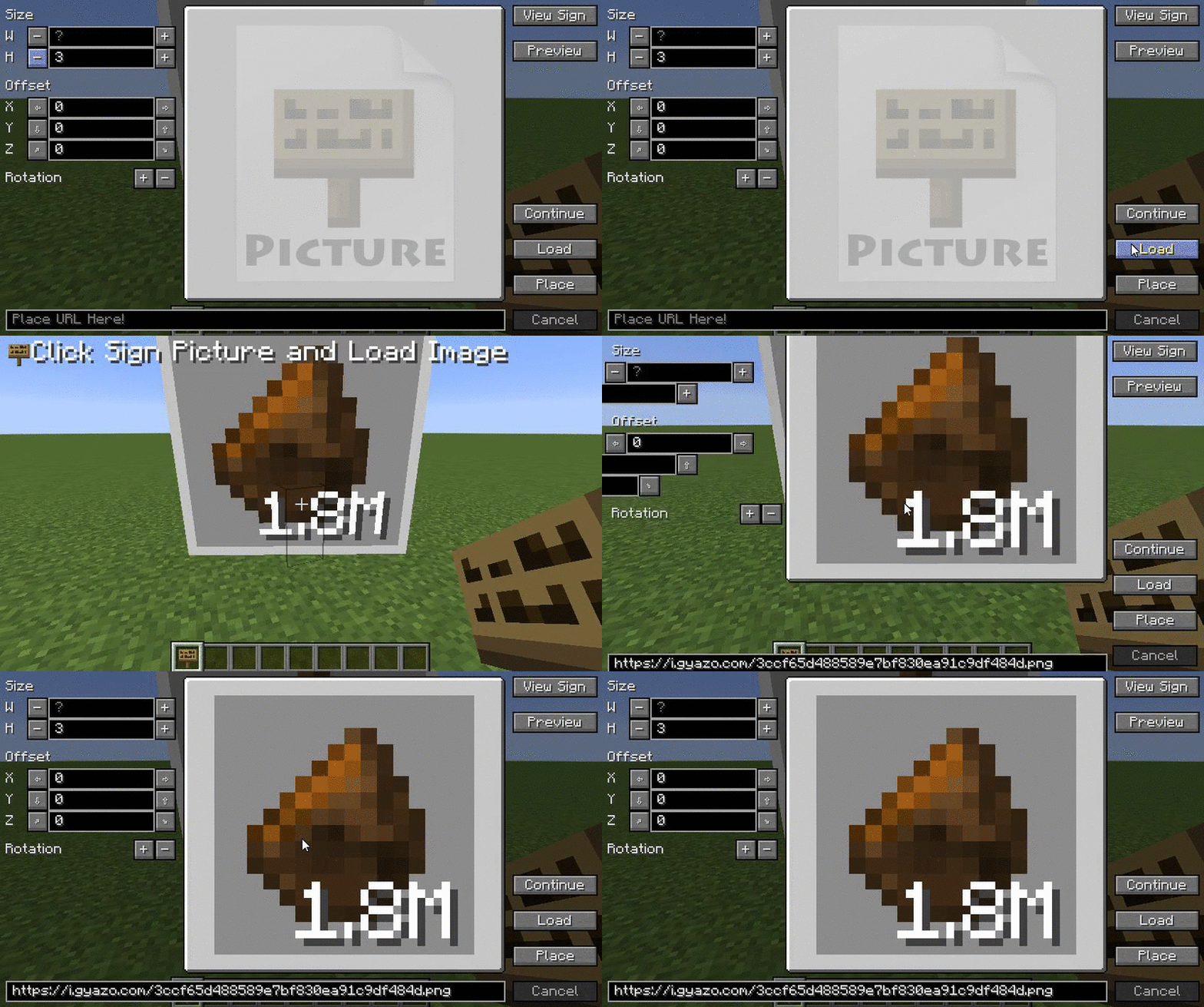
1. Press "" Key
2. Paste URL and some of the settings
3. Press "Place" Button
4. Place a sign!
Tips
- "Size" is image size. (W=Width, H=Height)
- "Offset" is image offset. (X=Left&Right, Y=Down&Up, Z=Back&Front)
- "Rotation" is image rotation.
Click "X" button to switch X, Y or X axis.
number is angle (8=360°).
"↑" or "↓" change order of rotation.
- "+" And "-" button is by usually = 1, one by Shift combination = 0.1, it can be adjusted by Ctrl combination = 0.01.
- Text box can be deleted by right-clicking.
- If the size is left blank ( "?"), It will be displayed with the aspect ratio of the image.
- "View Sign" to show raw text signs.
- "Preview" to set preview location. You can set more visually by using the preview function.
- "Continue" mode can be carried out continuously by using in combination with other functions.
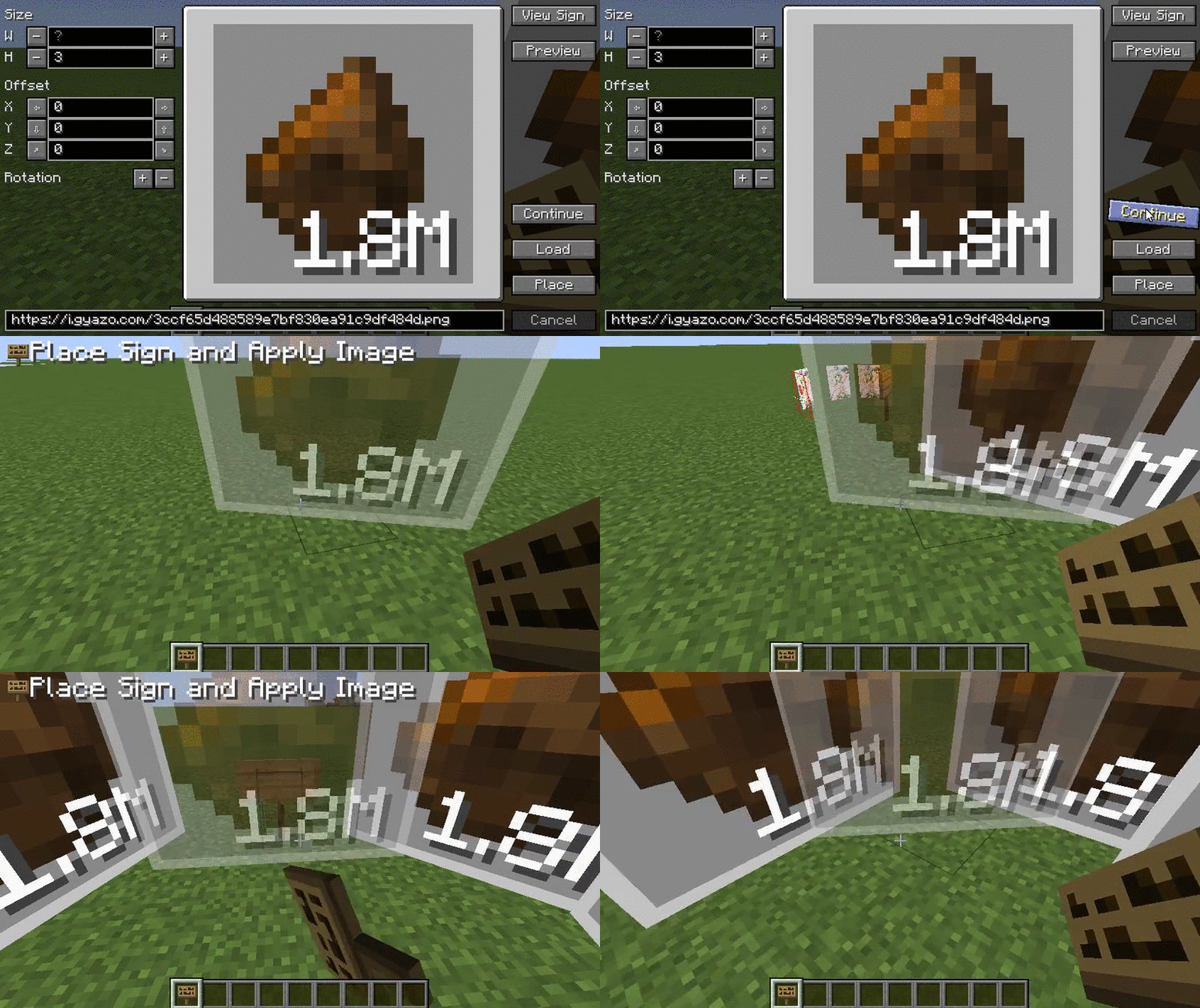
- "Load" mode can load an image you have already installed in the world in the load function.
- "Place" mode to place sign in the world!
- "Cancel" mode to cancel task.
Compatibility Sign Picture works with almost any mod. The main conflicting mod are those that rewrite the rendering of the sign.
FAQ
I have a bug to report/suggestion to make!
If you find a bug or have an idea to improve this mod, contribute to the issue list!
I want SignPicture in my modpack!
Sign Picture is under the LGPLv3. Feel free to redistribute it! My only request is to provide a link to either this thread or the mod's website.
I would like to contribute!
If you feel like doing some modifications, the source code of this mod is freely available here. Feel free to improve it by adding new features or fixing bugs!
I want to help translating!
Translation are welcome. Please pull a request here.
This page also will be saved and me translated into English from Japanese forum.
Special Thanks
- to Kamesuta for creating this mod,
- to Notch for Minecraft,
- Lex for MinecraftForge,
- all contributors,
- And of course, to every minecrafter who took their own time to report bugs and/or leave supporting comments!
Project description from CurseForge.
Pick your setup
SignPicture by Minecraft version and loader
Choose the version and loader you play, then open the matching release.
Minecraft version
1.12.1
1 loader buildMinecraft version
1.12
1 loader buildMinecraft version
1.11.2
1 loader buildMinecraft version
1.11
1 loader buildMinecraft version
1.10.2
1 loader buildMinecraft version
1.9.4
1 loader buildMinecraft version
1.8.9
1 loader buildMinecraft version
1.8.8
1 loader buildMinecraft version
1.7.10
1 loader buildCheck the dependencies, then try the file in a copied instance before changing a world you care about.
Recent files
SignPicture versions and loaders
SignPicture-1.12.1-2.8.1
SignPicture-1.12.1-2.8.1-universal.jar
15 Aug 2017
Client Source doesn’t say Server Source doesn’t say Dependencies No extras listed Listed on Release listing
Check the 1.12.2 setup 1.12.11.12.2 release
SignPicture-1.12-2.8.1
SignPicture-1.12-2.8.1-universal.jar
14 Jul 2017
Client Source doesn’t say Server Source doesn’t say Dependencies No extras listed Listed on Release listing
Check the 1.12 setup 1.12 release
SignPicture-1.11.2-2.8.0
SignPicture-1.11.2-2.8.0-universal.jar
14 Jul 2017
Client Source doesn’t say Server Source doesn’t say Dependencies No extras listed Listed on Release listing
Check the 1.11.2 setup 1.11.2 release
SignPicture-1.10.2-2.8.0
SignPicture-1.10.2-2.8.0-universal.jar
14 Jul 2017
Client Source doesn’t say Server Source doesn’t say Dependencies No extras listed Listed on Release listing
Check the 1.10.2 setup 1.10.2 release
SignPicture-1.9.4-2.8.0
SignPicture-1.9.4-2.8.0-universal.jar
14 Jul 2017
Client Source doesn’t say Server Source doesn’t say Dependencies No extras listed Listed on Release listing
Check the 1.9.4 setup 1.9.4 release
SignPicture-1.8.9-2.8.0
SignPicture-1.8.9-2.8.0-universal.jar
14 Jul 2017
Client Source doesn’t say Server Source doesn’t say Dependencies No extras listed Listed on Release listing
Check the 1.8.9 setup 1.8.9 release
SignPicture-1.7.10-2.8.0
SignPicture-1.7.10-2.8.0-universal.jar
14 Jul 2017
Client Source doesn’t say Server Source doesn’t say Dependencies No extras listed Listed on Release listing
Check the 1.7.10 setup 1.7.10 release
SignPicture-1.12-2.7.1
SignPicture-1.12-2.7.1-universal.jar
11 Jun 2017
Client Source doesn’t say Server Source doesn’t say Dependencies No extras listed Listed on Release listing
Check the 1.12 setup 1.12 release
SignPicture-1.8.8-2.7.1
SignPicture-1.8.8-2.7.1-universal.jar
8 Mar 2017
Client Source doesn’t say Server Source doesn’t say Dependencies No extras listed Listed on Release listing
Check the 1.8.8 setup 1.8.8 release
SignPicture-1.11.2-2.7.1
SignPicture-1.11.2-2.7.1-universal.jar
16 Jan 2017
Client Source doesn’t say Server Source doesn’t say Dependencies No extras listed Listed on Release listing
Check the 1.11.2 setup 1.11.2 release
SignPicture-1.11-2.7.1
SignPicture-1.11-2.7.1-universal.jar
16 Jan 2017
Client Source doesn’t say Server Source doesn’t say Dependencies No extras listed Listed on Release listing
Check the 1.11 setup 1.11 release
SignPicture-1.10.2-2.7.1
SignPicture-1.10.2-2.7.1-universal.jar
16 Jan 2017
Client Source doesn’t say Server Source doesn’t say Dependencies No extras listed Listed on Release listing
Check the 1.10.2 setup 1.10.2 release
Looking for an older file? The official CurseForge project page is in Resources.
 mod
mod CurseForge · Minecraft
MalisisDoorsReborn
Animated doors and custom door creation with millions of possibilities! — Re-imagined from the original MalisisDoors mod by Ordinastie.
 mod
mod CurseForge · Minecraft
Create More Seats
Mod that adds two types of modern seats for trains and contraptions.
 mod
mod CurseForge · Minecraft
TLM-GFL2 Maid Model Pack
GFL2 Maid Models