Minecraft version
Back to mods 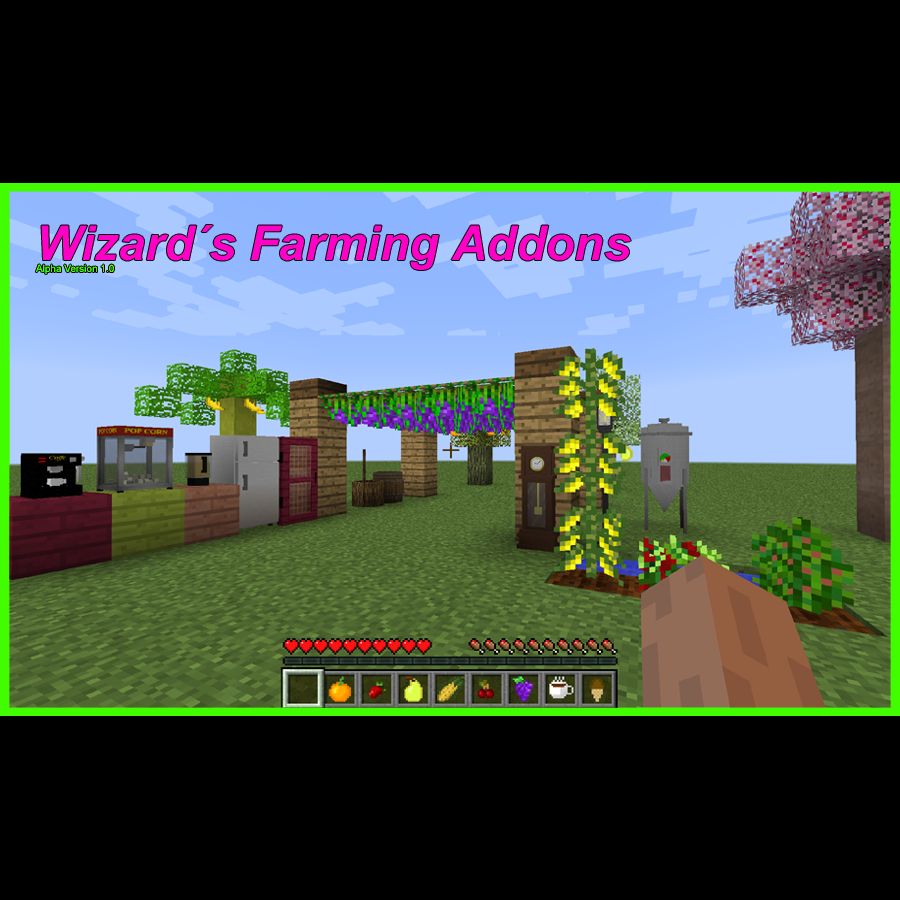
CurseForge · Minecraft mod
Wizard Farming Mod
This mod adds new Trees, Crops, Foods, Machines and other things!
Choose a version Pick your version below, then grab the matching file.
Quick answer
Which Wizard Farming Mod release should I use?
beta file WizardFarm2.0_Beta.jar
Game version 1.15, 1.15.2, 1.15.1
Loader Not required
Wizard Farming Mod WizardFarm2.0_Beta.jar targets 1.15, 1.15.2, 1.15.1. The project page does not say whether this file belongs on the client, dedicated server, or both. No extra mods listed for this file.
Where it goes
Is Wizard Farming Mod required on the client, server, or both?
The project page does not say whether this file belongs on the client, dedicated server, or both.
Client Source doesn’t say
Dedicated server Source doesn’t say
Loader for this release No loader listed
Required install it here Optional supported, not mandatory Not supported do not install here Source doesn’t say do not assume
The source does not explicitly classify this release as client-only or server-only.
What else does Wizard Farming Mod WizardFarm2.0_Beta.jar need?
WizardFarm2.0_Beta.jar. Change the file and its required mods may change too.
This file does not list any required mods. Do not add a library just because a different file uses it.
This file does not list any required or optional mods.
Before you install it
Add Wizard Farming Mod without breaking your instance.
Built for Wizard Farming Mod WizardFarm2.0_Beta.jar. Pick another file and the loader, install side or required mods may change.
- 01
Stick to this file
Use WizardFarm2.0_Beta.jar. It targets 1.15, 1.15.2, 1.15.1; another release may have different loader, side or dependency requirements.
- 02
Bring the mods it needs
This file does not list any required mods. Do not add a library just because a different file uses it.
- 03
Put it on the correct side
The project page does not say whether this file belongs on the client, dedicated server, or both.
- 04
Pick the file you checked
Use the “Get this file” button beside WizardFarm2.0_Beta.jar. It opens that exact file at the source.
About this project
What does Wizard Farming Mod add?
WIZARDFARM MOD

Version 1.15 Beta is Out!
Hello guys!
This mod add new trees, crops, farming machines and new food types.
NEW TREES!!!
-Cherry
-Orange
-Pear
-Banana
NEW CROPS!!!
-Strawberry
-Coffe
-Corn
-Grapes
1.15: SEEDS AND SAPPLINGS ARE OBTAINED WITH THE FARMER CATALOG, BUYING WITH GOLD NUGGETS!
1.10: SEEDS AND SAPPLINGS ARE OBTAINED BY BREAKING GRASS, THEY ARE A LITTLE RARE THOU, BREAK PLENTY!
RECIPES:
Farmer Catalog

Blender

Buttered Bread

Butter Bucket

Raw Coffe Cup

Coffe Grinder

Coffe (without Machine):

Coffe Filter

Coffe Grain (use Peeling Machine for more production)

Corn Grain (use Peeling Machine for more production)

Sweet Coffe

Coffe Dryer Plataform

Machine Water Reservoir

Coffe Machine

Grape Vine Support

Peeling Machine

Fermenter

Barrel

Ice Cream Cone

Ice Creams (on 1.15 replace the chocolate bar for Chocolate Powder)

Old Clock (on 1.15 it have animations and rings at midday and midnight)

PopCorn Machine

The New Woods recipes are like vanilla wood types:


Chocolate Powder (this recipe will change on the future)

Version 1.10 Recipes:
http://www.minecraftforum.net/forums/mapping-and-modding/minecraft-mods/2747709-wizardfarm-mod
JUICES and BLENDER: You can make juices of all the fruits like on the recipes below, or you can right click with a fruit on the Blender, it will make the Juice, then with a Empty Bottle, rightclick the Blender with Juice to get the juice bottle. Each fruit make a different color of texture on the blender, i made my own model but was inspired on MCrayFisher one.
Fruits: Strawberry, Grape, Orange, Cherry, Banana, Pear.
Vanilla: Apple

COFFE PRODUCTION:
Buy Seed on Catalog -> Plant -> Harvest gives x1 Coffe Fruit -> Fruit goes on Coffe Dryer (x10 on each plataform) -> after dry on the Sun you will have x10 Dry Coffe Fruits; you can Peel the dry fruit yourself with a Kitchen Knife OR put them on the Peeling Machine, producing x2 times more Raw Grains -> Furnace -> Roasted Grain -> Coffe Grinder -> Coffe Powder -> Coffe Machine -> Delicious Coffe.
CORN: Corn will grow 3 blocks high, each mature floor can give 1 Corn and 1 Corn Seed back, for post-planting.
POPCORN MACHINE:
Works with Coal; put Corn Seeds on it to get PopCorn (food); the process is animated (the popcorn jumps inside the machine).
GRAPES: To plant grapes you need the Grape Support, after this you place then (with Shift+Click) on at least 3 high on a post, then you add Vines on them, after they grow right click to collect Grapes, you can make juice or ice cream with them.
WINE: Put a Grape Juice Bottle on the Fermenter.
COFFE DRYER:
Put your coffe fruits here to dry, takes some time, make sure the plataform can 'see' the sun (dont put solid blocks above it).
PEELING MACHINE:
Double your Corn or Coffe grain production by peeling the dry fruit on this machine; put Dry Coffe Seed or Corn on it, to get x4 Corn Seed or x4 Coffe Grains from it. You need to have water on this machine for working, each operation consume 1 water recipient.
REFRIGERATOR: Inspired on MCrayFisher, mine is a multi-block structure, the bottom part is a container with custom sound, the upper part, if you right click with a Water Bottle, it will consume it and give you 2 Snowballs, witch you can use for Ice Creams.
ICE CREAM: Can be made of all Juice types plus chocolate, they give more hungry bars than Juice. First you need to make the eatable cones, than the Ice Cream itself. All ice creams are made with Juice except chocolate witch is made with chocolate bars instead, but gives more hungry bars.
OLD CLOCK: that old clock.. eveybody loves it.. This clock have a animated texture on the time (but not sync with minecraft time yet, only passes at the same speed) + custom sounds each tick rate cycle. Enjoy it!
LAMP POST: Its a gas lamp post to turn it on right click it with a Flint and Steel, to turn it off right click on it.
BARREL: just a new container block, match farms designs. (texture and number of slots will change on Beta)
VIDEO PRESENTATION (OLD):
https://www.youtube.com/watch?v=AMCBsiNSfJ8
SPECIAL THANKS:
THIS MOD WAS MADE WITH MCREATOR, PHOTOSHOP, BLOCKBENCH, TECHNE AND CODE EDITING
-MCrayFisher (for ideas)
-Decorcraft Mod (for ideas)
-Nuparu00 (For code helping)
-ArcaneMortis (For code helping)
-Mcreator Team (for Base Coding)
Project description from CurseForge.
Pick your setup
Wizard Farming Mod by Minecraft version and loader
Choose the version and loader you play, then open the matching release.
Minecraft version
1.15.1
1 loader buildMinecraft version
1.15
1 loader buildMinecraft version
1.10.2
1 loader buildMinecraft version
1.10.1
1 loader buildMinecraft version
1.10
1 loader buildCheck the dependencies, then try the file in a copied instance before changing a world you care about.
Recent files
Wizard Farming Mod versions and loaders
WizardFarm2.0_Beta.jar
3 Mar 2021
Client Source doesn’t say Server Source doesn’t say Dependencies No extras listed Listed on Release listing
Check the 1.15.2 setup 1.151.15.21.15.1 beta
WizardFarmBeta.jar
28 Nov 2017
Client Source doesn’t say Server Source doesn’t say Dependencies No extras listed Listed on Release listing
Check the 1.10.2 setup 1.10.21.101.10.1 beta
Wizard´s Farming Addons
WizardFarmAlpha.jar
12 Oct 2016
Client Source doesn’t say Server Source doesn’t say Dependencies No extras listed Listed on Release listing
Check the 1.10.2 setup 1.10.21.101.10.1 alpha
Looking for an older file? The official CurseForge project page is in Resources.
 mod
CurseForge · Minecraft
OrePounce
Enhance vanilla survival with wearable backpacks, smart inventory sorting, vein mining, tree felling, farming, villager rerolls, pet management, and extensive configuration.
 mod
CurseForge · Minecraft
Legendary Delicacies
Farmers Delight compat of Legendary Monsters, vanilla style.
 mod
CurseForge · Minecraft
NeroQuests
One guided path through the whole ecosystem — story missions, daily contracts, faction quests and space-race milestones that turn a pile of mods into a designed journey.