Minecraft version
Back to mods 
CurseForge · Minecraft mod
Queue Box
For all your item queueing needs
Choose a version Pick your version below, then grab the matching file.
Quick answer
Which Queue Box release should I use?
Latest stable file queuebox-1.10.2-1.0.5.jar
Game version 1.10.2
Loader Not required
Queue Box queuebox-1.10.2-1.0.5.jar targets 1.10.2. The project page does not say whether this file belongs on the client, dedicated server, or both. No extra mods listed for this file.
Where it goes
Is Queue Box required on the client, server, or both?
The project page does not say whether this file belongs on the client, dedicated server, or both.
Client Source doesn’t say
Dedicated server Source doesn’t say
Loader for this release No loader listed
Required install it here Optional supported, not mandatory Not supported do not install here Source doesn’t say do not assume
The source does not explicitly classify this release as client-only or server-only.
What else does Queue Box queuebox-1.10.2-1.0.5.jar need?
queuebox-1.10.2-1.0.5.jar. Change the file and its required mods may change too.
This file does not list any required mods. Do not add a library just because a different file uses it.
This file does not list any required or optional mods.
Before you install it
Add Queue Box without breaking your instance.
Built for Queue Box queuebox-1.10.2-1.0.5.jar. Pick another file and the loader, install side or required mods may change.
- 01
Stick to this file
Use queuebox-1.10.2-1.0.5.jar. It targets 1.10.2; another release may have different loader, side or dependency requirements.
- 02
Bring the mods it needs
This file does not list any required mods. Do not add a library just because a different file uses it.
- 03
Put it on the correct side
The project page does not say whether this file belongs on the client, dedicated server, or both.
- 04
Pick the file you checked
Use the “Get this file” button beside queuebox-1.10.2-1.0.5.jar. It opens that exact file at the source.
About this project
What does Queue Box add?
Queue Box is a mod for handling items in queues. As opposed to regular inventories and item handling blocks, items must always be extracted in the order they were inserted.
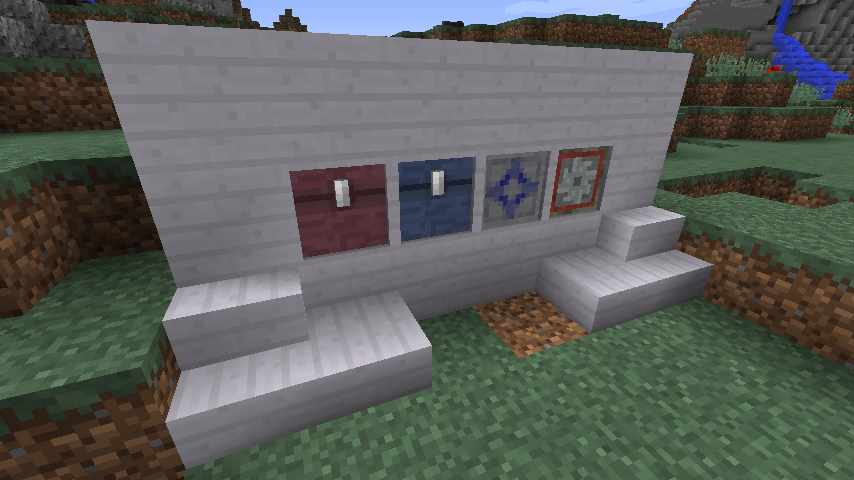
This mod currently provides 4 specialized blocks for different kinds of queued item handling.
Queue Chest
The Queue Chest is, like the vanilla chest, a basic inventory. To get items to move from the input towards the output, there is a GUI button to enable compacting, which will move the entire queue one step towards the output each game tick.
Queue Box
The Queue Box is a more advanced variant of the Queue Chest. It has options to limit input and output stack sizes, toggling stacking on and off, and setting the queue movement tick delay.
Queue Filter
The Queue Filter functions like filter in many other mods, except that it only accepts items in the order defined in the recipe.
Process Queuer
The Process Queuer is a block intended for automation where the order of items used is crucial.
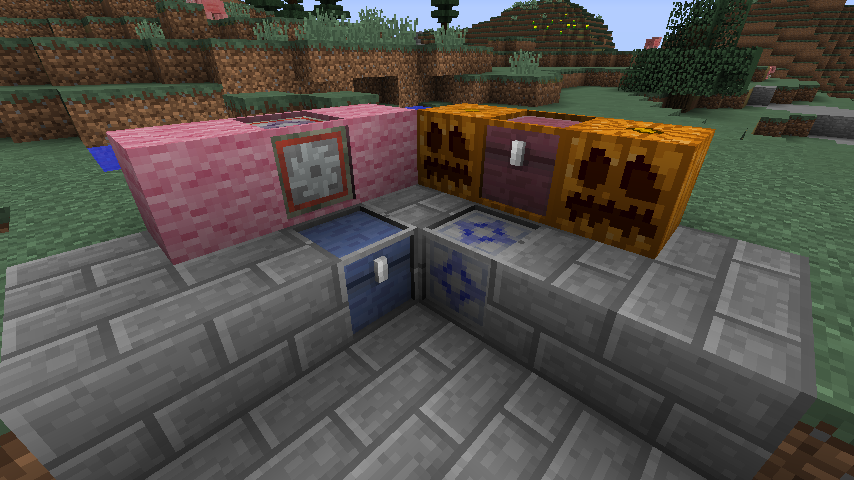
All 4 blocks by default uses models which includes a frame along the edges.
This frame can be painted using the Paintbrush item to look like most regular blocks in Minecraft (and most mods).
Project description from CurseForge.
Pick your setup
Queue Box by Minecraft version and loader
Choose the version and loader you play, then open the matching release.
Check the dependencies, then try the file in a copied instance before changing a world you care about.
Recent files
Queue Box versions and loaders
queuebox-1.10.2-1.0.5.jar
21 Dec 2016
Client Source doesn’t say Server Source doesn’t say Dependencies No extras listed Listed on Release listing
Check the 1.10.2 setup 1.10.2 release
queuebox-1.10.2-1.0.0.jar
12 Dec 2016
Client Source doesn’t say Server Source doesn’t say Dependencies No extras listed Listed on Release listing
Check the 1.10.2 setup 1.10.2 release
Looking for an older file? The official CurseForge project page is in Resources.