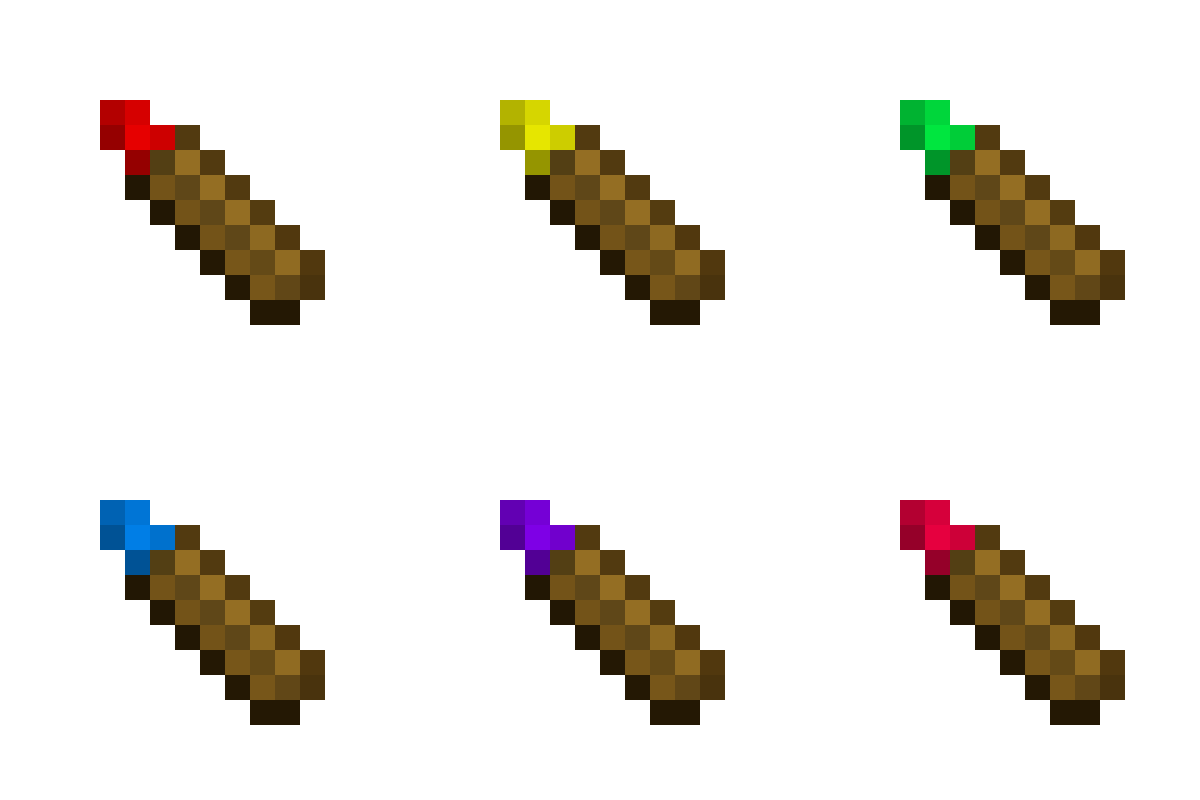
Quick answer
Which Biome Paint Tools release should I use?
Latest stable file [1.12.2] Biome Paint Tools - 1.1.4
Game version 1.12.2
Loader Not required
Biome Paint Tools [1.12.2] Biome Paint Tools - 1.1.4 targets 1.12.2. The project page does not say whether this file belongs on the client, dedicated server, or both. All 1 required mods have matching files.
Where it goes
Is Biome Paint Tools required on the client, server, or both?
The project page does not say whether this file belongs on the client, dedicated server, or both.
Client Source doesn’t say
Dedicated server Source doesn’t say
Loader for this release No loader listed
Required install it here Optional supported, not mandatory Not supported do not install here Source doesn’t say do not assume
The source does not explicitly classify this release as client-only or server-only.
What else does Biome Paint Tools [1.12.2] Biome Paint Tools - 1.1.4 need?
[1.12.2] Biome Paint Tools - 1.1.4. Change the file and its required mods may change too.
Install HammerLib first. We found matching files for this game-version and loader setup.
HammerLib Needed by Biome Paint Tools [1.12.2] Biome Paint Tools - 1.1.4 requiredMatching file found Matched file: [1.12.2] HammerLib - 12.2.66
We only count dependency files that match this setup. A file for another loader does not fill the gap.
Before you install it
Add Biome Paint Tools without breaking your instance.
Built for Biome Paint Tools [1.12.2] Biome Paint Tools - 1.1.4. Pick another file and the loader, install side or required mods may change.
- 01
Stick to this file
Use [1.12.2] Biome Paint Tools - 1.1.4. It targets 1.12.2; another release may have different loader, side or dependency requirements.
- 02
Bring the mods it needs
Install HammerLib first. We found matching files for this game-version and loader setup.
- 03
Put it on the correct side
The project page does not say whether this file belongs on the client, dedicated server, or both.
- 04
Pick the file you checked
Use the “Get this file” button beside [1.12.2] Biome Paint Tools - 1.1.4. It opens that exact file at the source.
About this project
What does Biome Paint Tools add?
This mod is all about drawing with biome pencil.
- What does this mod do?
- It allows people to change biome on certain positions using a pencil.
- How does it work?
- Craft biome pencil. (or use empty pencil)
- Sneak-right-click on the grass (or any other block). This will configure pencil to biome on that position.
- Continue sneak-right-clicking on any block with the same biome to charge pencil.
- Right-click on any block that has a different biome. This will change the biome to what is pencil bound to. Uses 1 charge.
Main recipe:
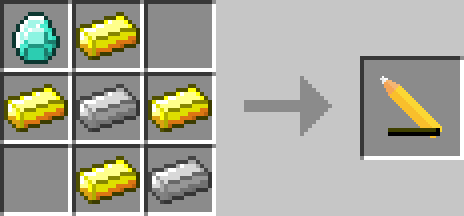
Reset recipe:
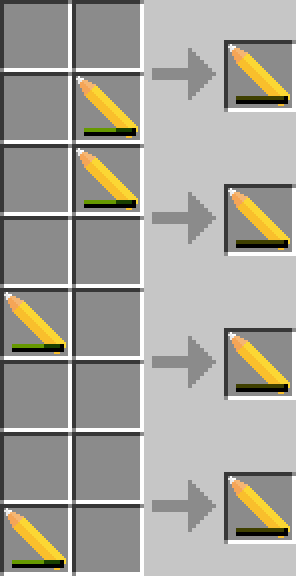

Permissions:
- You can use this mod in your modpack.
- You are not allowed to re-publish this mod to other sites without providing a CurseForge download link and my permission (PM to
 Zeitheron, or via Discord)
- You are not allowed to include this (or any other mods of the DragonForge team) in your own mod. Building add-ons, however, is allowed, but a friendly PM would be good.
Note:
- The only supported version of Minecraft is the latest one that this mod exists for. DO NOT ASK TO DOWNGRADE!

Want to discuss anything? Need help with APIs?
Join the discord server and follow Zeitheron on  Twitter!
If you would like to support my work, you can become a patron via  Patreon.
Project description from CurseForge.
Pick your setup
Biome Paint Tools by Minecraft version and loader
Choose the version and loader you play, then open the matching release.
Minecraft version
1.12.2
1
loader build Minecraft version
1.12.1
1
loader build Minecraft version
1.11.2
1
loader build Minecraft version
1.10.2
1
loader build Check the dependencies, then try the file in a copied instance before changing a world you care about.
Recent files
Biome Paint Tools versions and loaders
BiomePaintTools-1.12.2-1.1.4.jar
2 Jul 2018
Client Source doesn’t say Server Source doesn’t say Dependencies 1 required · matched Listed on Release listing
Check the 1.12.2 setup → BiomePaintTools-1.12.1-1.0.6.jar
7 Sept 2017
Client Source doesn’t say Server Source doesn’t say Dependencies 1 required · 1 unchecked Listed on Release listing
Check the 1.12.1 setup → BiomePaintTools_1.11.2-1.0.5.jar
3 Jun 2017
Client Source doesn’t say Server Source doesn’t say Dependencies 1 required · 1 unchecked Listed on Release listing
Check the 1.11.2 setup → BiomePaintTools_1.11.2-1.0.4.jar
23 Mar 2017
Client Source doesn’t say Server Source doesn’t say Dependencies 1 required · 1 unchecked Listed on Release listing
Check the 1.11.2 setup → BiomePaintTools_1.10.2-1.0.3.jar
20 Jan 2017
Client Source doesn’t say Server Source doesn’t say Dependencies 1 required · 1 unchecked Listed on Release listing
Check the 1.10.2 setup → BiomePaintTools_1.10.2-1.0.2.jar
27 Nov 2016
Client Source doesn’t say Server Source doesn’t say Dependencies 1 required · 1 unchecked Listed on Release listing
Check the 1.10.2 setup → BiomePaintTools_1.10.2-1.0.1.jar
26 Nov 2016
Client Source doesn’t say Server Source doesn’t say Dependencies No extras listed Listed on Release listing
Check the 1.10.2 setup →