Minecraft version
Back to mods 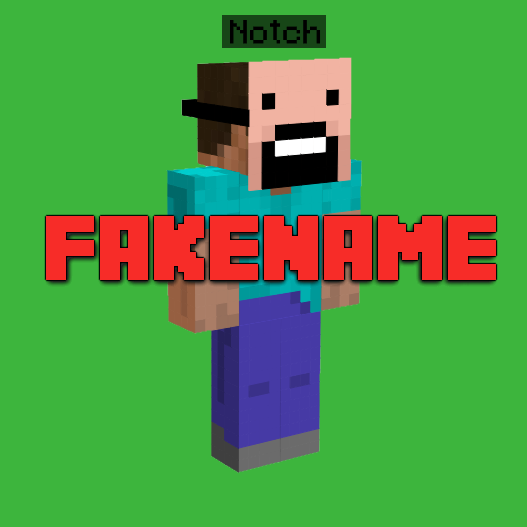
CurseForge · Minecraft mod
Fakename
Fakename adds Commands to change the display name
Choose a version Pick your version below, then grab the matching file.
Quick answer
Which Fakename release should I use?
Latest stable file fakename-1.21.1-1.5.0
Game version 1.21.1
Loader NeoForge
fakename-1.21.1-1.5.0 targets 1.21.1 with NeoForge. The project page does not say whether this file belongs on the client, dedicated server, or both. No extra mods listed for this file.
Where it goes
Is Fakename required on the client, server, or both?
The project page does not say whether this file belongs on the client, dedicated server, or both.
Client Source doesn’t say
Dedicated server Source doesn’t say
Loader for this release NeoForge
Required install it here Optional supported, not mandatory Not supported do not install here Source doesn’t say do not assume
The source does not explicitly classify this release as client-only or server-only.
What else does fakename-1.21.1-1.5.0 need?
fakename-1.21.1-1.5.0. Change the file and its required mods may change too.
This file does not list any required mods. Do not add a library just because a different file uses it.
This file does not list any required or optional mods.
Before you install it
Add Fakename without breaking your instance.
Built for fakename-1.21.1-1.5.0. Pick another file and the loader, install side or required mods may change.
- 01
Stick to this file
Use fakename-1.21.1-1.5.0. It targets 1.21.1 with NeoForge; another release may have different loader, side or dependency requirements.
- 02
Bring the mods it needs
This file does not list any required mods. Do not add a library just because a different file uses it.
- 03
Put it on the correct side
The project page does not say whether this file belongs on the client, dedicated server, or both.
- 04
Pick the file you checked
Use the “Get this file” button beside fakename-1.21.1-1.5.0. It opens that exact file at the source.
About this project
What does Fakename add?
Fakename adds a simple way to change your Display name ingame.
The name does display in Chat, Death Messages and over the Head of the Player.
The name is world/server specific, meaning that it doesn't change your name permanently.
This is not a hack, the server needs to install the mod as well.
To set your fake name, type
/fakename set [player] <fakename>
This will set the player's fake name to the provided fakename. If no player is specified, the sender's fake name will be changed. You can also use color codes, preceded with a &
Example: &6Notch displays as gold.
You can also use white spaces by typing /- (1.12 only) or by using quotes " " (1.15 and above)
In 1.18+, if you want to use colors, you need to enquote the entire fakename with " "
Example: My/-Name/-Is/-Tschipp would display as My Name Is Tschipp (In 1.12)
Example: "My Name Is Tschipp" would display as My Name Is Tschipp (In 1.15+)
You can of course also combine color codes and white spaces.
To clear a fake name, type
/fakename clear [player]
This will remove the provided player's fake name. If no player is specified, the sender's fake name will be removed.
Aliases for the command are /fn and /fname.
You need to be OP on the Server / have Cheats enabled in your world if you want to execute the command.
(Or on 1.15+, you can clear your own name by leaving the player field blank)
To get the real name of a player, type
/realname <fakename> (on 1.12)
or
/fakename real <fakename> (on 1.15+)
If the fake name has any color codes or white spaces, ignore them.
Example: &4Herobrine/-the/-Boss would become HerobrinetheBoss
You can hit tab for auto completion. (Not on 1.15+, known issue)
This will return the the real name of the player with the provided fake name.
Aliases for the command are /rn and /rname. (on 1.12 only)
You do not need to be OP / have Cheats enabled to execute this command.
For 1.15+, you can change the permission levels of the commands in the server config (inside the world folder)
Project description from CurseForge.
Pick your setup
Fakename by Minecraft version and loader
Choose the version and loader you play, then open the matching release.
Minecraft version
1.20.1
2 loader buildsMinecraft version
1.20
2 loader buildsMinecraft version
1.19.2
1 loader buildMinecraft version
1.18.2
1 loader buildMinecraft version
1.18.1
1 loader buildMinecraft version
1.16.5
1 loader buildMinecraft version
1.16.4
1 loader buildMinecraft version
1.16.3
1 loader buildMinecraft version
1.16.2
1 loader buildMinecraft version
1.16.1
1 loader buildMinecraft version
1.15.2
1 loader buildShowing the newest 12 of 18 game versions. Older files are in the list below.
Check the dependencies, then try the file in a copied instance before changing a world you care about.
Recent files
Fakename versions and loaders
fakename-1.21.1-1.5.0
fakename-1.5.0.jar
3 May 2025
Client Source doesn’t say Server Source doesn’t say Dependencies No extras listed Listed on Release listing
Check the 1.21.1 · NeoForge setup NeoForge1.21.1 release
fakename-1.20.1-1.3.1
fakename-1.20.1-1.3.1.jar
3 Sept 2023
Client Source doesn’t say Server Source doesn’t say Dependencies No extras listed Listed on Release listing
Check the 1.20.1 · NeoForge setup NeoForge1.20.1Forge1.20 beta
fakename-1.19.2-1.3.1
fakename-1.19.2-1.3.1.jar
1 Oct 2022
Client Source doesn’t say Server Source doesn’t say Dependencies No extras listed Listed on Release listing
Check the 1.19.2 · Forge setup 1.19.2Forge release
fakename-1.18.1-1.3.5
fakename-1.18.1-1.3.5.jar
17 Feb 2022
Client Source doesn’t say Server Source doesn’t say Dependencies No extras listed Listed on Release listing
Check the 1.18.2 · Forge setup 1.18.11.18.2Forge release
fakename-1.16.2-1.4.0.9
fakename-1.16.2-1.4.0.9.jar
15 Aug 2020
Client Source doesn’t say Server Source doesn’t say Dependencies No extras listed Listed on Release listing
Check the 1.16.5 · Forge setup 1.16.31.16.5Forge1.16.4 release
fakename-1.16.1-1.4.0.2
fakename-1.16.1-1.4.0.2.jar
6 Aug 2020
Client Source doesn’t say Server Source doesn’t say Dependencies No extras listed Listed on Release listing
Check the 1.16.1 · Forge setup 1.16.1Forge beta
fakename-1.15.2-1.3.3
fakename-1.15.2-1.3.3.jar
5 Aug 2020
Client Source doesn’t say Server Source doesn’t say Dependencies No extras listed Listed on Release listing
Check the 1.15.2 · Forge setup 1.15.2Forge beta
Fakename MC1.12.2 v1.2
Fakename MC1.12.2 v1.2.jar
5 Jul 2019
Client Source doesn’t say Server Source doesn’t say Dependencies No extras listed Listed on Release listing
Check the 1.12.2 setup 1.12.2 release
Fakename MC1.12.2 v1.1
Fakename MC1.12.2 v1.1.jar
12 Jan 2018
Client Source doesn’t say Server Source doesn’t say Dependencies No extras listed Listed on Release listing
Check the 1.12.2 setup 1.12.11.121.12.2 release
Fakename MC1.11.2 v1.0
Fakename MC1.11.2 v1.0.jar
8 Feb 2017
Client Source doesn’t say Server Source doesn’t say Dependencies No extras listed Listed on Release listing
Check the 1.11.2 setup 1.11.2 release
Fakename MC1.7.10 v1.0
Fakename MC1.7.10 v1.0.jar
20 Jan 2017
Client Source doesn’t say Server Source doesn’t say Dependencies No extras listed Listed on Release listing
Check the 1.7.10 setup 1.7.10 release
Fakename MC1.10.2 v1.0.1
Fakename MC1.10.2 v1.2.jar
12 Jan 2017
Client Source doesn’t say Server Source doesn’t say Dependencies No extras listed Listed on Release listing
Check the 1.10.2 setup 1.10.2 release
Looking for an older file? The official CurseForge project page is in Resources.
 mod
CurseForge + Modrinth · Minecraft
OmniVault
All-in-one storage that grows from a chest network on day one to channel-free cell drives, autocrafting and quantum bridges, plus vaults, drawers and backpacks.
 mod
CurseForge + Modrinth · Minecraft
Brightness Aura
Darkness? Never heard of it
 mod
CurseForge + Modrinth · Minecraft
Remnants | RPG Stats, Skills & Progression
Soulslike leveling for Minecraft: stage attribute points, preview every stat before and after, and confirm your build in one press.