Quick answer
Which Void Island Control release should I use?
Latest stable file voidislandcontrol-1.5.3.jar
Game version 1.12.2
Loader Not required
Void Island Control voidislandcontrol-1.5.3.jar targets 1.12.2. The project page does not say whether this file belongs on the client, dedicated server, or both. No extra mods listed for this file.
Where it goes
Is Void Island Control required on the client, server, or both?
The project page does not say whether this file belongs on the client, dedicated server, or both.
Client Source doesn’t say
Dedicated server Source doesn’t say
Loader for this release No loader listed
Required install it here Optional supported, not mandatory Not supported do not install here Source doesn’t say do not assume
The source does not explicitly classify this release as client-only or server-only.
What else does Void Island Control voidislandcontrol-1.5.3.jar need?
voidislandcontrol-1.5.3.jar. Change the file and its required mods may change too.
This file does not list any required mods. Do not add a library just because a different file uses it.
2 listed on this file 4 pulled in by those mods
Botania Optional for Void Island Control voidislandcontrol-1.5.3.jar optionalMatching file found Matched file: Botania r1.10-364.4.jar
Matching file found Matched file: GardenOfGlass.jar
Matching file found Matched file: Baubles-1.12-1.5.2.jar
Matching file found Matched file: 4.22.0.1034 for Forge 1.12.2
Matching file found Matched file: Quark-r1.6-179.jar
Matching file found Matched file: AutoRegLib-1.3-32.jar
4
extra mods were pulled in by other dependencies.
Indented rows show who needs each one. We only count dependency files that match this setup. A file for another loader does not fill the gap.
Before you install it
Add Void Island Control without breaking your instance.
Built for Void Island Control voidislandcontrol-1.5.3.jar. Pick another file and the loader, install side or required mods may change.
- 01
Stick to this file
Use voidislandcontrol-1.5.3.jar. It targets 1.12.2; another release may have different loader, side or dependency requirements.
- 02
Bring the mods it needs
This file does not list any required mods. Do not add a library just because a different file uses it.
- 03
Put it on the correct side
The project page does not say whether this file belongs on the client, dedicated server, or both.
- 04
Pick the file you checked
Use the “Get this file” button beside voidislandcontrol-1.5.3.jar. It opens that exact file at the source.
About this project
What does Void Island Control add?
NOTE: CURRENTLY NOT BEING UPDATED OR SUPPORTED.
FOR INSTRUCTIONS ON HOW TO DO CUSTOM ISLANDS....LOOK DOWN ON THIS PAGE!
Adds a world type for a "void" world that works for multiplayer and teams.
Basic Instructions
- Make sure CompatLayer is installed (1.10/1.11 Only)
- Choose the world type Void? World in single-player, or voidworld on servers.
- Type /island create <optional type> to start on an island
Comes with 5 default island types that all have some customize configs and can enabled/disabled:
Garden of Glass (Only if enabled in config and Botania and Garden of Glass are installed)
Custom Islands
- Uses structure block data (located in the "save folder/structures")
- Place the .nbt files made using structure blocks in the "voidislandcontrolstructures" config folder
- To set a spawn point, place down a structure block in data mode. Set the tag to "spawn_point".
- Add the island to the Custom Islands list in the config
These island types work with Sky Resources as starting islands
(Incompatible with Sky Resources on 1.10)
{width=854 height=480}
Customize some of these included configs:
- Fill blocks for under the islands
- Get rid of bedrock
- Generate an overworld (and even with a single biome)
- Cloud and horizon Y level
- Island Y level, Size, Buffer Distance
- Have a void nether dimension, and have portals link 1-1 to the overworld
- One Chunk Mode on 1 island
- Starter Empty Chest
- Starting Inventory
- Use the startingInv command to easily set it!
- Just put the items in your inventory and use the command!
- Have command blocks spawn for each island
- Run commands on world start
- Along with more advanced configs!
The /island command has many sub-commands.
- create (optional int/string)[type] - The create command creates a new island at a position in the world.
- invite [player] - The invite command asks another player join your island.
- join - The join command will have you join an island if recently asked by the invite command.
- leave - The leave command has you leave the island you're on, go to spawn, and clears the inventory. If you are the last person on the island, the island can't be claimed again.
- home - The home command teleports the player back to their home island, but has to be by default 500 blocks away.
- spawn - The spawn command teleports the player to spawn.
- reset (optional int/string)[type] - The reset command clears the island, the inventory, and starts brand new like the create command does.
- onechunk - The onechunk command creates a world border of one chunk size at spawn and resets spawn. This command is disabled by default and has to be changed in the config.
Project description from CurseForge.
Pick your setup
Void Island Control by Minecraft version and loader
Choose the version and loader you play, then open the matching release.
Minecraft version
1.12.2
1
loader build Minecraft version
1.12.1
1
loader build Minecraft version
1.12
1
loader build Minecraft version
1.11.2
1
loader build Minecraft version
1.11
1
loader build Minecraft version
1.10.2
1
loader build Check the dependencies, then try the file in a copied instance before changing a world you care about.
Recent files
Void Island Control versions and loaders
30 Jan 2019
Client Source doesn’t say Server Source doesn’t say Dependencies No extras listed Listed on Release listing
Check the 1.12.2 setup → 4 Jan 2019
Client Source doesn’t say Server Source doesn’t say Dependencies No extras listed Listed on Release listing
Check the 1.12.2 setup → 15 Dec 2018
Client Source doesn’t say Server Source doesn’t say Dependencies No extras listed Listed on Release listing
Check the 1.12.2 setup → 27 Oct 2018
Client Source doesn’t say Server Source doesn’t say Dependencies No extras listed Listed on Release listing
Check the 1.12.2 setup → 2 Sept 2018
Client Source doesn’t say Server Source doesn’t say Dependencies No extras listed Listed on Release listing
Check the 1.12.2 setup → 23 Aug 2018
Client Source doesn’t say Server Source doesn’t say Dependencies No extras listed Listed on Release listing
Check the 1.12.2 setup → 16 Aug 2018
Client Source doesn’t say Server Source doesn’t say Dependencies No extras listed Listed on Release listing
Check the 1.12.2 setup → 16 Aug 2018
Client Source doesn’t say Server Source doesn’t say Dependencies No extras listed Listed on Release listing
Check the 1.12.2 setup → 30 Jul 2018
Client Source doesn’t say Server Source doesn’t say Dependencies No extras listed Listed on Release listing
Check the 1.12.2 setup → 20 Jul 2018
Client Source doesn’t say Server Source doesn’t say Dependencies No extras listed Listed on Release listing
Check the 1.12.2 setup → 14 Jul 2018
Client Source doesn’t say Server Source doesn’t say Dependencies No extras listed Listed on Release listing
Check the 1.12.2 setup → 1 Jun 2018
Client Source doesn’t say Server Source doesn’t say Dependencies No extras listed Listed on Release listing
Check the 1.12.2 setup → 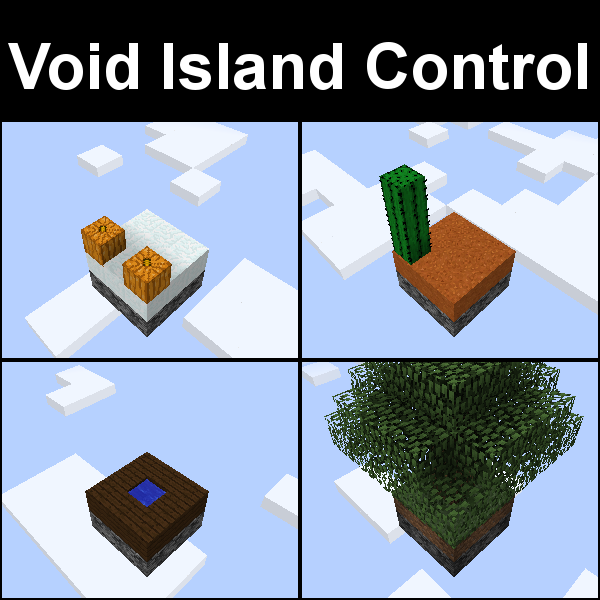
 mod
mod mod
mod mod
mod