Minecraft version
Back to mods 
CurseForge · Minecraft mod
Switch-Bow
Adds a new improved bow, a quiver and over 35 new arrows
Choose a version Pick your version below, then grab the matching file.
Quick answer
Which Switch-Bow release should I use?
Latest stable file Switch-Bow 1.6.8 (1.12.2 / Forge 14.23.5.2838)
Game version 1.12.2
Loader Forge
Switch-Bow 1.6.8 (1.12.2 / Forge 14.23.5.2838) targets 1.12.2 with Forge. The project page does not say whether this file belongs on the client, dedicated server, or both. No extra mods listed for this file.
Where it goes
Is Switch-Bow required on the client, server, or both?
The project page does not say whether this file belongs on the client, dedicated server, or both.
Client Source doesn’t say
Dedicated server Source doesn’t say
Loader for this release Forge
Required install it here Optional supported, not mandatory Not supported do not install here Source doesn’t say do not assume
The source does not explicitly classify this release as client-only or server-only.
What else does Switch-Bow 1.6.8 (1.12.2 / Forge 14.23.5.2838) need?
Switch-Bow 1.6.8 (1.12.2 / Forge 14.23.5.2838). Change the file and its required mods may change too.
This file does not list any required mods. Do not add a library just because a different file uses it.
This file does not list any required or optional mods.
Before you install it
Add Switch-Bow without breaking your instance.
Built for Switch-Bow 1.6.8 (1.12.2 / Forge 14.23.5.2838). Pick another file and the loader, install side or required mods may change.
- 01
Stick to this file
Use Switch-Bow 1.6.8 (1.12.2 / Forge 14.23.5.2838). It targets 1.12.2 with Forge; another release may have different loader, side or dependency requirements.
- 02
Bring the mods it needs
This file does not list any required mods. Do not add a library just because a different file uses it.
- 03
Put it on the correct side
The project page does not say whether this file belongs on the client, dedicated server, or both.
- 04
Pick the file you checked
Use the “Get this file” button beside Switch-Bow 1.6.8 (1.12.2 / Forge 14.23.5.2838). It opens that exact file at the source.
About this project
What does Switch-Bow add?
New 1.16.* Infos and Feature:
Infos:
- Rocket-Arrows are deaktivate at the moment
Feature:
Craft your Switch-Bow or Switch-Crossbow with an Netherstar together to get "True Infinity". All Arrows are "Infinity"
Craft your Switch-Bow or Switch-Crossbow with an Netherid-Ingot together to get "Multishot"
Hello everybody,
This mod adds a new improved bow, a quiver and over 35 new arrows.
For questions or ideas you can write a comment or follow me on Discord.
Switch-Bow
{width=507 height=270}
- Search the complete inventory and quiver for arrows
- By sneaking and rotating the mouse wheel or with keys you can select the arrow you want to shoot (Keys can configurate in the Controls-Option)
- Enchant with "Pull-Speed", you will can shoot faster
Switch-Crossbow
{width=507 height=270}
- Search the complete inventory and quiver for arrows
- By sneaking and rotating the mouse wheel or with keys you can select the arrow you want to shoot (Keys can configurate in the Controls-Option)
- Enchant with "Reduce Cooldown" to decrease the cooldown
Quiver
{width=507 height=270}
- Can contain up to 9 stacks of any arrows
- Click on the right mouse button to open the inventory
- Arrows from the inventory are automatically sorted into the quiver by sneaky and right-clicking
- Can only use from Switch-Bow and Switch-Crossbow
Big-Quiver
{width=507 height=270}
- Can contain up to 18 stacks of any arrows
- All arrows remain after the crafting
- Click on the right mouse button to open the inventory
- Arrows from the inventory are automatically sorted into the quiver by sneaky and right-clicking
- Can only use from Switch-Bow and Switch-Crossbow
Arrow-Dispenser
{width=507 height=270}
{width=507 height=490}
- Fires arrows by a redstone signal or right-click with an Redstone-Torch
- Configurable flight path setting, as well as the amount to be shot
- Little list of arrows that can't shot with the Arrow-Dispenser:
- Teleport-Arrow
- Vampier-Arrow
- Triple-Arrow
Arrows
Piercing-Arrow
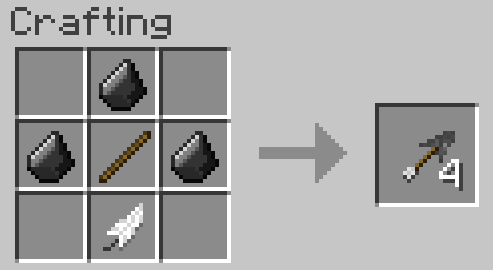
- 70% to pierce the enemy
Protector-Arrow
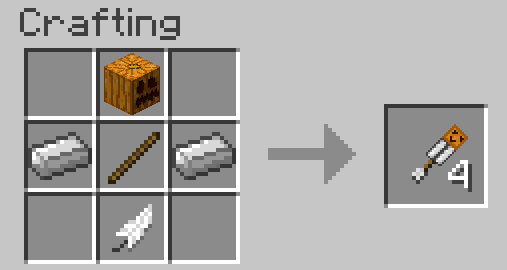
- Spawn's an Mini-Irongolem for a few secound, when it hits an enemy
Knockback-Arrow
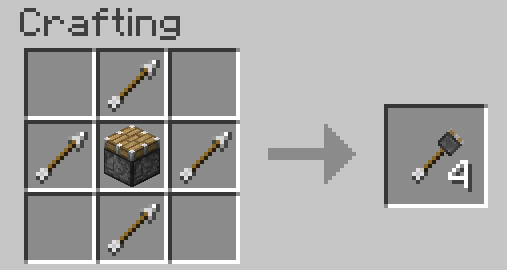
- Kicks the enemy back extremely
Bouncy-Arrow
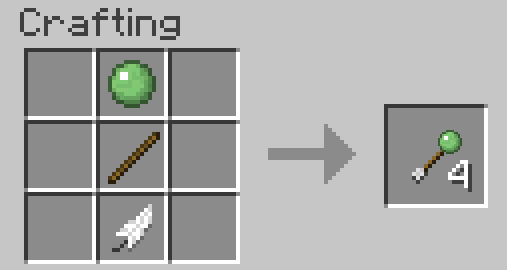
- The arrow bounce like an flummy
Arrow of the Searcher
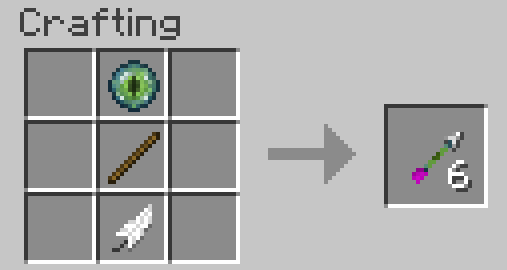
- Focus the closest opponent around the arrow
Triple-Arrow
{width=507 height=270}
- Shoot three arrow at ones
Burial-Arrow
{width=507 height=270}
- Tear the ground under the enemy
Chorus-Arrow
{width=507 height=270}
- When hit an enemy, it will be random teleported
Sprinkler-Arrow
{width=507 height=270}
- Extinguishes fire, breaks torches and makes lava to obsidian
Dragon-Arrow
{width=507 height=270}
- Create an Area of Dragonbreath on impact
Thunder-Arrow
{width=507 height=270}
- Generates a lightning bolt when striking enemy or block
TNT-Arrow
{width=507 height=270}
- Generates an explosion when striking enemy or block
Frost-Arrow
{width=507 height=270}
- Generates snow when striking a block
- Gives the enemy a "Freeze" effect when hit. The opponent cannot move.
- Freeze water to frosted ice
Air-Arrow
{width=507 height=270}
- Gives the enemy a "Levitation" effect when hit
Teleport-Arrow
{width=507 height=270}
- If the arrow hits the ground, the player is teleported like an Ender Pearl
- When hit an opponent, the position are exchanged
Vampire-Arrow
{width=507 height=270}
- When hit an opponent, a portion of the damage is returned to the Protector as life
Wither-Arrow
{width=507 height=270}
- Gives the enemy a "Wither" effect when hit
Torch-Arrow
{width=507 height=270}
- Place a torch when striking a block
Underwater-Arrow
{width=507 height=270}
- Has the same flight characteristics under water as on land
- Arrow get's an damage-boost under water
Reinforced Arrow
{width=507 height=270}
- The arrow does 2.5 times more damage than a normal arrow
Fire-Arrow
{width=507 height=270}
- Generates a fire storm when striking an opponent or block
Bone-Arrow
{width=507 height=270}
- When striking a block, the arrow has an effect like bone meal
Luck-Arrow
{width=507 height=270}
- Effect like an enchanted sword with looting 3 when the opponent is killed
Redstone-Arrow
{width=507 height=270}
- Simulates a very short Redstone signal when hitting a block
Sliver-Arrow
{width=507 height=270}
- When hitting an opponent or block fragmented arrow
- Enemies in the action area get damage and an effect "weakness"
Love-Arrow
{width=507 height=270}
{width=507 height=270}
- When hitting an animal is placed in readiness to mate
- When encountering a hostile enemy that gets an effect "In Love". During the effect, the opponent forgets to attack.
Love-Arrow (AOE)
{width=507 height=270}
- Same property as love arrow, acts only with the arrow fragmented and in an area where the effect (max. 6 Entitys)
Rocket-Arrow
{width=507 height=270}
- Can be made with any fireworks rocket
- Fly like a fireworks rocket straight
- If the Rocket-Arrow has an effect charge explodes after a certain time, when striking an opponent, or when hitting a block. The explosion spreads damage and displays the effect of the fireworks.
Transformation Arrows / Pedestal
Transformation Arrows are improved version from the source arrow.
To transformate Arrows you need an Multi-Block-Structure with an Pedestal.
Pedestal:
{width=507 height=270}
Multi-Block-Structure:
Step 1 (4x Pillar Quartz Block, 9x Block of Quartz, 12x Quartz-Stairs)
{width=566 height=300}
Step 2 (4x Pillar Quartz Block, 1x Obsidian)
{width=566 height=300}
Step 3 (4x Pillar Quartz Block, 1x Pedestal)
{width=566 height=300}
Step 4 (4x Magma Block)
{width=566 height=300}
Rightclick with an Arrow, you will transformate, on the Pedestal to start the Transformation. Pro Arrow will need 5 sec.(100 Ticks). This can be set in Config-Data.
Start-Prozess:
{width=566 height=300}
Finish Prozess:
{width=566 height=300}
When it finish you can get back the transformate Arrows by rightclick on the Pedestal.
List of transformable Arrows:
- Thunder-Arrow to Thunderstorm-Arrow
- Bone-Arrow to Bone-Arrow(AOE)
- Sliver-Arrow to Transforming Sliver-Arrow
- Burial-Arrow to Burial-Arrow(AOE)
- Fire-Arrow to FireStorm-Arrow
- Luck-Arrow to Transforming Luck-Arrow
- Air-Arrow to Air-Arrow(AOE)
- Love-Arrow (AOE) to Transforming Love-Arrow(AOE)
Commands and Config-File
- In the Config-File, you can:
- Change Attribute from the Switch-Bow
- Change Attribute from the Switch-Crossbow
- Set spawn Fire from the Lightning-Bolt to true or false
- Set destroy Blocks on Explosion from TNT-Arrow to true or false
- Activate and deactivate Crafting-Recipes (true = activate / false = deactivate)
- Activate and deactivate "Infinity" of Arrows
- Enable or disable the Scope View
- Commands:
- "/switchbow spawnFire (true/false)" to set spawn Fire from the Lightning-Bolt to true or false (also in the Config-File)
- "/switchbow destroyBlockswithTNTArrow (true/false)" to set destroy Blocks on Explosion from TNT-Arrow to true or false (also in the Config-File)
- "/switchbow showScope (true/false)" to enable or disable the View of the Scope (also in the Config-File)(Only ClientSide)
Project description from CurseForge.
Pick your setup
Switch-Bow by Minecraft version and loader
Choose the version and loader you play, then open the matching release.
Minecraft version
1.16.4
1 loader buildMinecraft version
1.16.3
1 loader buildMinecraft version
1.15.2
1 loader buildMinecraft version
1.14.4
1 loader buildMinecraft version
1.13.2
1 loader buildMinecraft version
1.12.2
2 loader buildsMinecraft version
1.12
1 loader buildMinecraft version
1.11.2
1 loader buildMinecraft version
1.11
1 loader buildMinecraft version
1.10.2
1 loader buildCheck the dependencies, then try the file in a copied instance before changing a world you care about.
Recent files
Switch-Bow versions and loaders
Switch-Bow 1.6.8 (1.12.2 / Forge 14.23.5.2838)
switchbow-1.6.8.jar
11 Dec 2021
Client Source doesn’t say Server Source doesn’t say Dependencies No extras listed Listed on Release listing
Check the 1.12.2 · Forge setup Forge1.12.2 release
Switch-Bow 1.6.7 (1.12.2 / Forge 14.23.5.2838)
switchbow-1.6.7.jar
25 Nov 2021
Client Source doesn’t say Server Source doesn’t say Dependencies No extras listed Listed on Release listing
Check the 1.12.2 · Forge setup Forge1.12.2 release
Switch-Bow 1.6.6 (1.12.2 / Forge 14.23.5.2838)
switchbow-1.6.6.jar
25 Nov 2021
Client Source doesn’t say Server Source doesn’t say Dependencies No extras listed Listed on Release listing
Check the 1.12.2 · Forge setup Forge1.12.2 release
Switch-Bow 1.6.5 (1.12.2 / Forge 14.23.5.2838)
switchbow-1.6.5.jar
31 Oct 2021
Client Source doesn’t say Server Source doesn’t say Dependencies No extras listed Listed on Release listing
Check the 1.12.2 · Forge setup Forge1.12.2 release
Switch-Bow 1.6.4 (1.12.2 / Forge 14.23.5.2838)
switchbow-1.6.4.jar
26 Oct 2021
Client Source doesn’t say Server Source doesn’t say Dependencies No extras listed Listed on Release listing
Check the 1.12.2 · Forge setup Forge1.12.2 release
Switch-Bow 1.6.3 (1.12.2 / Forge 14.23.5.2838)
switchbow-1.6.3.jar
12 Oct 2021
Client Source doesn’t say Server Source doesn’t say Dependencies No extras listed Listed on Release listing
Check the 1.12.2 · Forge setup Forge1.12.2 release
Switch-Bow 1.6.2 (1.12.2 / Forge 14.23.5.2838)
switchbow-1.6.2.jar
11 Oct 2021
Client Source doesn’t say Server Source doesn’t say Dependencies No extras listed Listed on Release listing
Check the 1.12.2 · Forge setup Forge1.12.2 release
Switch-Bow 1.6.1 (1.12.2 / Forge 14.23.5.2838)
switchbow-1.6.1.jar
7 Oct 2021
Client Source doesn’t say Server Source doesn’t say Dependencies No extras listed Listed on Release listing
Check the 1.12.2 · Forge setup Forge1.12.2 release
Switch-Bow 1.7 (1.16.5 / Forge 36.2.0)
switchbow-1.7.jar
22 Jul 2021
Client Source doesn’t say Server Source doesn’t say Dependencies No extras listed Listed on Release listing
Check the 1.16.5 · Forge setup 1.16.5Forge release
Switch-Bow 1.7 (1.16.3 / Forge 34.1.42)
switchbow-1.7.jar
11 Dec 2020
Client Source doesn’t say Server Source doesn’t say Dependencies No extras listed Listed on Release listing
Check the 1.16.3 setup 1.16.3 release
Switch-Bow 1.7 (1.16.4 / Forge 35.1.0)
switchbow-1.7.jar
9 Dec 2020
Client Source doesn’t say Server Source doesn’t say Dependencies No extras listed Listed on Release listing
Check the 1.16.4 setup 1.16.4 release
Switch-Bow 1.6 (1.15.2 / Forge 31.2.33)
switchbow-1.6.jar
31 Jul 2020
Client Source doesn’t say Server Source doesn’t say Dependencies No extras listed Listed on Release listing
Check the 1.15.2 setup 1.15.2 release
Looking for an older file? The official CurseForge project page is in Resources.
 mod
mod CurseForge · Minecraft
Genetic Ascension
A minecraft mod based on the novel Genetic Ascension.
 mod
mod CurseForge · Minecraft
MCEndgame
MCEndgame aims to make Minecraft's endgame more engaging through repeatable dungeon content, meaningful gear progression, and ARPG-inspired itemization.
 mod
mod CurseForge · Minecraft
Simple Weaponry
Just adds some simple weapons! (Also the sequel to Simple Clubs)