Minecraft version
Back to mods 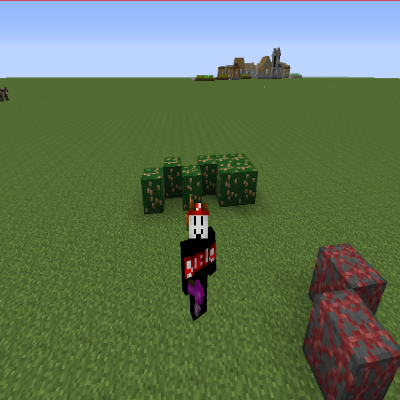
CurseForge · Minecraft mod
Multiplycraft Mod
This mod adds many more features to Minecraft.
Choose a version Pick your version below, then grab the matching file.
Quick answer
Which Multiplycraft Mod release should I use?
beta file Mod
Game version 1.7.10
Loader Not required
Multiplycraft Mod Mod targets 1.7.10. The project page does not say whether this file belongs on the client, dedicated server, or both. No extra mods listed for this file.
Where it goes
Is Multiplycraft Mod required on the client, server, or both?
The project page does not say whether this file belongs on the client, dedicated server, or both.
Client Source doesn’t say
Dedicated server Source doesn’t say
Loader for this release No loader listed
Required install it here Optional supported, not mandatory Not supported do not install here Source doesn’t say do not assume
The source does not explicitly classify this release as client-only or server-only.
What else does Multiplycraft Mod Mod need?
Mod. Change the file and its required mods may change too.
This file does not list any required mods. Do not add a library just because a different file uses it.
This file does not list any required or optional mods.
Before you install it
Add Multiplycraft Mod without breaking your instance.
Built for Multiplycraft Mod Mod. Pick another file and the loader, install side or required mods may change.
- 01
Stick to this file
Use Mod. It targets 1.7.10; another release may have different loader, side or dependency requirements.
- 02
Bring the mods it needs
This file does not list any required mods. Do not add a library just because a different file uses it.
- 03
Put it on the correct side
The project page does not say whether this file belongs on the client, dedicated server, or both.
- 04
Pick the file you checked
Use the “Get this file” button beside Mod. It opens that exact file at the source.
About this project
What does Multiplycraft Mod add?
This mod adds in the following:
Materials & Tools:
Ruby Ore - An auto-generated ore
Ruby - Smelted from the Ruby Ore
Ruby Block - Made from the Rubies in a block style in the crafting table
Ruby Pickaxe -Made with Rubies and Blaze Rods in a pickaxe style in the crafting table
Ruby Quiver - (Creation info in upcoming video) - Can be placed in a crafting table to make an enchanted arrow.
Topaz Ore - Smelted from the Ruby
Topaz Block - Made from the Topaz Gems in a block style in the crafting table
Amethyst Ore - An auto-generated ore
Amethyst - Smelted from the Amethyst Ore
Amethyst Block - Made from the Amethyst Gems in a block style in the crafting table
Rhodium Ore - An auto-generated ore
Rhodium - Smelted from the Rhodium Ore
Rhodium Block - Made from the Rhodium Metals in a block style in the crafting table
Rhodium Rod - Crafting from the Rhodium Metals in a stick style in the crafting table
Opal Ore - An auto-generated ore
Pure Opal - Smelted from the Opal Ore
Opal Block - Made from the Opal Gems in a block style in the crafting table
Opal Battleaxe - (Creation info in upcoming video) - Deals 18 Damage;Slow Attack Speed
Uranium Ore - An auto-generated ore
Uranium - Smelted from the Uranium Ore
Uranium Sword - (Creation info in upcoming video) - Deals 10 Damage;Intermediate Attack Speed|SPECIAL:Right Click with it to cause an EXPLOSION!
Ender Ingot - Smelted from End Stone
Ender Scraper - (Creation info in upcoming video) - Instantly destroys dirt
Ender Cutter - (Creation info in upcoming video) - Basically a pickaxe with extreme durability
Ender Scythe - (Creation info in upcoming video) - Deals 26 damage;Intermediate Attack Speed
Ender Block - Made from the Ender Ingots in a block style in the crafting table
Citrine Ore - An auto-generated ore
Citrine - Smelted from the Citrine Ore
Citrine Rod - Crafted from the Citrine Stones in a stick style in the crafting table
Citrine Cables - (Creation info in upcoming video) - A material needed for multiple things
Citrine Staff - (Creation info in upcoming video) - Deals 4 damage;Intermediate Attack Speed|SPECIAL:Hold right click on a block to strike lightning!
Black Diamond - (Creation info in upcoming video)
Black Diamond - (Creation info in upcoming video) - Deals 11 damage;Fast attack speed
Obsidian Ingot - Smelted from Obsidian
Obsidian Sword - Made from Obsidian Ingots and Blaze Rods in a sword style in a crafting table - Deals 14 damage;Fast attack speed
Crystal - (Creation info coming in upcoming video)
Crystal Block - Made from Crystals in a block style in a crafting table
Bloodstone Ore - An auto-generated ore
Bloodstone - Smelted from the Bloodstone Ore
Bloodstone Block - Made from Bloodstones in a block style in a crafting table
Dragonglass Ore - An auto-generated ore
Dragonglass Gem - Smelted from the Dragonglass Ore
Dragonglass Block - Made from Dragonglass Gems in a block style in a crafting table
Dragonglass Sickle - (Creation info coming soon) - Can break wood,dirt,and ores/stones/rocks.
Aquamarine - Made from a water bucket and a diamond
Aquamarine Block - Made from Aquamarine Gemstones in a block style in a crafting table
Saw - (Creation info coming soon) - A strong,duriable axe basically
Platinum Plate - (Creatioon info in upcoming video)
Platinum Pickaxe - (Creation info in upcoming video) - A strong,duriable pickaxe
Harvester - (Creation info in upcoming video) - Allows you to harvest Oranges from Orange Bushes
Food -
Orange Bush - Randomly spawns in the world,can only be broken by the Harvester
Orange - 5 Obtained from breaking the Orange Bush - Fills 0.5 hunger
Soda - Made from a glass bottle with sugar ontop of it in a crafting table - Fills 2.5 hunger
Candy - (Creation info in upcoming video) - Fills 4 hunger
Raw Boar Meat - Obtained from Killing a boar - Fills 1 hunger;may poison/weaken
Cooked Boar Meat - Obtained by cooking Raw Boar Meat - Fills 5 hunger
Mobs -
Boar - A dark brown pig with 20 HP than randomly spawns and drops Raw Boar Meat on death
WIP Things -
Anything you find in the mod that is not listed here is either a W.I.P or a leftover from an extremely old alpha build.
Currently only for 1.7.10
Project description from CurseForge.
Pick your setup
Multiplycraft Mod by Minecraft version and loader
Choose the version and loader you play, then open the matching release.
Check the dependencies, then try the file in a copied instance before changing a world you care about.
Recent files
Multiplycraft Mod versions and loaders
Mod
Minecraftia_1710.jar
19 Feb 2017
Client Source doesn’t say Server Source doesn’t say Dependencies No extras listed Listed on Release listing
Check the 1.7.10 setup 1.7.10 beta
Looking for an older file? The official CurseForge project page is in Resources.