Foamflower Needed by enderpay-1.12.2-1.0.1.0.jar
requiredMatching file found Matched file: foamflower-1.12.2-1.0.0.0-beta1.jar

CurseForge · Minecraft mod
Adds Economy to your Forge server.
Quick answer
enderpay-1.12.2-1.0.1.0.jar targets 1.12.2. The project page does not say whether this file belongs on the client, dedicated server, or both. All 1 required mods have matching files.
Where it goes
The project page does not say whether this file belongs on the client, dedicated server, or both.
The source does not explicitly classify this release as client-only or server-only.
enderpay-1.12.2-1.0.1.0.jar. Change the file and its required mods may change too.
Install Foamflower first. We found matching files for this game-version and loader setup.
We only count dependency files that match this setup. A file for another loader does not fill the gap.
Before you install it
Built for enderpay-1.12.2-1.0.1.0.jar. Pick another file and the loader, install side or required mods may change.
Use enderpay-1.12.2-1.0.1.0.jar. It targets 1.12.2; another release may have different loader, side or dependency requirements.
Install Foamflower first. We found matching files for this game-version and loader setup.
The project page does not say whether this file belongs on the client, dedicated server, or both.
Use the “Get this file” button beside enderpay-1.12.2-1.0.1.0.jar. It opens that exact file at the source.
About this project
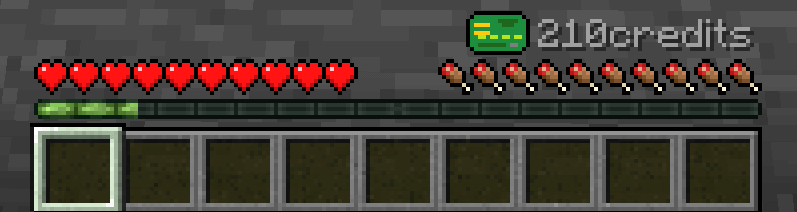
EnderPay adds economy to forge servers.
The diffculty that appers when one wants to add economy to the server is where the credits should come from.
To solve that problem EnderPay introduces basic income and stamped money.
By default the user gets 100 credits on first login, and 50 for each (real time) day, as long as they login at least once every 6 days.
Each day 1% of user balance is taken from him and 1% of each banknote's value is lost.
The amount of tax taken each day is configurable (as well as other values)
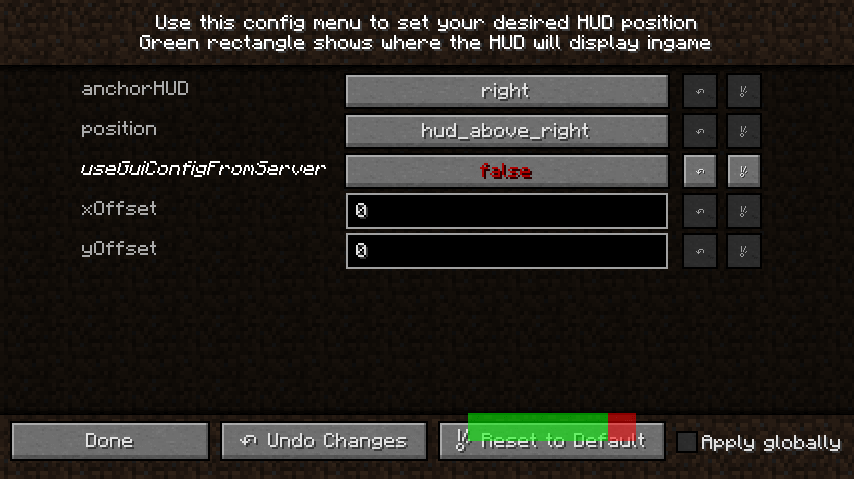
# Configuration filebasicincome { # Amount of credits to give each player each day [range: 0 ~ 10000, default: 50] I:amount=50 # Day length in minutes [range: 1 ~ 525600, default: 1440] I:dayLength=1440 # Number of days after banknote no longer has value [range: 1 ~ 100, default: 10] I:daysAfterBanknotesExpires=10 # Each day give set amount of credits to each player to stimulate economy [default: true] B:enabled=true # Maximum number of day since last login the player will be payed for. [range: 1 ~ 20, default: 6] I:maxLoginDelta=6 # Number of days of inactivity after account balance will be set to startBalance [range: 1 ~ 100, default: 100] I:resetLoginDelta=100}general { # Should banknotes be consumed when used by player in creative mode [default: true] B:consumeBanknotesInCreativeMode=true # Currency name (displayed in HUD, max 20 char) [default: credits] S:"currency name (multiple)"=credits # Currency name (displayed in HUD, max 20 char) [default: credit] S:"currency name (singular)"=credit # What percentage (0-100) or what amount (pvpMoneyDrop<0) of players money should be transferred to slayer [range: -2147483647 ~ 100, default: 0] I:pvpMoneyDrop=0 # Set to true to allow crafting banknotes [temporary disabled] [default: true] B:registerBanknoteRecipe=true # Amount of credits given to new players joining the server [range: 0 ~ 10000, default: 100] I:startBalance=100}gui { # HUD anchor position [default: right] S:anchorHUD=right # Position of HUD [default: hud_above_right] S:position=hud_above_right # Use HUD position provided by server [default: true] B:useGuiConfigFromServer=true # HUD x offset in scaled pixels [range: -10000 ~ 10000, default: 0] I:xOffset=0 # HUD y offset in scaled pixels [range: -10000 ~ 10000, default: 0] I:yOffset=0}stampedmoney { # Take % of players money each day to stimulate economy [default: true] B:enabled=true # What percentage of players money should be taken each day [range: 0 ~ 100, default: 1] I:percent=1}
This mod allows you to craft blank banknote with the following recipe.
 Right click with blank banknote in your hand to open GUI where you can enter the amount of credits to fill the banknote with.
/balance - Check account balance
/pay <player> <amount> - Pay another player money from your account
/wallet balance <player> - Check another player's account balance
/wallet give <player> - Add credits to player's account
/wallet take <player> - Take credits from player's account
/wallet set <player> - Set player's account balance
To allow easy HUD position configuration, in-game config menu was added.
Installation
Permissions:
This mod is available under GPL2.
You are allowed to include it into mod packs of any kind, without asking for permission.
Project description from CurseForge.
Pick your setup
Choose the version and loader you play, then open the matching release.
Check the dependencies, then try the file in a copied instance before changing a world you care about.
Recent files
6 Jan 2018
10 Oct 2017
4 Jul 2017
2 Jul 2017
24 Jun 2017
enderpay-1.10.2-0.0.3.jar
23 Feb 2017
enderpay-1.11.2-0.0.3.jar
22 Feb 2017
enderpay-1.11.2-0.0.2.jar
21 Feb 2017
Looking for an older file? The official CurseForge project page is in Resources.
 mod
a library for MMF-Group's mod
 mod
Cleanroom's JEI fork for 1.12.2 with optimizations and more features
 mod
Adds specific compatibility changes across various mods for the Desecrated modpack.