ElecCore Needed by Huds - Armor Status & Damage Indicators Huds-1.12.2-1.0.6.jar
requiredMatching file found Matched file: ElecCore-1.12.2-1.9.453.jar
CurseForge · Minecraft mod
Multiple HUD's alle in one mod! Fully configurable with ingame configs!
Quick answer
Huds - Armor Status & Damage Indicators Huds-1.12.2-1.0.6.jar targets 1.12.2. The project page does not say whether this file belongs on the client, dedicated server, or both. All 1 required mods have matching files.
Where it goes
The project page does not say whether this file belongs on the client, dedicated server, or both.
The source does not explicitly classify this release as client-only or server-only.
Huds-1.12.2-1.0.6.jar. Change the file and its required mods may change too.
Install ElecCore first. We found matching files for this game-version and loader setup.
We only count dependency files that match this setup. A file for another loader does not fill the gap.
Before you install it
Built for Huds - Armor Status & Damage Indicators Huds-1.12.2-1.0.6.jar. Pick another file and the loader, install side or required mods may change.
Use Huds-1.12.2-1.0.6.jar. It targets 1.12.2; another release may have different loader, side or dependency requirements.
Install ElecCore first. We found matching files for this game-version and loader setup.
The project page does not say whether this file belongs on the client, dedicated server, or both.
Use the “Get this file” button beside Huds-1.12.2-1.0.6.jar. It opens that exact file at the source.
About this project
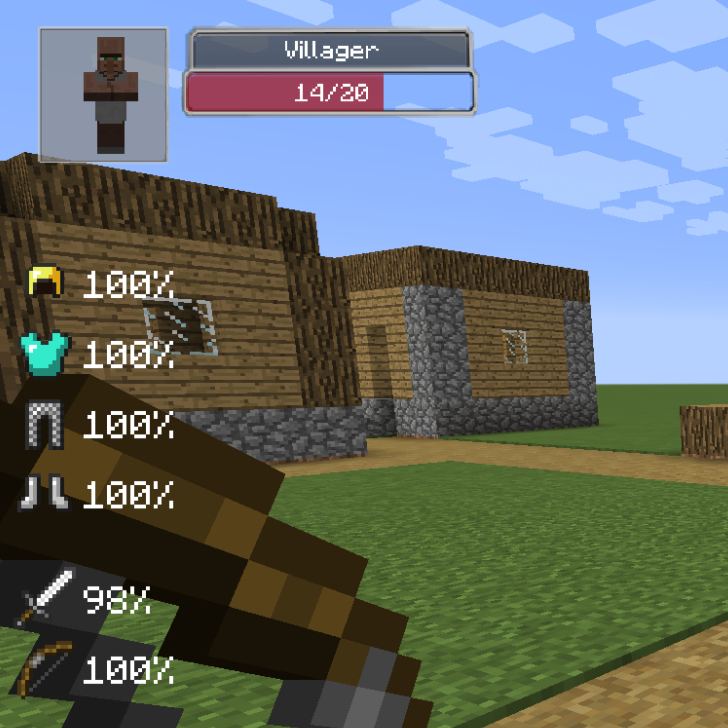
The Huds mod is a clientside-only mod that contains multiple, fully configurable HUD's!
Current HUD's:
-Armor HUD: displays your currently equipped armor and its damage status
-Tool HUD: displays your currently equipped held items (on- an offhand) along with its durability status
-Damage Indicator: when you mouse over a mob, its 3D model and health is displayed in a HUD on your screen
All HUD's can be enabled/disabled and configured in a config file, or with the in-game config, which can be accessed with:
/hudconfig show
If you changed the config file manually, you can use /hudconfig reload to reload the config file.
Project description from CurseForge.
Pick your setup
Choose the version and loader you play, then open the matching release.
Check the dependencies, then try the file in a copied instance before changing a world you care about.
Recent files
5 Jan 2020
3 Jan 2020
24 Feb 2019
19 Apr 2017
Looking for an older file? The official CurseForge project page is in Resources.
 mod
A mod that adds fictional mobs to the game, with cool and unique functions
 mod
A fork of the RL Ice & Fire mod for Modern minecraft
 mod
Become a fluffy sheep by wearing wool! Cap mob damage at 6 HP, bleat when hurt, and embrace your inner newbie!