Minecraft version
Back to mods 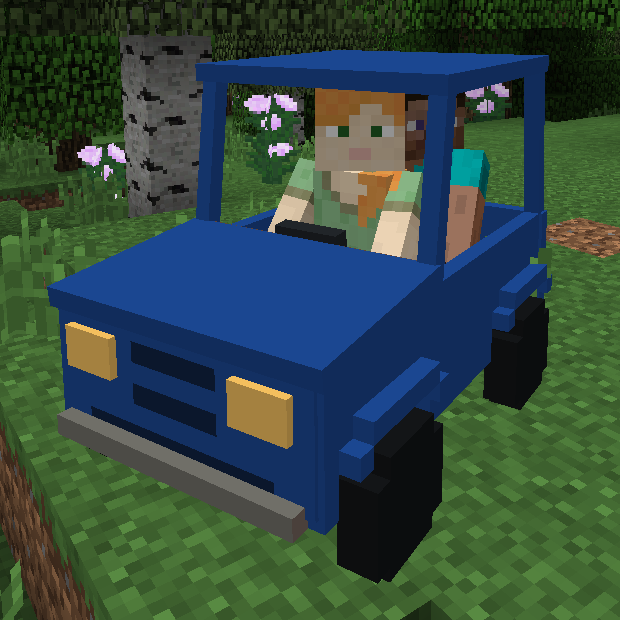
CurseForge · Minecraft mod
Personal Cars
Your own cars in Minecraft!
Choose a version Pick your version below, then grab the matching file.
Quick answer
Which Personal Cars release should I use?
Latest stable file Personal Cars 1.4
Game version 1.12.1, 1.12, 1.12.2
Loader Not required
Personal Cars 1.4 targets 1.12.1, 1.12, 1.12.2. The project page does not say whether this file belongs on the client, dedicated server, or both. No extra mods listed for this file.
Where it goes
Is Personal Cars required on the client, server, or both?
The project page does not say whether this file belongs on the client, dedicated server, or both.
Client Source doesn’t say
Dedicated server Source doesn’t say
Loader for this release No loader listed
Required install it here Optional supported, not mandatory Not supported do not install here Source doesn’t say do not assume
The source does not explicitly classify this release as client-only or server-only.
What else does Personal Cars 1.4 need?
Personal Cars 1.4. Change the file and its required mods may change too.
This file does not list any required mods. Do not add a library just because a different file uses it.
This file does not list any required or optional mods.
Before you install it
Add Personal Cars without breaking your instance.
Built for Personal Cars 1.4. Pick another file and the loader, install side or required mods may change.
- 01
Stick to this file
Use Personal Cars 1.4. It targets 1.12.1, 1.12, 1.12.2; another release may have different loader, side or dependency requirements.
- 02
Bring the mods it needs
This file does not list any required mods. Do not add a library just because a different file uses it.
- 03
Put it on the correct side
The project page does not say whether this file belongs on the client, dedicated server, or both.
- 04
Pick the file you checked
Use the “Get this file” button beside Personal Cars 1.4. It opens that exact file at the source.
About this project
What does Personal Cars add?
Hi!
Today I want to show you my new mod called Personal Cars.
{width=700 height=371}
Currently it adds 5 types of cars (compact car, SUV, animal transporter, truck and a racecar), each available in 4 colors (green, red, blue and grey).
What makes them personal is the fact that every car in the game has its own unique identifier and after crafting a car you need to pair a key with it. That means that only the key owner can open and close the car (when the car is open you can enter and drive it, otherwise you can just.. look at it and be jealous it's not yours, i guess? ). Each type of car has its own accelleration, maximum speed, health points amount and more. For some of these cars you can enter them with a passenger!
Important Note #1: As of version 1.4 of the mod, you no longer can press R to start the engine. Instead, you need to right click the car's key while sitting inside it.
Important Note #2: You have 2 drive modes available now.
First (default) one is the simple one. It lets you instantly gain maximum speed of the car (like while driving horses or any other animals). The second mode (you can enable it using your config file) lets car gain and lose momentum while driving. This makes the car smoothly speed up/slow down and allows you to DRIFT using your handbrake (space bar). The realistic mode is still being worked on so it might not be what you desire (that's why right now the easy mode is set to default, this might be changed when i improve the steering).
A quick tutorial:
First you have to craft yourself a car key and a car. The car gets an identifier as soon as you craft it (you can check it by hovering your mouse over it). The key will show "not paired" status at start like here:
You need to place your car and right click with that clear key on it. Your key will get that car's identifier and they will be paired now. If you want to have more than just one key, you can craft a key modifier (recipe above) and place this key in first slot, a new (unpaired) key in the second and you will be able to use button "Copy" to copy key's identifier to the blank one. If you lose your car or just want to unpair a key to use it elsewhere, just put it in the first slot of key modifier's and press "Unpair" button.
When your key is paired with a car, you can right click when you're close to that car to open/close it. When car's lights are turned off it, of course, means that the car is closed. When you open it, you can get in and start driving. To start the engine, right click your key while sitting inside the car. When the engine is running, you're ready to drive! You can also use horn (by pressing H, you can change this key binding as well) for fun or for scarying animals (animals get scared of car horn about once every 20 seconds).
If the car is a truck, you can store items in it by pressing G while being inside the car (as passenger or driver).
Transporter usage tutorial:
Transporters are vehicles capable of carrying any mobs you can use lead on. To get them in your car, unlock it, craft yourself a whip and get some leads. Use the leads on animals and right click the transporter with a whip to make them enter it. To make a single animal leave the car, left click the car with a whip. To make all animals leave, right click the car with a whip while sneaking or just lock it with a key (as locking the car always removes all of it's passengers).
Crafting recipes:
Car key:
Car engine:
Car wheel:
Compact car - can carry 2 passengers, achieves average speed and HP.
SUV - can carry 2 passengers, doesn't sink and blow up easily in water, slower than compact car, has more HP.
Racecar - can carry 1 person, moves quickly on surface, barely in the water.
Transporter - not too fast and it's nearly 4 blocks wide, but it can transport any mobs you can use lead on. When you're transporting big animals, it can carry up to 6 of them, otherwise you can carry even 9 mobs! And yourself as a driver, of course.
Truck - a resistant, big car that can carry 2 players and up to 36 (4x9) itemstacks. You can store items in trucks by pressing G inside them.
In car recipes you can use one of the following dyes to get different car colors:
Whip - required if you want to put your animals in a transporter. It also punishes animals if you right click them (it doesn't deal any damage, but makes mobs flee in panic).
Key modifier (you can unpair a paired key here or copy one key's identifier to another:
I hope you enjoy my work. Have fun!
Project description from CurseForge.
Pick your setup
Personal Cars by Minecraft version and loader
Choose the version and loader you play, then open the matching release.
Minecraft version
1.12.1
1 loader buildMinecraft version
1.12
1 loader buildMinecraft version
1.11.2
1 loader buildMinecraft version
1.11.1
1 loader buildMinecraft version
1.11
1 loader buildCheck the dependencies, then try the file in a copied instance before changing a world you care about.
Recent files
Personal Cars versions and loaders
Personal Cars 1.4
PersonalCars-1.4.jar
23 Aug 2017
Client Source doesn’t say Server Source doesn’t say Dependencies No extras listed Listed on Release listing
Check the 1.12.2 setup 1.12.11.121.12.2 release
Personal Cars 1.3
PersonalCars-1.3.jar
26 Jun 2017
Client Source doesn’t say Server Source doesn’t say Dependencies No extras listed Listed on Release listing
Check the 1.12 setup 1.12 release
Personal Cars 1.2.2
PersonalCars-1.2.2.jar
25 Jun 2017
Client Source doesn’t say Server Source doesn’t say Dependencies No extras listed Listed on Release listing
Check the 1.11.2 setup 1.11.2 release
PersonalCars-1.2.jar
23 Apr 2017
Client Source doesn’t say Server Source doesn’t say Dependencies No extras listed Listed on Release listing
Check the 1.11.2 setup 1.111.11.11.11.2 release
Looking for an older file? The official CurseForge project page is in Resources.
 mod
CurseForge + Modrinth · Minecraft
Tinkers' Gadgets
A lightweight Tinkers' Construct addon featuring tools, new materials, and exclusive projectile traits.
 mod
Modrinth · Minecraft
AnvilCraft
A technology mod centered around anvils
 mod
CurseForge + Modrinth · Minecraft
Runeborn | Soulslike RPG progression
A soulslike RPG overhaul: earn runes, level eight attributes at Ember Shrines, wield 74 scaling armaments and hunt seven Sovereigns.