Minecraft version
Back to mods 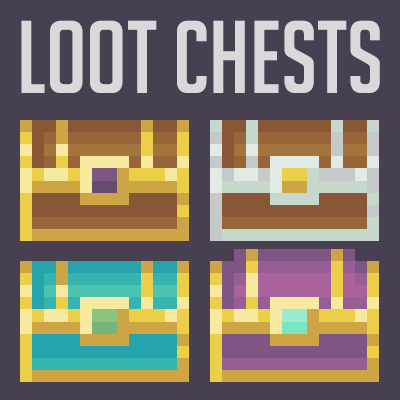
CurseForge · Minecraft mod
SeriousCreeper's Loot Chests
Loot Chests that can contain items
Choose a version Pick your version below, then grab the matching file.
Quick answer
Which SeriousCreeper's Loot Chests release should I use?
Latest stable file lootchests-1.2.5.jar
Game version 1.12.2
Loader Not required
SeriousCreeper's Loot Chests lootchests-1.2.5.jar targets 1.12.2. The project page does not say whether this file belongs on the client, dedicated server, or both. No extra mods listed for this file.
Where it goes
Is SeriousCreeper's Loot Chests required on the client, server, or both?
The project page does not say whether this file belongs on the client, dedicated server, or both.
Client Source doesn’t say
Dedicated server Source doesn’t say
Loader for this release No loader listed
Required install it here Optional supported, not mandatory Not supported do not install here Source doesn’t say do not assume
The source does not explicitly classify this release as client-only or server-only.
What else does SeriousCreeper's Loot Chests lootchests-1.2.5.jar need?
lootchests-1.2.5.jar. Change the file and its required mods may change too.
This file does not list any required mods. Do not add a library just because a different file uses it.
This file does not list any required or optional mods.
Before you install it
Add SeriousCreeper's Loot Chests without breaking your instance.
Built for SeriousCreeper's Loot Chests lootchests-1.2.5.jar. Pick another file and the loader, install side or required mods may change.
- 01
Stick to this file
Use lootchests-1.2.5.jar. It targets 1.12.2; another release may have different loader, side or dependency requirements.
- 02
Bring the mods it needs
This file does not list any required mods. Do not add a library just because a different file uses it.
- 03
Put it on the correct side
The project page does not say whether this file belongs on the client, dedicated server, or both.
- 04
Pick the file you checked
Use the “Get this file” button beside lootchests-1.2.5.jar. It opens that exact file at the source.
About this project
What does SeriousCreeper's Loot Chests add?
This mod adds 4 chest items that can be opened to aquire items, defined by a loot table.
By default these chests can't be aquired anywhere in game other than the creative menu, so you will need a mod to either add them to mob drops, random chest loot or quest rewards.
To add your own loot, just override the loot table "lootchests:serious_loot".
It has 4 tables entries, "common", "uncommon", "rare" and "mythic".
To learn more about how vanilla loot tables work, look here: https://minecraft.gamepedia.com/Loot_table
Either add your own loot table file to your world save folder, or use mods that modify it. Personally i recommend using LootTweaker.
Vanilla Example:
{ "pools": [ { "name": "common", "rolls": { "min": 1, "max": 3 }, "entries": [ { "type": "item", "name": "minecraft:stone", "weight": 1 } ] }, { "name": "uncommon", "rolls": { "min": 1, "max": 3 }, "entries": [ { "type": "item", "name": "minecraft:apple", "weight": 1 } ] }, { "name": "rare", "rolls": { "min": 1, "max": 3 }, "entries": [ { "type": "item", "name": "minecraft:diamond", "weight": 1 } ] }, { "name": "mythic", "rolls": { "min": 1, "max": 3 }, "entries": [ { "type": "item", "name": "minecraft:nether_star", "weight": 1 } ] } ]}
LootTweaker Example:
import loottweaker.vanilla.loot.LootTables;import loottweaker.vanilla.loot.LootTable;import loottweaker.vanilla.loot.LootPool;import loottweaker.vanilla.loot.Conditions;import loottweaker.vanilla.loot.Functions;val table = LootTables.getTable("lootchests:serious_loot");// Grab all the existing poolsval common = table.getPool("common"); val uncommon = table.getPool("uncommon");val rare = table.getPool("rare");val mythic = table.getPool("mythic");// Set the rolls. By default, each pool has a minRoll of 1, maxRoll of 3common.setRolls(3, 10);// Add loot to poolscommon.addItemEntryHelper(<minecraft:stone> * 16, 50, 1, [Functions.setCount(8, 16)], []);uncommon.addItemEntryHelper(<minecraft:cooked_chicken> * 4, 50, 1, [], []);rare.addItemEntryHelper(<minecraft:diamond> * 4, 20, 1, [], []);mythic.addItemEntryHelper(<minecraft:nether_star>, 1, 1, [], []);
Project description from CurseForge.
Pick your setup
SeriousCreeper's Loot Chests by Minecraft version and loader
Choose the version and loader you play, then open the matching release.
Minecraft version
1.12.1
1 loader buildMinecraft version
1.12
1 loader buildMinecraft version
1.10.2
1 loader buildCheck the dependencies, then try the file in a copied instance before changing a world you care about.
Recent files
SeriousCreeper's Loot Chests versions and loaders
lootchests-1.2.5.jar
4 Mar 2019
Client Source doesn’t say Server Source doesn’t say Dependencies No extras listed Listed on Release listing
Check the 1.12.2 setup 1.12.2 release
lootchests-1.2.4.jar
28 Feb 2019
Client Source doesn’t say Server Source doesn’t say Dependencies No extras listed Listed on Release listing
Check the 1.12.2 setup 1.12.2 release
lootchests-1.2.3.jar
16 Feb 2019
Client Source doesn’t say Server Source doesn’t say Dependencies No extras listed Listed on Release listing
Check the 1.12.2 setup 1.12.2 release
lootchests-1.2.2.jar
27 Jan 2018
Client Source doesn’t say Server Source doesn’t say Dependencies No extras listed Listed on Release listing
Check the 1.10.2 setup 1.10.2 release
lootchests-1.2.2.jar
4 Dec 2017
Client Source doesn’t say Server Source doesn’t say Dependencies No extras listed Listed on Release listing
Check the 1.12.2 setup 1.12.11.121.12.2 release
lootchests-1.2.1.jar
25 Nov 2017
Client Source doesn’t say Server Source doesn’t say Dependencies No extras listed Listed on Release listing
Check the 1.12.2 setup 1.12.11.121.12.2 release
lootchests-1.2.jar
25 Nov 2017
Client Source doesn’t say Server Source doesn’t say Dependencies No extras listed Listed on Release listing
Check the 1.12.2 setup 1.12.11.121.12.2 release
lootchests-1.1.jar
24 Nov 2017
Client Source doesn’t say Server Source doesn’t say Dependencies No extras listed Listed on Release listing
Check the 1.12.2 setup 1.12.11.121.12.2 release
lootchests-1.0.jar
12 May 2017
Client Source doesn’t say Server Source doesn’t say Dependencies No extras listed Listed on Release listing
Check the 1.10.2 setup 1.10.2 release
Looking for an older file? The official CurseForge project page is in Resources.
 mod
CurseForge · Minecraft
Spirits of Purified Undead
An unofficial ENDER LILIES fan mod featuring cursed accessories, spirit-assisted combat, agile movement, and purification.
 mod
CurseForge · Minecraft
Lanecraft
A real MOBA inside Minecraft: top-down camera, click to move, QWER abilities, 10 champions, three lanes, jungle, items and fog of war. Play vs bots or with friends.
 mod
CurseForge · Minecraft
Book of Dragons: Mazon's Almenac
A Book of Dragons addon that turns dragon ownership into a hands-on bond: heal them, feed them, and customize them your way