Minecraft version
Back to mods 
CurseForge · Minecraft mod
RTFM
A customizable markdown-based in-game manual.
Choose a version Pick your version below, then grab the matching file.
Quick answer
Which RTFM release should I use?
Latest stable file RTFM-MC1.12-1.0.1.4.jar
Game version 1.12.1, 1.12, 1.12.2
Loader Not required
RTFM-MC1.12-1.0.1.4.jar targets 1.12.1, 1.12, 1.12.2. The project page does not say whether it belongs on the client. The project page does not say whether it belongs on the dedicated server. No extra mods listed for this file.
Where it goes
Is RTFM required on the client, server, or both?
The project page does not say whether it belongs on the client. The project page does not say whether it belongs on the dedicated server.
Client Source doesn’t say
Dedicated server Source doesn’t say
Loader for this release No loader listed
Required install it here Optional supported, not mandatory Not supported do not install here Source doesn’t say do not assume
The source does not explicitly classify this release as client-only or server-only.
What else does RTFM-MC1.12-1.0.1.4.jar need?
RTFM-MC1.12-1.0.1.4.jar. Change the file and its required mods may change too.
This file does not list any required mods. Do not add a library just because a different file uses it.
This file does not list any required or optional mods.
Before you install it
Add RTFM without breaking your instance.
Built for RTFM-MC1.12-1.0.1.4.jar. Pick another file and the loader, install side or required mods may change.
- 01
Stick to this file
Use RTFM-MC1.12-1.0.1.4.jar. It targets 1.12.1, 1.12, 1.12.2; another release may have different loader, side or dependency requirements.
- 02
Bring the mods it needs
This file does not list any required mods. Do not add a library just because a different file uses it.
- 03
Put it on the correct side
The project page does not say whether it belongs on the client. The project page does not say whether it belongs on the dedicated server.
- 04
Pick the file you checked
Use the “Get this file” button beside RTFM-MC1.12-1.0.1.4.jar. It opens that exact file at the source.
About this project
What does RTFM add?
RTFM is a small mod adding a customizable, data-driven manual to the game that can be populated using Markdown files. It is aimed towards modpack makers that wish to add some in-game documentation using non-arcane formatting. The mod itself doesn't do anything useful unless you use it to actually add some pages to it, in particular it does not automatically add documentation for stuff in the game. It's just a system that allows you to document stuff yourself. Using Markdown files. That's it. Really.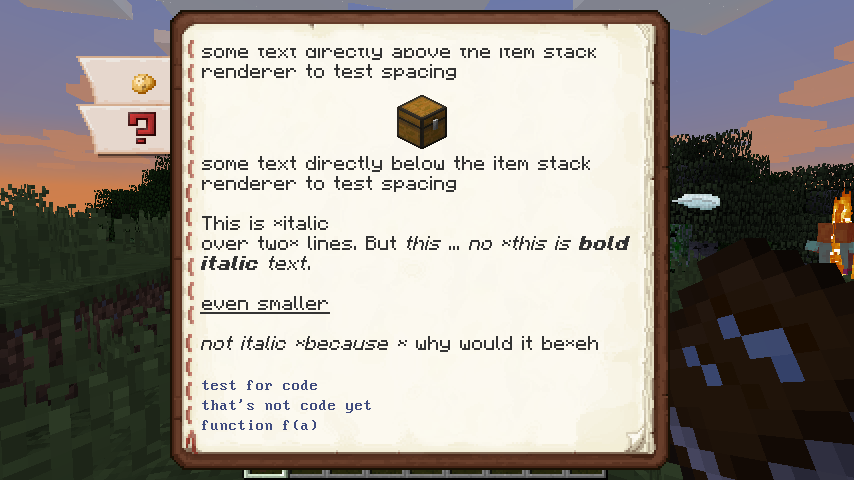
Once installed and you've run Minecraft once, have a look at the config. It allows defining tabs for the manual (shown to the side of the manual GUI). These are essentially just glorified entry points to a specified page in the manual. You'll also find a default index file in the rtfm subdirectory in your config directory, explaining how to add pages and such. Spoiler: it's really simple, just throw Markdown files in there and cross-reference them using standard Markdown links.
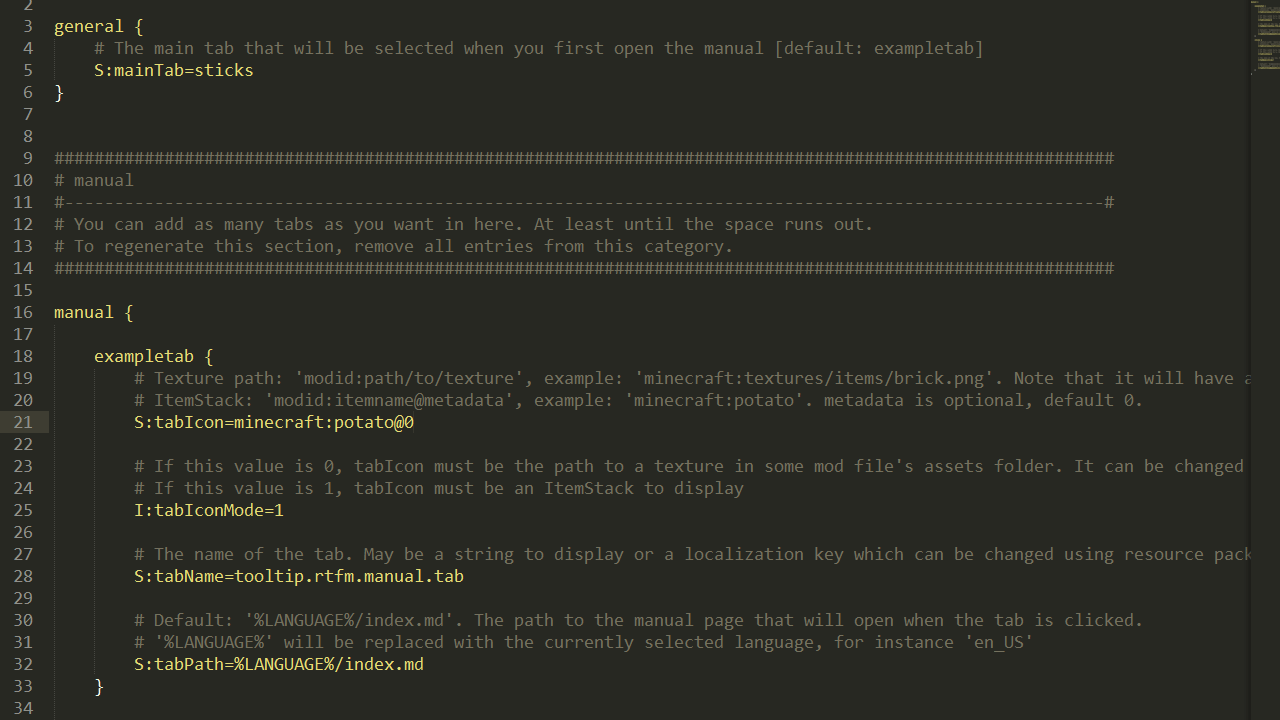
As a free bonus, due to the manual pages being Markdown, if you maintain them on Github or so, you automagically have a more or less perfect copy of your manual in web-browsable from (minus images of items).
Project description from CurseForge.
Pick your setup
RTFM by Minecraft version and loader
Choose the version and loader you play, then open the matching release.
Minecraft version
1.12.1
1 loader buildMinecraft version
1.12
1 loader buildMinecraft version
1.11.2
1 loader buildCheck the dependencies, then try the file in a copied instance before changing a world you care about.
Recent files
RTFM versions and loaders
RTFM-MC1.12-1.0.1.4.jar
6 May 2018
Client Source doesn’t say Server Source doesn’t say Dependencies No extras listed Listed on Release listing
Check the 1.12.2 setup 1.12.11.121.12.2 release
RTFM-MC1.11.2-1.0.1.9.jar
6 May 2018
Client Source doesn’t say Server Source doesn’t say Dependencies No extras listed Listed on Release listing
Check the 1.11.2 setup 1.11.2 release
RTFM-MC1.12-1.0.0.2.jar
30 Apr 2018
Client Source doesn’t say Server Source doesn’t say Dependencies No extras listed Listed on Release listing
Check the 1.12.2 setup 1.12.11.121.12.2 release
RTFM-MC1.11.2-1.0.0.7.jar
30 Apr 2018
Client Source doesn’t say Server Source doesn’t say Dependencies No extras listed Listed on Release listing
Check the 1.11.2 setup 1.11.2 release
RTFM-MC1.12-1.0.0.1.jar
12 Aug 2017
Client Source doesn’t say Server Source doesn’t say Dependencies No extras listed Listed on Release listing
Check the 1.12.2 setup 1.12.11.121.12.2 release
RTFM-MC1.11.2-1.0.0.5.jar
11 Jun 2017
Client Source doesn’t say Server Source doesn’t say Dependencies No extras listed Listed on Release listing
Check the 1.11.2 setup 1.11.2 release
RTFM-MC1.11.2-1.0.0.3.jar
10 Jun 2017
Client Source doesn’t say Server Source doesn’t say Dependencies No extras listed Listed on Release listing
Check the 1.11.2 setup 1.11.2 release
Looking for an older file? The official CurseForge project page is in Resources.
 mod
mod CurseForge · Minecraft
Brilliant Text
A Library for Minecraft 1.12.2 that allows you to give your text more flare.
 mod
mod CurseForge + Modrinth · Minecraft
HBM's NTM Nuclear Tech Reforged
Unofficial 1.12.2 port of HBM's Nuclear Tech Mod, based on the original 1.7.10 version with selected Extended Edition content
 mod
mod CurseForge · Minecraft
Point Zero
The world-famous OneBlock mode, now transformed into a feature-packed 1.12.2 mod with 8 phases, island protection, and full server support!