Tinkers Construct Needed by Meltery-1.0.5-1.11.2.jar
requiredMatching file found Matched file: TConstruct-1.11.2-2.7.1.34.jar
CurseForge · Minecraft mod
Tinker's Construct Addon for melting ingots, nuggets and dusts without the rest
Quick answer
Meltery-1.0.5-1.11.2.jar targets 1.11.2. The project page does not say whether this file belongs on the client, dedicated server, or both. 1 required mod needs a matching file.
Where it goes
The project page does not say whether this file belongs on the client, dedicated server, or both.
The source does not explicitly classify this release as client-only or server-only.
Meltery-1.0.5-1.11.2.jar. Change the file and its required mods may change too.
Install Tinkers Construct, Mantle first, but 1 required mod has no matching file for this setup. Do not mix loader builds to force a match. 1 comes through another mod in the chain.
1 extra mod was pulled in by another dependency. Indented rows show who needs each one. We only count dependency files that match this setup. A file for another loader does not fill the gap.
Before you install it
Built for Meltery-1.0.5-1.11.2.jar. Pick another file and the loader, install side or required mods may change.
Use Meltery-1.0.5-1.11.2.jar. It targets 1.11.2; another release may have different loader, side or dependency requirements.
Install Tinkers Construct, Mantle first, but 1 required mod has no matching file for this setup. Do not mix loader builds to force a match. 1 comes through another mod in the chain.
The project page does not say whether this file belongs on the client, dedicated server, or both.
Use the “Get this file” button beside Meltery-1.0.5-1.11.2.jar. It opens that exact file at the source.
About this project
A simple block that allows melting materials into the Tinker's Construct fluids without the need for a
Smeltery, but does not allow Ore doubling or Alloying, giving a means to progression in modpacks.
{width=1280 height=961}

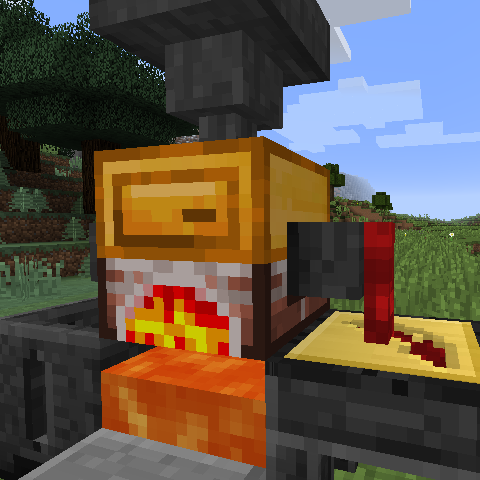
The Meltery is a simple block that does not have a GUI, instead is it entirely player or world interactions
The block has one internal slot for 64 items and a tank which can hold 10 ingots worth (1440 millibuckets).
Fuel: To fuel the Meltery it must be above a lava block, flowing or source and will be passively used to heat up the block.
Melting: Once fueled and a valid item is inserted, the Meltery will light up and slowly heat up to the require recipe temperature,
when the temperature is reached it will make a noise indicating that the fluid was added to the tank or will sizzle to indicate that the tank is full and will continue to sizzle until it can continue the recipe.
Inserting: To insert items into the meltery, simply right click with the item or insert via item transportation such as a hopper.
Extracting Items: Items can be removed by simply shift-right clicking with an empty-hand (or the same item which is being extracted).
Extracting Fluid: Any fluid pipe, including the Tic Faucet, can extract from the Meltery to be used else where.

Meltery comes default with compat for the following
JEI - Has a recipe handler to show all melting recipes
Minetweaker - Has a handler for adding or removing melting recipes like so
To add
meltery.Meltery.addMelting(ILiquidStack output, IIngredient input, int temp)
To remove
meltery.Meltery.removeMelting(IItemStack input)
Thanks to Gil for the idea and the textures
Project description from CurseForge.
Pick your setup
Choose the version and loader you play, then open the matching release.
Check the dependencies, then try the file in a copied instance before changing a world you care about.
Recent files
17 Sept 2017
7 Jun 2017
4 Jun 2017
3 Jun 2017
Looking for an older file? The official CurseForge project page is in Resources.