The One Probe Optional for The Lost Cities LostCities - 1.20-7.5.1
optionalMatching file found Matched file: TheOneProbe - 1.20.1-10.0.3
CurseForge · Minecraft mod
Allows the player to play in an old abandoned city instead of the normal overworld
Quick answer
The Lost Cities LostCities - 1.20-7.5.1 targets 1.20.1 with Forge. The project page does not say whether this file belongs on the client, dedicated server, or both. No extra mods listed for this file.
Where it goes
The project page does not say whether this file belongs on the client, dedicated server, or both.
The source does not explicitly classify this release as client-only or server-only.
LostCities - 1.20-7.5.1. Change the file and its required mods may change too.
This file does not list any required mods. Do not add a library just because a different file uses it.
3 extra mods were pulled in by other dependencies. Indented rows show who needs each one. We only count dependency files that match this setup. A file for another loader does not fill the gap.
Before you install it
Built for The Lost Cities LostCities - 1.20-7.5.1. Pick another file and the loader, install side or required mods may change.
Use LostCities - 1.20-7.5.1. It targets 1.20.1 with Forge; another release may have different loader, side or dependency requirements.
This file does not list any required mods. Do not add a library just because a different file uses it.
The project page does not say whether this file belongs on the client, dedicated server, or both.
Use the “Get this file” button beside LostCities - 1.20-7.5.1. It opens that exact file at the source.
About this project
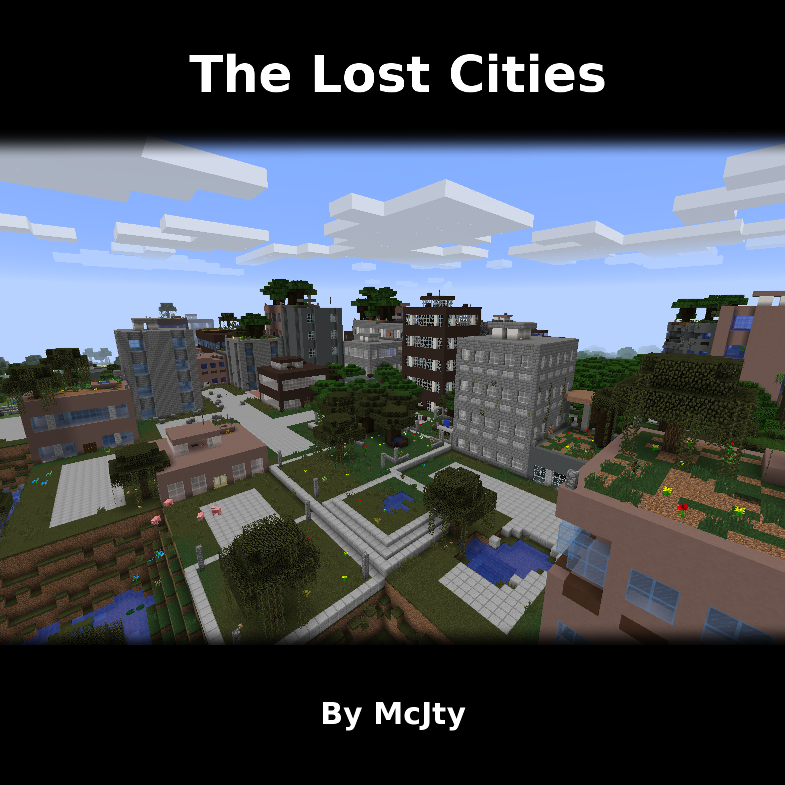
The Lost Cities transforms Minecraft's Overworld into a vast, abandoned civilization. Explore ruined skyscrapers, apartment blocks, factories, roads, highways, bridges, tunnels, subway systems, parks, flooded areas, and underground rooms filled with loot and dangers.
Cities are integrated into the normal terrain, so Lost Cities can be combined with other biome and terrain mods. Depending on the selected profile, the world can contain sprawling city regions, rare cities separated by wilderness, heavily damaged ruins, safer buildings, tall skylines, domed cities, or other specialized landscapes.
Note: New Street/Highway layout was commissioned by TqLxQuanZ. Thanks for the support!
The documentation stored in the GitHub branch for your Minecraft version is the most accurate and up-to-date source. The Lost Cities Wiki remains useful for older versions and general background, but it may describe legacy behavior that no longer applies.
Choose the profile before generating the world. Changing the profile later affects only newly generated chunks and can create abrupt borders or an inconsistent world. If the server has already generated the intended world, stop it, make a backup, and use a new level-name or remove the old world before continuing.
The profile name is the identifier shown in the Lost Cities profile selector, such as default, nodamage, or another installed profile. Names are case-sensitive. A custom profile must also be installed in the server's Lost Cities profile configuration before the world is created.
The safest way to configure a 1.20.1 server is to prepare the settings in single player:
saves/<your-world>/serverconfig/lostcities-server.toml from the client instance to defaultconfigs/lostcities-server.toml in the server directory.selectedProfile contains the desired profile. Leave selectedCustomJson as generated if the profile was customized in the UI.defaultconfigs is copied into the new world's serverconfig directory and Lost Cities generates the Overworld using that profile.For an existing server installation that has not generated its world yet, you can instead place a prepared lostcities-server.toml directly in defaultconfigs. Do not use the old level-type=lostcities setting on 1.20.1; Lost Cities is selected through its configuration.
These versions use the regular server config directory instead of a per-world serverconfig file:
config/lostcities-server.toml in the server directory.profiles section, set selectedProfile to the desired profile name. For example:[profiles]
selectedProfile = "default"
selectedCustomJson = ""
selectedCustomJson value as well; otherwise leave it empty.level-name in server.properties, or back up and remove that generated world, so the next startup creates a completely fresh world.selectedProfile enables Lost Cities generation in the new Overworld; an empty value leaves the normal Overworld unchanged.For all four current versions, Lost Cities can run only on the server, which permits unmodded clients to connect. Clients still need the mod when they need its configuration GUI or when the modpack contains other content that requires it on both sides.
The instructions below are retained for old modpacks. They do not apply to Minecraft 1.20.1 or newer.
Lost Cities is not a separate world type in these versions. In single player, choose the normal world type, open world customization, and use the LC button to enable Lost Cities and select a profile.
For a dedicated server, create and configure a single-player world first. Copy saves/<your-world>/serverconfig/lostcities-server.toml to the server's defaultconfigs directory, then generate a new server world.
Set the following in server.properties before creating the world:
level-type=lostcities
generator-settings={"profile":"nodamage"}
Replace nodamage with the desired profile. When Biomes O' Plenty is installed, use level-type=lostcities_bop for the Biomes O' Plenty variant.
Minecraft 1.12 also provides a separate Lost Cities dimension, using dimension ID 111 by default. This can be disabled for server-side-only use. To travel there, place a bed on two diamond blocks, surround it with six skulls, and try to sleep in it.
For still older releases and historical details, consult the Lost Cities Wiki and the matching branch of the GitHub repository.
Lost Souls adds more challenge and danger to Lost Cities buildings.
CurseForge comments are disabled because support requests are difficult to track across multiple sites. Please use the Lost Cities issue tracker for bugs and the Lost Cities Discord for discussion.
Modpack policy: Feel free to use Lost Cities in any modpack.
Project description from CurseForge.
Pick your setup
Choose the version and loader you play, then open the matching release.
Check the dependencies, then try the file in a copied instance before changing a world you care about.
Recent files
lostcities-1.20-7.5.1.jar
8 Aug 2026
lostcities-1.21-8.4.1.jar
8 Aug 2026
LostCities-1.21.11-9.5.1.jar
8 Aug 2026
LostCities-26.1.2-10.0.1.jar
8 Aug 2026
LostCities-26.1.2-10.0.0.jar
5 Aug 2026
LostCities-1.21.11-9.5.0.jar
5 Aug 2026
lostcities-1.21-8.4.0.jar
5 Aug 2026
lostcities-1.20-7.5.0.jar
5 Aug 2026
LostCities-1.21.11-9.4.2.jar
23 May 2026
lostcities-1.21-8.3.10.jar
23 May 2026
lostcities-1.20-7.4.13.jar
23 May 2026
9 May 2026
Looking for an older file? The official CurseForge project page is in Resources.
 mod
modA Jojo's Bizarre Adventure mod that interprets the world and power system of the anime into the world of Minecraft. ( JJBA )
 mod
modAdds various progression items, tools, armour and blocks for the Desecrated modpack.
 mod
modThis mod is Brazilian, features Brazilian references, and is a remake of the first one.