Minecraft version
Back to mods 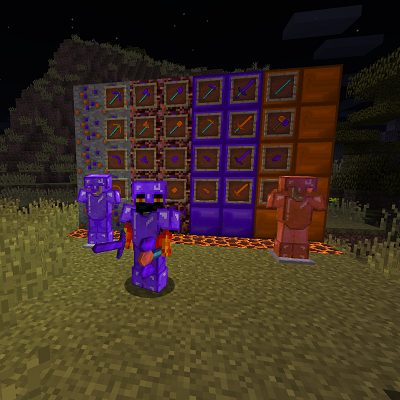
CurseForge · Minecraft mod
GemTools
GemTools 1.2
Choose a version Pick your version below, then grab the matching file.
Quick answer
Which GemTools release should I use?
Latest stable file GemTools-V1.4.2
Game version 1.16.4
Loader Forge
GemTools-V1.4.2 targets 1.16.4 with Forge. The project page does not say whether this file belongs on the client, dedicated server, or both. No extra mods listed for this file.
Where it goes
Is GemTools required on the client, server, or both?
The project page does not say whether this file belongs on the client, dedicated server, or both.
Client Source doesn’t say
Dedicated server Source doesn’t say
Loader for this release Forge
Required install it here Optional supported, not mandatory Not supported do not install here Source doesn’t say do not assume
The source does not explicitly classify this release as client-only or server-only.
What else does GemTools-V1.4.2 need?
GemTools-V1.4.2. Change the file and its required mods may change too.
This file does not list any required mods. Do not add a library just because a different file uses it.
This file does not list any required or optional mods.
Before you install it
Add GemTools without breaking your instance.
Built for GemTools-V1.4.2. Pick another file and the loader, install side or required mods may change.
- 01
Stick to this file
Use GemTools-V1.4.2. It targets 1.16.4 with Forge; another release may have different loader, side or dependency requirements.
- 02
Bring the mods it needs
This file does not list any required mods. Do not add a library just because a different file uses it.
- 03
Put it on the correct side
The project page does not say whether this file belongs on the client, dedicated server, or both.
- 04
Pick the file you checked
Use the “Get this file” button beside GemTools-V1.4.2. It opens that exact file at the source.
About this project
What does GemTools add?
Tired of mining blocks one by one?
this mods adds two powerfull sets of tools and armor with the following features:
fluorite tools: adjustable range 1x1x1 or 3x3x1.
Citrine Tools: adjustable range 1x1x1 or 3x3x1, 5x5x1.
battle axe: take down a tree in one hit and fight enemies.
Hoe: till in an area of 1x1, 3x3 or 5x5.
Paxel: a combination of an pickaxe, axe, shovel, and sword, Mines in 1x1x1, 3x3x1 or 5x5x1.
You are free to use this mod in your modpack and adjust the textures, names and data in the config file.
Installation:
install minecraft 1.16.4 from the minecraft launcher.
download the minecraft forge installer for the right version and run it.
put the GemTools mod in %appdata%/.minecraft/mods if there is no folde mods create it.
select the forge profile i the launcher.
Project description from CurseForge.
Pick your setup
GemTools by Minecraft version and loader
Choose the version and loader you play, then open the matching release.
Minecraft version
1.12.1
1 loader buildMinecraft version
1.11.2
1 loader buildMinecraft version
1.11.1
1 loader buildMinecraft version
1.11
1 loader buildMinecraft version
1.10.2
1 loader buildCheck the dependencies, then try the file in a copied instance before changing a world you care about.
Recent files
GemTools versions and loaders
GemTools-V1.4.2
GemTools-V1.4.2.jar
25 Nov 2020
Client Source doesn’t say Server Source doesn’t say Dependencies No extras listed Listed on Release listing
Check the 1.16.4 · Forge setup Forge1.16.4 release
GemTools-v1.4.1
GemTools-V1.4.jar
24 Nov 2020
Client Source doesn’t say Server Source doesn’t say Dependencies No extras listed Listed on Release listing
Check the 1.16.4 · Forge setup Forge1.16.4 beta
GemTools-V1.4
GemTools-V1.4.jar
24 Nov 2020
Client Source doesn’t say Server Source doesn’t say Dependencies No extras listed Listed on Release listing
Check the 1.16.4 · Forge setup Forge1.16.4 beta
GemTools-MC1.10.2_V1.3.3
GemTools-MC1.10.2_V1.3.3.jar
23 Aug 2017
Client Source doesn’t say Server Source doesn’t say Dependencies No extras listed Listed on Release listing
Check the 1.10.2 setup 1.10.2 release
GemTools-MC1.11.2_V1.3.3
GemTools-MC1.11.2_V1.3.3.jar
23 Aug 2017
Client Source doesn’t say Server Source doesn’t say Dependencies No extras listed Listed on Release listing
Check the 1.11.2 setup 1.11.2 release
GemTools-MC1.12.1_V1.3.3
GemTools-MC1.12.1_V1.3.3.jar
23 Aug 2017
Client Source doesn’t say Server Source doesn’t say Dependencies No extras listed Listed on Release listing
Check the 1.12.1 setup 1.12.1 release
MC1.12.1_V1.3.1
GemTools-MC1.12.1_V1.3.1.jar
18 Aug 2017
Client Source doesn’t say Server Source doesn’t say Dependencies No extras listed Listed on Release listing
Check the 1.12.1 setup 1.12.1 beta
GemTools-MC1.11.2_V1.3.2
GemTools-MC1.11.2_V1.3.2.jar
13 Aug 2017
Client Source doesn’t say Server Source doesn’t say Dependencies No extras listed Listed on Release listing
Check the 1.11.2 setup 1.11.2 release
GemTools-MC1.10.2_V1.3.2
GemTools-MC1.10.2_V1.3.2.jar
13 Aug 2017
Client Source doesn’t say Server Source doesn’t say Dependencies No extras listed Listed on Release listing
Check the 1.10.2 setup 1.10.2 release
GemTools-MC1.11.2_V1.3.1
GemTools-MC1.11.2_V1.3.1.jar
2 Jul 2017
Client Source doesn’t say Server Source doesn’t say Dependencies No extras listed Listed on Release listing
Check the 1.11.2 setup 1.11.2 release
GemTools-MC-1.10.2_V1.3.1
GemTools-MC1.10.2_V1.3.1.jar
2 Jul 2017
Client Source doesn’t say Server Source doesn’t say Dependencies No extras listed Listed on Release listing
Check the 1.10.2 setup 1.10.2 release
GemTools-MC1.10.2_V1.3.0
GemTools-MC1.10.2_V1.3.0.jar
2 Jul 2017
Client Source doesn’t say Server Source doesn’t say Dependencies No extras listed Listed on Release listing
Check the 1.10.2 setup 1.10.2 release
Looking for an older file? The official CurseForge project page is in Resources.
 mod
mod CurseForge · Minecraft
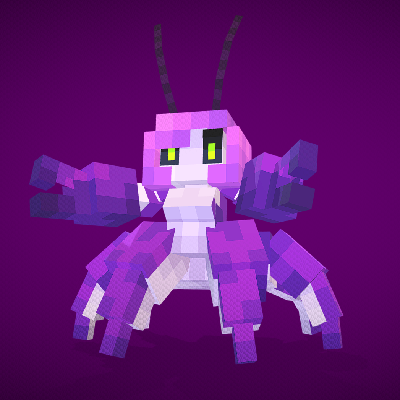
Monsters&Girls: Secrets of Mermaids
It's a mod that adds various mermaids to your world, serving as spin-off to original Monsters&Girls mod.
 mod
mod CurseForge · Minecraft
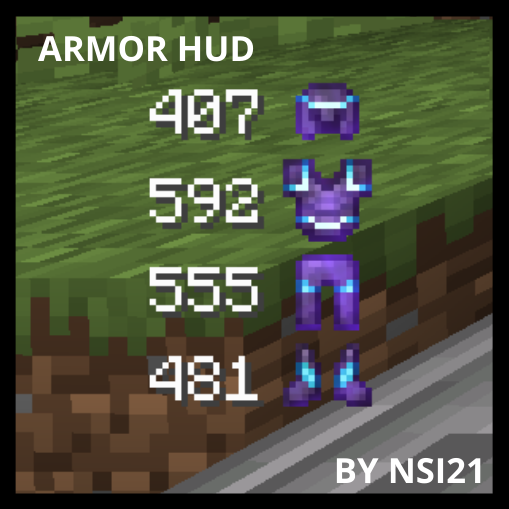
Armor Durability HUD
This mod will show you your armor durability
 mod
mod CurseForge · Minecraft
Myths & Legends
A dark fantasy mod that introduces mythical creatures, structures, and relics, all inspired by global folklore.